•
Drizz raises $2.7M in seed funding •
•
Featured on Forbes
•
Drizz raises $2.7M in seed funding •
•
Featured on Forbes


There are more mobile testing frameworks available in 2026 than ever before and picking the wrong one costs you months. Not in licensing fees, but in setup time, maintenance overhead, and the engineering hours spent fighting flaky tests instead of shipping features.
The problem with most "best frameworks" articles is that they rank tools by popularity instead of fit. Appium is great until your team spends 60% of QA time fixing broken selectors. Espresso is fast until you need iOS coverage. Maestro is simple until you need to test dynamic UIs that change with every A/B experiment.
This guide takes a different approach. We'll walk through the 7 frameworks that matter in 2026, give each one an honest assessment of where it excels and where it struggles, and then help you decide when Drizz a Vision AI testing platform is the right choice for your team.
Before comparing tools, clarify three things:
1. What are you testing? Native apps, hybrid apps, mobile web, or progressive web apps? Some frameworks only support one type.
2. Which platforms? Android only, iOS only, or both? If both, you need to decide: one cross-platform framework, or two native ones with separate test suites?
3. What's your maintenance tolerance? A framework that's easy to set up but creates a 200-test maintenance burden six months later isn't actually saving time. The total cost of ownership matters more than the getting-started experience.
With that context, let's look at what's available.
What it is: The open-source industry standard for cross-platform mobile test automation, built on the W3C WebDriver protocol.
Platforms: Android, iOS, Windows, macOS, Tizen, and more. Languages: Java, Python, JavaScript, Ruby, C#, PHP.
App types: Native, hybrid, mobile web.
Cost: Free (Apache 2.0). iOS testing requires macOS and Xcode
Best for: Large teams with strong engineering capacity that need maximum platform flexibility and can absorb the maintenance overhead.
What it is: Google's official UI testing framework for Android, built into Android Studio.
Platforms: Android only. Languages: Java, Kotlin. App types: Native Android. Cost: Free.
Where it excels:
Where it struggles:
Best for: Android-focused teams who want the fastest, most stable test execution and are willing to maintain a separate iOS solution.
What it is: Apple's native UI testing framework, built into Xcode.
Platforms: iOS only. Languages: Swift, Objective-C. App types: Native iOS. Cost: Free (requires macOS and Xcode).
Where it excels:
Where it struggles:
Best for: iOS-focused teams who build in Xcode and want native-level reliability without additional tooling.
What it is: A YAML-based UI testing framework for Android and iOS, designed for simplicity.
Platforms: Android (emulators and real devices), iOS (simulators). Languages: YAML (no code required). App types: Native, hybrid, web. Supports React Native, Flutter, Swift, Kotlin. Cost: Free (MIT). Paid cloud execution via Maestro Cloud.
Where it excels:
Where it struggles:
Best for: Teams that want the fastest path from zero to working cross-platform tests, especially for straightforward user flows.
What it is: A gray-box end-to-end testing framework built specifically for React Native.
Platforms: Android, iOS. Languages: JavaScript/TypeScript. App types: React Native (primary), with some support for native apps. Cost: Free (MIT).
Where it excels:
Where it struggles:
Best for: React Native teams who want the most reliable end-to-end testing with minimal flakiness.
What they are: Cloud-based real device labs that provide infrastructure for running your tests across thousands of device/OS combinations.
Important distinction: These are not test authoring frameworks. They don't help you write tests, they provide the devices to run them on. You still need a framework (Appium, Espresso, XCUITest, Maestro) to author and execute your tests.
Where they excel:
Where they struggle:
Best for: Any team that needs broad device coverage without the operational burden of managing physical devices.
Every framework above from Appium to Maestro shares one architectural assumption: to interact with a UI element, you need to identify it through the app's internal structure. Whether that's an XPath, an accessibility ID, a resource ID, or a YAML reference, the test is ultimately pointing at something in an element tree. Drizz represents a fundamentally different approach that's emerging as the next evolution in mobile test automation.
What it is: A Vision AI mobile testing platform that sees your app the way a human tester does through the rendered screen, not the element tree.
Platforms: Android, iOS. Languages: Plain English test definitions. App types: Native, hybrid. Cost: Contact for pricing.
Where it excels:
Where it struggles:
Best for: Teams where the UI changes faster than the test suite can keep up with frequent releases, A/B testing, dynamic content and where the maintenance cost of selector-based testing has become the bottleneck, not the solution.
Rather than ranking frameworks, here's a practical decision guide based on your situation:
Choose Appium if your team has strong engineering capacity, you need the broadest platform coverage possible, your UI is relatively stable, and you can invest in locator maintenance.
Choose Espresso if you're Android-only, you want the fastest possible test execution, and your team writes Java or Kotlin.
Choose XCUITest if you're iOS-only, you develop in Xcode, and you want native-level integration.
Choose Maestro if you want the simplest possible getting-started experience, your test flows are straightforward, and you're comfortable with simulator-only iOS testing.
Choose Detox if your app is React Native and you want the tightest framework integration.
Choose a Cloud Platform if you need device coverage at scale but pair it with one of the above frameworks for test authoring.
Choose Drizz if you check two or more of these boxes:
.png)
Most framework comparisons focus on setup and features. But the real cost of a mobile testing framework shows up six months after adoption when you have 200 tests, your app has shipped 20 UI updates, and someone has to keep everything passing.
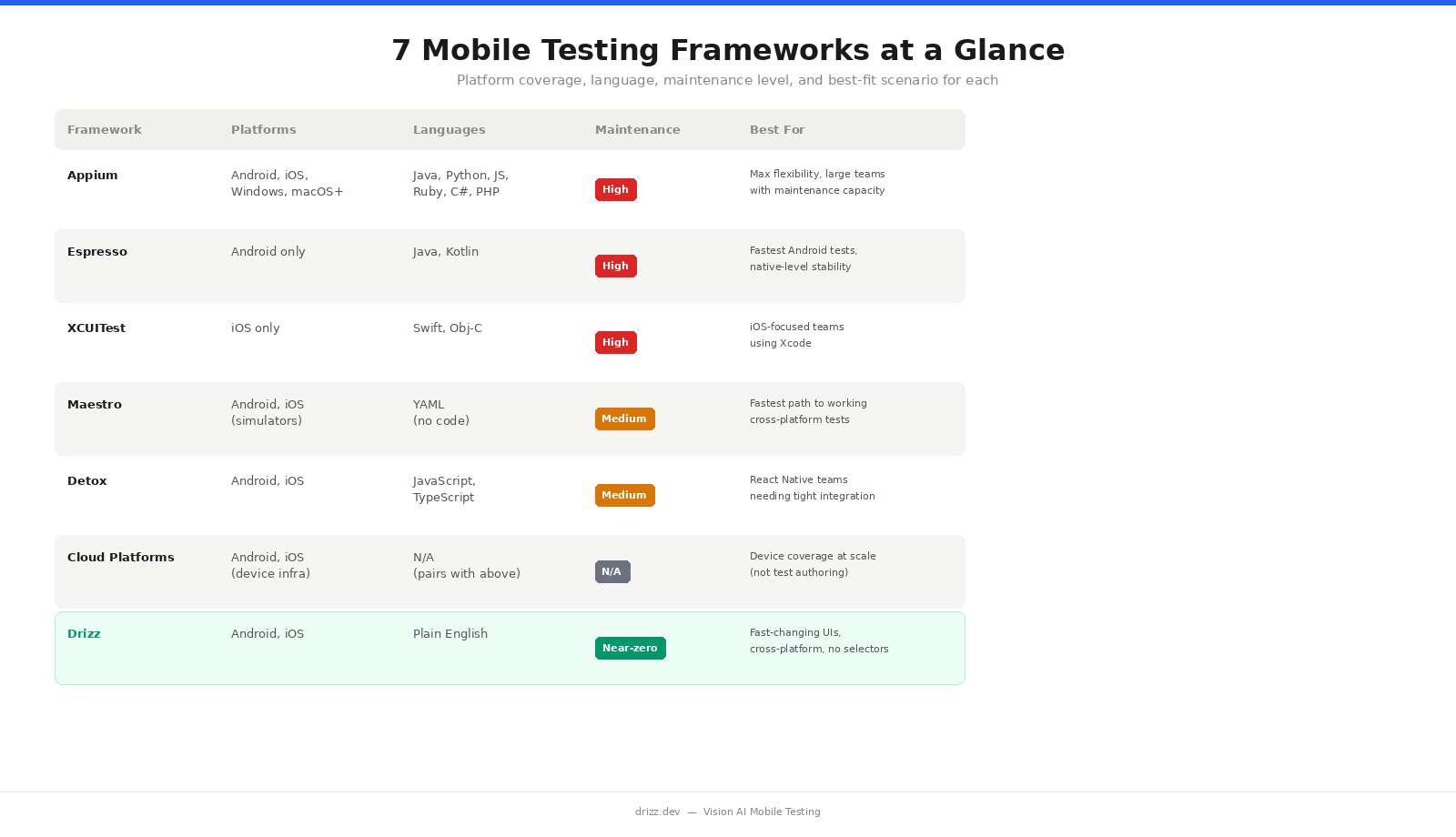
Here's how the frameworks compare on long-term maintenance:
High maintenance (scales linearly with test count): Appium, Espresso, XCUITest. Every UI change risks breaking locators. More tests = more locators to maintain.
Medium maintenance: Maestro, Detox. Simpler authoring reduces initial friction, but element-based identification still creates some locator dependency.
Near-zero maintenance: Drizz. Visual identification adapts to UI changes automatically. Tests don't reference internal element structures, so refactors don't break them.
If your team currently spends more time fixing tests than writing them, the framework isn't the problem the locator paradigm is. That's the specific problem Drizz was built to solve.
If your situation matches the criteria above:
Maestro and Drizz have the lowest learning curves. Maestro uses YAML and requires no coding. Drizz uses plain English test steps and eliminates the need to learn locator strategies entirely. Appium and Espresso require programming experience and take weeks to become productive with.
Yes. Many teams use Espresso or XCUITest for fast unit-level UI tests in their development workflow, then use a cross-platform tool (Appium, Maestro, or Drizz) for end-to-end regression testing. Cloud platforms like BrowserStack layer on top of any framework for device coverage.
Yes. Appium remains the most widely used mobile testing framework and understanding it is valuable for any QA career. However, for new test suites especially on fast-moving apps teams are increasingly choosing alternatives that reduce the maintenance burden Appium creates at scale.
Drizz's Vision AI identifies elements using visual context beyond just text including icons, layout position, color, shape, and surrounding elements. For apps that are heavily icon-based, you can describe elements by their visual appearance and position (e.g., "tap the search icon in the top right").
Yes. Drizz integrates with GitHub Actions, Jenkins, Bitrise, CircleCI, and other CI/CD tools. Tests can run automatically on every build, PR, or scheduled interval just like any other testing framework.
Both simplify test authoring compared to Appium. Maestro uses YAML and interacts through the accessibility layer simpler than Appium but still element-based. Drizz uses Vision AI to identify elements visually, eliminating locator dependency entirely. The practical difference shows up in maintenance: Maestro tests can still break when accessibility identifiers change; Drizz tests adapt to visual changes automatically.
Read More:
best mobile test automation tools





©Drizz 2026 • All Rights Reserved






