Takeaways:
- Equivalence partitioning divides input data into groups where every value in group should produce same behavior. Test one value per group instead of every possible value. This cuts thousands of potential test cases down to a handful.
- Boundary value analysis targets edges between partitions, where off-by-one errors and misplaced conditions cluster. The ISTQB Foundation Syllabus v4.0 defines two versions: 2-value BVA (test boundary and its neighbor) and 3-value BVA (add value on other side).
- Using both together on a single input field produces a compact set of test cases that catches more defects than random test data. Adding decision table testing handles cases where multiple inputs interact.
Boundary value analysis and equivalence partitioning are black-box test design techniques that reduce test cases without reducing defect coverage. Every QA team uses them, whether formally or by instinct.
How equivalence partitioning works
Equivalence partitioning splits an input's range into groups (called partitions or equivalence classes) where every value within a group is expected to produce identical behavior. If one value in partition passes, all others should pass. If one fails, all should fail.
The technique has two rules:
- Test at least one value from every valid partition.
- Test at least one value from every invalid partition, and test invalid partitions one at a time (don't combine two invalid inputs in a single test case, because you won't know which one caused failure).
Mobile example: quantity field in a shopping app
A shopping app lets users order between 1 and 10 units of a product. Anything outside that range gets rejected.
The equivalence partitions:
- Invalid partition 1: values below 1 (0, -1, -100)
- Valid partition: values from 1 to 10
- Invalid partition 2: values above 10 (11, 50, 999)
- Invalid partition 3: non-numeric input ("abc", special characters, empty string)
Four partitions. Four test cases cover them all:
Without equivalence partitioning, a tester might try to test dozens of values. With it, four test cases give representative coverage. The logic: if app handles 5 correctly, it should handle 3 and 7 same way, because they're in same partition.
How boundary value analysis adds precision
Equivalence partitioning tells you which groups to test. Boundary value analysis tells you exactly where within those groups defects are most likely to hide: at edges.
The principle, from ISTQB Foundation Syllabus: defects cluster at boundaries. A developer writing if (quantity <= 10) when spec says if (quantity < 10) creates an off-by-one error at exactly boundary value. BVA catches that.
Same mobile example, now with BVA
The quantity field accepts 1 to 10. The boundaries are at 1 (lower) and 10 (upper).
Using 2-value BVA (test boundary and its closest invalid neighbor):
- Lower boundary: test 0 (invalid) and 1 (valid)
- Upper boundary: test 10 (valid) and 11 (invalid)
Using 3-value BVA (add value just inside boundary):
- Lower boundary: test 0 (invalid), 1 (boundary), 2 (just inside)
- Upper boundary: test 9 (just inside), 10 (boundary), 11 (invalid)
The 3-value approach catches defects that 2-value misses. If a developer writes if (quantity == 1) instead of if (quantity >= 1), value 2 will expose error while values 0 and 1 won't.
Combining EP and BVA on same field
Start with equivalence partitioning to identify partitions. Then apply BVA at each boundary between partitions. The merged test set for quantity field (using 3-value BVA):
Nine test cases for a single input field, derived systematically. No guessing. No "let me try random values and see what happens." Each test targets a specific partition or boundary for a specific reason.
More mobile input examples worth testing
The quantity field is one case. Mobile apps have dozens of input fields where EP and BVA apply. A few that catch real bugs:
Payment amount field (transfer app, min $1, max $10,000):
- Partitions: below $1, $1-$10,000, above $10,000, non-numeric, negative values
- Boundaries: $0.99, $1.00, $1.01, $9,999.99, $10,000.00, $10,000.01
- Mobile-specific: test with locale-specific decimal separators (comma vs. period)
OTP input field (6-digit code):
- Partitions: fewer than 6 digits, exactly 6 digits, more than 6 digits, non-numeric
- Boundaries: 5 digits, 6 digits, 7 digits
- Mobile-specific: test paste from clipboard, test auto-fill from SMS
Search query field (max 200 characters):
- Partitions: empty string, 1-200 characters, 201+ characters, special characters only, emoji-only input
- Boundaries: 0 chars, 1 char, 200 chars, 201 chars
- Mobile-specific: test with predictive keyboard suggestions, test with voice-to-text input
PIN creation (4 to 6 digits):
- Partitions: fewer than 4 digits, 4-6 digits, more than 6 digits, non-numeric
- Boundaries: 3 digits, 4 digits, 6 digits, 7 digits
- Mobile-specific: test with biometric keyboard overlay, test sequential digits (1234) if app has strength rules
Each of these fields benefits from same EP → BVA workflow. Identify partitions, identify boundaries, generate test cases. The mobile-specific additions (clipboard paste, auto-fill, locale formatting, keyboard types) are extra partitions that most QA teams miss because they're thinking about value, not about how it enters field.
When to bring in decision table testing
Equivalence partitioning and boundary value analysis work well for single-input fields. When output depends on combinations of multiple inputs, decision table testing fills gap.
Example: a mobile app offers free shipping based on two conditions:
- Cart total above $50
- User has a premium membership
The decision table:
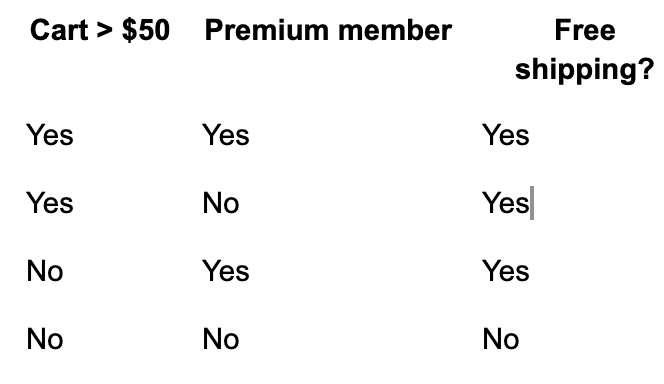
Four combinations, four test cases. You can apply BVA to $50 threshold ($49.99, $50.00, $50.01) and EP to membership status (premium, free, expired). Decision table testing then combines them.
For teams writing test cases for mobile apps, practical workflow is:
- Use EP for each input to identify partitions
- Apply BVA at each boundary for numeric/range inputs
- Build a decision table when multiple inputs affect same outcome
- Add mobile-specific partitions (input method, locale, device state)
Automating boundary and partition tests in Drizz
Once you've derived test cases from EP and BVA, next step is automating them so they run on every build. Manual boundary testing works for first pass, but these test cases need to be part of regression testing suite to catch regressions when validation logic changes.
Drizz tests for quantity field boundaries:
Tap on "Quantity"
Clear field
Type "0"
Tap on "Add to Cart"
Validate error message contains "minimum"

Clear field
Type "1"
Tap on "Add to Cart"
Validate "Added to Cart" is visible

Clear field
Type "10"
Tap on "Add to Cart"
Validate "Added to Cart" is visible

Clear field
Type "11"
Tap on "Add to Cart"
Validate error message contains "maximum"
Each block tests one boundary value with a clear expected outcome. Drizz's Vision AI reads error message text visually, so test works regardless of how error is rendered (toast, inline text, bottom sheet, dialog).
For OTP field, testing paste-from-clipboard scenario:
Copy "123456" to clipboard
Tap on "OTP" field
Paste from clipboard
Validate "123456" is visible in OTP field
Tap on "Verify"
Validate verification succeeds
These tests run on real Android and iOS devices through Drizz Cloud, catching device-specific validation bugs that emulators miss. A boundary value that's accepted on one keyboard type might be rejected on another if input method sends different character encodings.
FAQ
What is boundary value analysis in software testing?
A test design technique that targets values at edges of input ranges, where off-by-one and misplaced-condition defects cluster.
What is equivalence partitioning?
Dividing input data into groups where all values produce same behavior, then testing one representative from each group.
How do BVA and equivalence partitioning work together?
EP identifies groups. BVA tests boundary values between groups. Together they produce a compact, high-coverage test set.
What is difference between 2-value and 3-value BVA?
2-value tests boundary and its invalid neighbor. 3-value adds value just inside boundary, catching more subtle defects.
When should you use decision table testing instead?
When output depends on combinations of multiple inputs. EP and BVA handle single inputs; decision tables handle multi-input logic.
Can boundary value tests be automated for mobile apps?
Yes. Each boundary test case translates directly to a scripted test that enters value and validates expected response.