Flutter apps are uniquely difficult to test and most QA teams don't realize it until they're already deep into a broken test suite.
Here's the core problem: Flutter doesn't use native UI components the way most mobile frameworks do. Instead of creating real platform buttons and text fields that the operating system knows about, Flutter uses its own graphics engine (called Skia) to paint every pixel of your app directly onto the screen like drawing on a digital canvas. The result looks identical to a native app, but under the hood, it's fundamentally different.
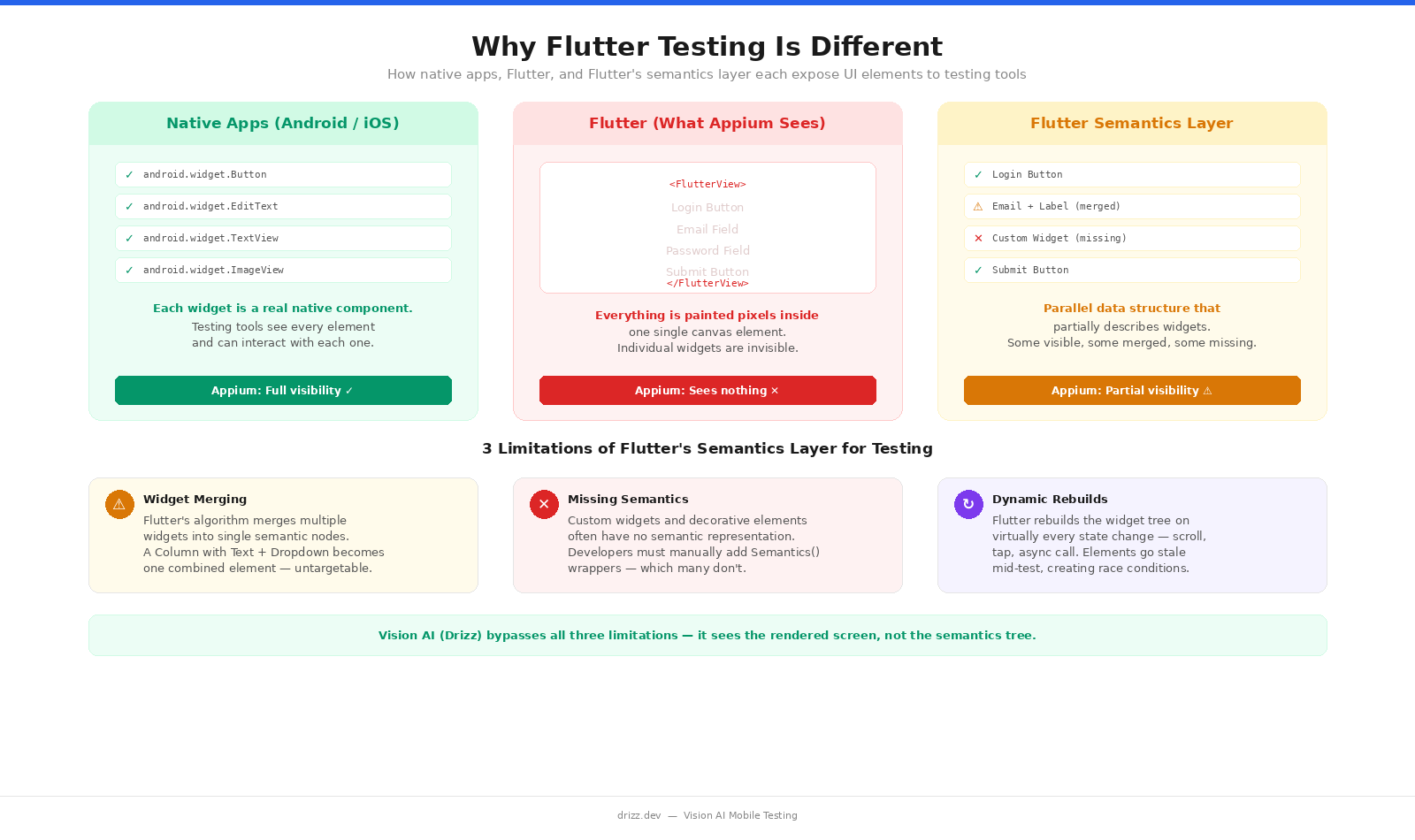
When a testing tool like Appium looks at a Flutter app, it doesn't see buttons, text fields, or lists. It sees a single <FlutterView> element, one giant canvas with no accessible widgets inside. It's like trying to click a button inside a photograph. The button looks real, but the system doesn't recognize it as a tappable element.
This isn't a bug. It's a fundamental architectural decision that gives Flutter pixel-perfect consistency across platforms. But it makes traditional selector-based testing the approach that works on native Android and iOS apps either unreliable or impossible without significant workarounds.
If you're building with Flutter in 2026, this guide covers everything you need to know: why standard testing approaches fail, what your real options are (Patrol, Appium Flutter Driver, Vision AI), and how to choose the right approach for your team.
Key Takeaways
Flutter renders to a canvas using Skia, not native UI components standard Appium drivers see the entire app as one element and can't find individual widgets.
Patrol is Flutter-native (written in Dart), extends integration_test with native OS interactions, and is the strongest Flutter-specific option but requires Dart knowledge and is Flutter-only.
Vision AI (Drizz) bypasses the widget tree entirely by identifying elements visually on the rendered screen, the only approach that works regardless of how the app is built internally.
Your choice depends on team skills, app complexity, and whether you need to test only Flutter or also native/hybrid components.
Why Flutter Is Different: The Canvas Rendering Problem
To understand why Flutter testing is hard, you need to understand how Flutter renders UI.
Native Apps: Real Components, Real Elements
When you build a native Android app, a Button widget becomes an android.widget.Button in the view hierarchy. When you build with React Native, a <Button> compiles to a real UIButton on iOS and android.widget.Button on Android. These are actual native components with real accessibility properties. Appium's UiAutomator2 and XCUITest drivers can see them, query them, and interact with them.
Flutter: Painted Pixels, No Native Elements
Flutter takes a completely different approach. Every widget button, text fields, lists, images is painted directly onto a Skia canvas. Flutter doesn't create native platform components. A Flutter ElevatedButton isn't a UIButton or an android.widget.Button. It's pixels drawn by the rendering engine.
When standard Appium drivers (UiAutomator2 or XCUITest) look at a Flutter app, they see something like this:
<FlutterView>
<!-- Your entire UI lives inside this single element -->
<!-- Individual widgets are invisible to native accessibility APIs -->
</FlutterView>
Your login button, email field, navigation bar, and entire UI exist as painted graphics inside one FlutterView container. Appium can't find them. It can't tap them. It can't read their text.
The Semantics Layer: Flutter's Partial Solution
Flutter does provide a semantics tree a parallel data structure that describes the meaning of widgets for accessibility services and testing tools. Widgets like Text, Button, and TextField automatically generate semantic nodes. You can also manually wrap widgets with Semantics() to expose custom labels.
But the semantics tree has real limitations for testing:
Widget merging. Flutter's semantics algorithm frequently merges multiple widgets into a single semantic node. A Column containing a Text and a DropdownButton might appear as one combined element making it impossible to target them individually.
Missing semantics. Not all widgets generate semantic nodes automatically. Custom widgets, decorative elements, and complex layouts often have no semantic representation unless developers explicitly add it.
Dynamic rebuilds. Flutter rebuilds its widget tree on virtually every state change a scroll, a tap, an async call. Elements go stale mid-test, creating race conditions that are extremely hard to debug.
This is why Flutter testing requires specialized approaches that go beyond standard Appium.
Option 1: Appium Flutter Integration Driver
What It Is
The Appium Flutter Integration Driver is an Appium plugin that communicates directly with Flutter's Dart VM instead of relying on native accessibility APIs. It queries Flutter's widget tree to find and interact with elements, bypassing the canvas rendering problem.
How It Works
Instead of using standard locators (XPath, accessibility ID, resource ID), you use Flutter-specific finders:
byValueKey Finds widgets by their Key property. Most reliable, but requires developers to add keys to every testable widget.
byText Finds widgets by visible text. Breaks when text changes (localization, A/B tests, dynamic content).
byType Finds widgets by class name (e.g., ElevatedButton). Least reliable multiple widgets of the same type on one screen cause ambiguity.
Cross-language support. Write tests in JavaScript, Python, Java, or Ruby no Dart required. This is a major advantage for QA teams that don't know Dart.
Cloud device farm compatibility. Works with BrowserStack, Sauce Labs, LambdaTest, and other cloud platforms unlike Patrol, which requires local or specialized CI setups.
Hybrid app support. Can switch contexts between Flutter, native, and WebView components in the same test critical for apps that mix Flutter with native modules.
Where It Struggles
Requires debug or profile builds. The driver communicates with the Dart VM, which is only accessible in non-release builds. You can't test production APKs or IPAs directly.
Developer dependency. Every testable widget needs a Key assigned by developers. Without keys, you fall back to byText or byType both fragile. This creates a hard dependency between QA and dev teams.
Widget tree instability. Flutter's frequent rebuilds cause elements to go stale between test steps. Explicit waits and synchronization logic are essential, adding complexity.
Limited Inspector support. Appium Inspector can't inspect Flutter widgets you need Flutter DevTools to explore the widget tree, then translate what you find into Appium finders. Two separate tools for one workflow.
Maintenance scales with complexity. As your app grows, keeping keys consistent, handling dynamic content, and debugging stale-element errors creates the same maintenance burden that plagues selector-based testing in native apps just with Flutter-specific flavors.
Best for: Teams with mixed tech stacks (Flutter + native), QA engineers who don't write Dart, and projects that need cloud device farm integration.
Option 2: Patrol
What It Is
Patrol is an open-source E2E testing framework built specifically for Flutter by LeanCode. It extends Flutter's built-in integration_test package with native OS interaction capabilities meaning you can test permission dialogs, notifications, device settings, and system alerts directly from Dart test code.
How It Works
Tests are written in Dart using Patrol's custom finder system, which simplifies Flutter's default finders into a more readable syntax:
Flutter-native. Written in Dart, runs inside Flutter's test environment, and has direct access to the widget tree. No translation layer, no WebDriver protocol overhead, no context switching.
Native OS automation. The killer feature. Patrol can interact with permission dialogs, notification trays, system settings, Wi-Fi toggles, and other native OS elements that integration_test can't reach and Appium struggles with on Flutter apps.
Test isolation and sharding. Patrol 4.0 introduced full test isolation between tests and built-in sharding — solving two major pain points of Flutter's default integration_test package.
Readable syntax. $('Login').tap() is significantly cleaner than find.byValueKey('login_button'). Lower cognitive load, faster test writing.
Hot restart. During development, Patrol monitors your test files and app code, reflecting changes immediately dramatically faster iteration than rebuild-and-rerun cycles.
Where It Struggles
Dart required. Your QA team needs to write Dart. If your testers are comfortable with Java, Python, or JavaScript but not Dart, Patrol isn't accessible to them without upskilling.
Flutter-only. Patrol only tests Flutter apps. If your product includes native Android/iOS modules, embedded WebViews, or non-Flutter components, Patrol can't reach them.
CI complexity. Running Patrol in CI pipelines (especially for iOS) requires more setup than running Appium tests on cloud device farms. Firebase Test Lab and Codemagic support exists, but teams have reported reliability issues.
Still element-based. Patrol interacts with Flutter's widget tree meaning tests reference widget keys, text, or types. When the widget structure changes, tests can break. The maintenance burden is lower than Appium's but not zero.
Growing ecosystem. Patrol's community is smaller than Appium's. Fewer Stack Overflow answers, fewer plugins, fewer enterprise case studies. It's maturing fast, but the support ecosystem isn't at Appium's level yet.
Best for: Flutter-focused teams with Dart expertise who need native OS interaction testing and want the tightest Flutter integration possible.
Option 3: Vision AI (Drizz)
What It Is
Drizz is a Vision AI mobile testing platform that identifies UI elements visually by looking at the rendered screen rather than querying widget trees, element hierarchies, or semantic nodes.
Why This Matters Specifically for Flutter
Remember the core problem: Flutter renders everything to a canvas. Standard Appium can't see widgets. Appium Flutter Driver requires debug builds and developer-added keys. Patrol requires Dart and is Flutter-only.
Drizz sidesteps all of these constraints because it doesn't interact with the widget tree at all. It sees the screen the same way a user does and identifies elements by their visual appearance, text, layout, and context.
name: Flutter Login Flow
steps:
- tap: "Login" button
- type: "user@example.com" into email field
- type: "SecurePass123" into password field
- tap: "Submit" button
- verify: Dashboard screen is visible
This test works identically whether the app is built with Flutter, React Native, native Android, native iOS, or any other framework. The Vision AI doesn't care how the UI is rendered internally, it cares what the UI looks like on screen.
Where It Excels
No widget tree dependency. Doesn't need Key properties, semantic labels, or accessibility IDs. Works with Flutter's canvas rendering out of the box no developer coordination required.
Works on release builds. Unlike Appium Flutter Driver, Drizz tests your actual production APK or IPA. No debug-mode requirement.
Framework-agnostic. The same test works on Flutter, React Native, native, and hybrid apps. If your product mixes frameworks, you write one test suite not three.
Near-zero maintenance. Widget tree restructuring, key changes, and semantic label updates don't break tests. The button still says "Login" on screen the test still passes.
No Dart required. Tests are written in plain English. QA engineers, product managers, and manual testers can write and understand tests without learning Dart, Java, or Python.
95%+ test stability. Visual identification is resilient to the frequent widget rebuilds that cause flakiness in widget-tree-based approaches.
Where It Struggles
No widget-level introspection. Drizz sees the rendered output, not the widget tree. If you need to verify internal widget state, property values, or non-visual data, you need a widget-tree-based tool.
Newer ecosystem. The community and integration ecosystem are still growing compared to Appium and Patrol.
Icon-heavy interfaces. Apps with minimal text and many similar-looking icons give visual identification less to differentiate though Drizz handles layout position and visual context, not just text.
Best for: Teams where Flutter's canvas rendering has made traditional testing painful, teams that ship production builds frequently, teams with mixed-framework apps, and teams that want to eliminate the developer dependency for widget keys.
Head-to-Head: Patrol vs Appium Flutter Driver vs Drizz
Dimension
Appium Flutter Driver
Patrol
Drizz (Vision AI)
Language
Java, Python, JS, Ruby
Dart
Plain English
Flutter widget access
Via Dart VM (debug builds)
Direct (native Dart)
Via rendered screen
Release build testing
No (debug/profile only)
No (debug/profile only)
Yes
Native OS interactions
Limited
Full support
Via visual identification
Developer key dependency
High (needs Key on widgets)
Medium (uses finders)
None
Cross-framework apps
Yes (context switching)
No (Flutter-only)
Yes
Cloud device farm support
Full
Limited
Yes
Maintenance burden
High
Medium
Near-zero
Learning curve
Medium (Appium + Flutter finders)
Medium (Dart + Patrol API)
Low
Community size
Large (Appium ecosystem)
Growing (LeanCode + Flutter)
Growing
Decision Guide: Which Approach Fits Your Team
Choose Appium Flutter Driver if:
Your QA team writes Java/Python/JS but not Dart
You need cloud device farm execution (BrowserStack, Sauce Labs)
Your app mixes Flutter with native or WebView components
You have developers willing to add Key properties to all testable widgets
Choose Patrol if:
Your team is Dart-fluent and Flutter-focused
You need to test native OS interactions (permissions, notifications, settings)
You want the tightest possible integration with Flutter's test infrastructure
You're comfortable managing CI setup for Flutter integration tests
Choose Drizz if:
Flutter's canvas rendering has made selector-based testing unreliable
You want to test actual release builds, not debug-mode APKs
Your app mixes Flutter with other frameworks and you need one test suite
Your team doesn't write Dart and you don't want to add Key properties to every widget
You ship UI changes frequently and can't afford the maintenance tax of widget-tree-based testing
The Bigger Picture: Flutter Testing Is a Rendering Problem
Every testing challenge specific to Flutter invisible widgets, merged semantics, stale elements, debug-build requirements traces back to one architectural fact: Flutter draws pixels instead of creating native components.
Patrol and Appium Flutter Driver both work around this by accessing Flutter's internal widget tree through different mechanisms. Both are valid approaches. Both have real strengths.
But both still require tests to reference internal structures keys, types, text finders that can change when the app changes. The maintenance burden is inherent to the widget-tree-based paradigm, not to any specific tool.
Vision AI represents a different approach entirely. By testing what the user actually sees the rendered output, not the internal structure it treats Flutter's canvas rendering as a non-issue rather than a problem to work around.
For Flutter teams specifically, this distinction matters more than for any other mobile framework. Because Flutter's rendering is the source of the testing complexity, an approach that bypasses rendering entirely is solving the problem at its root.
Not effectively. Standard Appium drivers (UiAutomator2, XCUITest) see a Flutter app as a single FlutterView element. Individual widgets are invisible to native accessibility APIs because Flutter renders to a canvas instead of using native components. You need either Appium Flutter Integration Driver, Patrol, or a visual approach like Drizz.
Does Patrol work on iOS real devices?
Patrol supports iOS simulators and real devices, but real-device execution requires additional setup (code signing, provisioning profiles). CI integration with real devices is possible through Firebase Test Lab and other services, though some teams have reported reliability challenges compared to Android execution.
Can Drizz test Flutter apps without any app modifications?
Yes. Drizz doesn't require debug builds, Key properties on widgets, semantic labels, or any code changes. Upload your production APK or IPA and start writing tests. This is the primary advantage of visual identification over widget-tree-based approaches for Flutter.
Is Flutter's integration_test package enough?
For basic widget interactions within Flutter, integration_test works well. But it can't interact with native OS elements (permissions, notifications, settings), doesn't support test isolation between tests without Patrol, and requires Dart. If you need full E2E testing including native interactions, you need Patrol, Appium, or Drizz on top of or instead of integration_test.
Which approach handles Flutter's widget rebuilds best?
Flutter's frequent widget rebuilds cause stale-element issues in both Appium Flutter Driver and Patrol (though Patrol handles it better with built-in synchronization). Drizz is unaffected by widget rebuilds because it identifies elements visually on the rendered screen the visual output remains stable even when the widget tree is reconstructing internally.