•
Drizz raises $2.7M in seed funding •
•
Featured on Forbes
•
Drizz raises $2.7M in seed funding •
•
Featured on Forbes


Live-service mobile games ship faster than any other category of software in production. A single title on a competitive release cadence pushes a client build every one to two weeks, a remote config change every day, a limited-time offer every weekend, and a seasonal event every four to six weeks.
Every push is a regression risk against a UI that traditional automation cannot see, running against an economy that must not miscount currency, delivered to players who will notice the moment a battle-pass reward stops appearing.
The result is that QA on a live-service game is not a suite. It is a schedule.
Different testing surfaces run at different frequencies, catch different classes of bug, and hand off to each other in a rhythm that maps to game's release calendar. The ranked game testing tool comparison covers each category of tool; this post drills into timing.
Live-service mobile games differ from traditional software releases in three specific ways:
Testing has to cover all three at the cadence of each ship. The complete mobile game testing guide maps this into a broader six-category testing landscape. This post drills into specific rhythms live service imposes on that landscape.
Surface 1: Configuration and feature flags. Remote config values, A/B test variants, feature-flag rollouts, region-specific rollouts. The layer Firebase Remote Config, LaunchDarkly, and equivalent tools operate on. A misconfigured flag pushes a broken UI to 40% of players before anyone notices.
Surface 2: Content and event updates. Over-the-air asset delivery, addressable content bundles, event start and end timers, seasonal cosmetics, limited-time offers.
Google's Firebase Remote Config documentation describes network delivery mechanism, and Unity's Addressables system covers on-client content management. The specific bug this surface produces is stale content after a push server thinks update went out, and client is still rendering last week.
Surface 3: Economy and reward systems. Currency ledgers, purchase-to-inventory sync, battle-pass progression tiers, daily-and-weekly reward resets, event currency conversions. This is highest-stakes surface because bugs here map directly to revenue and player trust.
Each surface has its own failure modes, its own test cadence, and its own set of tools. A live-service test strategy that treats them as one problem misses roughly two-thirds of bugs.
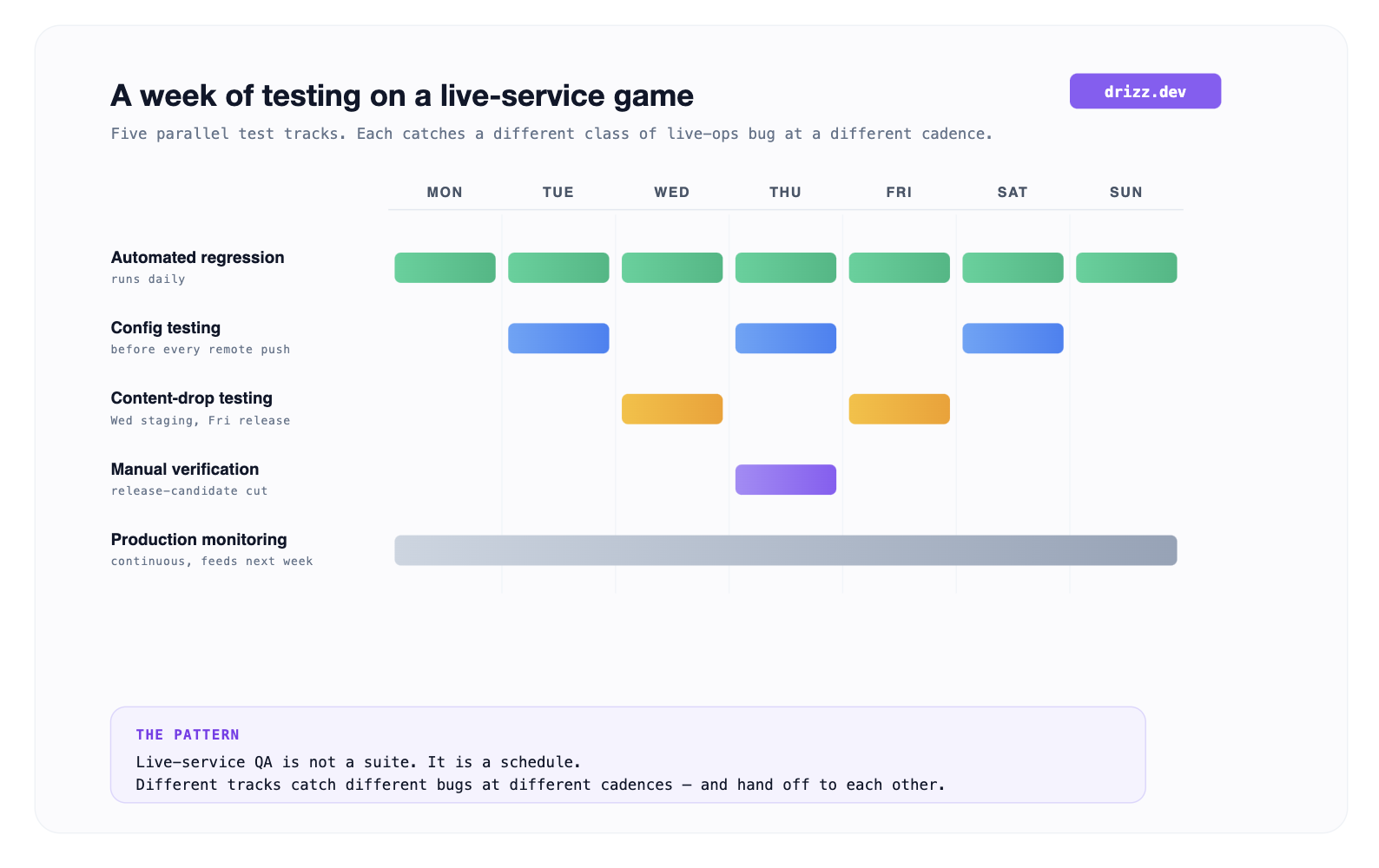
What this diagram helps with: it makes clear that live-service testing is a scheduled operation, not a single suite. Automated regression runs daily. Config testing runs before every remote push. Content-drop testing spikes on Wednesday and Friday. Manual verification concentrates around release-candidate cuts on Thursday. Production monitoring runs continuously and feeds back into next week's regression pass.
A remote config change can reach every player's device within minutes. That's feature; it's also risk. Config-testing patterns that mature studios settle on:
The bug this catches is class where config is technically valid but produces a broken UI a price that renders past character-count budget, a promotional badge that overlaps with pause button, an event timer that displays "-04:12" because end time is before current time.
Content drops on live-service games are highest-frequency change type. Every drop carries risk that a new asset breaks an old client, or that an old asset renders differently against new asset it now sits next to.
The failure modes cluster into four groups:
Testing pattern that catches these: a nightly test pass that runs current client against latest content bundle, plus a per-drop test pass against representative save states from last three client builds. The nightly pass catches asset delivery and rendering issues. The per-drop pass catches migration and backward-compatibility issues.
Economy testing is surface that most benefits from deterministic overnight simulations. Once invariants are written down as assertions, a test harness can run thousands of simulated player sessions and verify that:
The bug this catches is specific class where economy silently accumulates errors that compound over a season.
A player wins 5 tokens per match, redeems 100 tokens for a bundle, and after 100 matches finds their balance is 480 instead of 500 because a rounding bug ate 20 tokens over season. Manual QA cannot find that class of bug in reasonable time; a simulation harness catches it overnight.
Twelve items, done as a pre-release smoke pass on release candidate:
Anything longer belongs in continuous suite, not release-candidate smoke pass.
Three tools cover three surfaces between them. No single tool covers all three at depth.
Drizz is a Vision AI mobile testing platform that reads rendered game screen and runs plain-English tests on real iOS and Android devices. On live-service surface, Drizz covers visual regression tier: every config change, content drop, and event push needs a fast automated check that affected shop tiles, event banners, and HUD elements still render correctly.
Because Drizz matches on rendered pixels rather than on selectors or engine hierarchies, it catches config-triggered regressions on release builds without SDK integration. When a remote config change pushes a price that overflows character budget, or an LTO timer that renders past its expiry, Drizz surfaces visual regression within one test run.
Reported flakiness on production customer suites sits around 5%. Every run returns per-step screenshots and action logs, which is difference between attributing a config-triggered regression to specific screen and specific device where it appeared, and losing an afternoon debugging "shop looks weird."
Suited to game QA teams shipping weekly or biweekly live-ops updates on Unity, Unreal, or React Native titles where shop, HUD, and menus live inside engine canvas.
AltTester is industry standard framework for looking inside a Unity build. It injects an SDK into an instrumented build and exposes GameObject hierarchy over a WebSocket, letting automation frameworks query and interact with engine's scene graph.
On live-service testing, AltTester covers surface Drizz cannot: engine-state verification. The specific class of test "after this event start, is internal event manager set to state ACTIVE with correct end-timestamp integer?" requires reading engine's memory directly.
The trade-off is that AltTester needs source-code access and an instrumented build. It cannot run on final release builds, so studios that need release-candidate coverage pair AltTester with a rendering-based tool.
Best fit for Unity studios needing engine-level state verification of event and economy systems alongside their rendering-based regression suite.
GameBench is enterprise standard for mobile game performance profiling: FPS stability, frame pacing, CPU, GPU, memory, battery, and thermal metrics measured on real devices.
Live-service content drops routinely add complexity more particle effects, higher-poly assets, more concurrent animated shop tiles and cumulative effect over a season can degrade performance below game's target frame rate. GameBench catches this class of bug by running same benchmark scene on same device before and after each content drop and flagging any regression larger than a configured threshold.
Best fit for studios shipping content-heavy live-service titles where performance regressions from cumulative asset load are a real risk.
Even a well-instrumented live-service test schedule has bounds worth planning for:
A competitive live-service title ships a client update every one to two weeks, a remote config change every day (multiple times during events), a content drop every one to two weeks, and a seasonal event every four to six weeks.
The cumulative change rate is high enough that manual regression cannot keep pace.
Yes. Remote config values are applied at runtime, so same automated regression suite can run against a client build with new config values applied. The staged-rollout pattern (1% → 10% → 50% → 100%) provides an additional safety net for changes that pass automated testing but produce unexpected results in production.
Traditional mobile QA runs against a single build shipped to users, on a monthly or quarterly cadence. LiveOps QA runs against a build that receives content and config updates continuously, on a daily cadence for config changes and weekly for content. The tooling and process assumptions are different: LiveOps needs scheduled parallel test tracks, canary environments, and rapid rollback, none of which are typical for traditional mobile QA.
Roughly 75-85% of surface. Automated regression catches visual and config-triggered bugs at pre-release; simulation harnesses catch economy invariant bugs overnight. The remaining 15-25% is manual: verifying new content that has never existed before, real-money end-to-end validation, and player-behavior edge cases automation didn't anticipate.
Time-mocking. The game client's clock is set to a specific future time via a debug hook, and event manager is asked to compute state for that time. Studios that ship this correctly build a small test harness that lets QA move client clock forward and backward at will, then verify that correct event states activate at each simulated time.





©Drizz 2026 • All Rights Reserved






