•
Drizz raises $2.7M in seed funding •
•
Featured on Forbes
•
Drizz raises $2.7M in seed funding •
•
Featured on Forbes

Test. Verify. Ship.
Every testing tool now claims AI. Almost none publishes a number you can check. We open-sourced our benchmark — 570 screenshots from 20 production apps, Apache 2.0 — because on mobile, whether the agent taps the right thing is the
entire product.






94.51%
tap accuracy on UI-TapBench, our open benchmark — reproducible, not a marketing figure.
570
annotated screenshots in the dataset, drawn from 20 real production apps rather than synthetic UI.
~5%
flakiness, against roughly 15% on selector-based Appium suites.
1.0×
effort to cover iOS and Android — one plain-English test, both platforms.
Definition
AI mobile testing is the use of artificial intelligence — most often computer vision and natural-language processing — to generate, execute, maintain and diagnose tests for mobile applications.
Mobile app testing is the process of validating a mobile application's functionality, usability, performance, security and accessibility across the real devices and operating-system versions your users actually run. The goal of testing mobile applications is simple: catch the crash, the broken checkout or the truncated screen before your users do.
Generation, execution, maintenance and diagnosis are four separate jobs. Most tools apply AI to one of them — usually generation — and run ordinary selector automation underneath. Which of the four a tool actually covers is the question that matters.
A systematic academic review of AI-powered testing tools describes NLP-based test generation as the category's defining feature: non-technical users write a scenario in plain English, and the system converts it to executable steps.
Worth separating, because the search terms collide. This page is about using AI to test mobile apps. Testing an AI system — evaluating a model's outputs — is a different discipline with different tooling.
The honest problem
This is the awkward truth about the category, and pretending otherwise doesn't help you evaluate anything. After interviewing hundreds of automation experts, TestGuild's review of the field concluded that most so called AI testing tools" are just GPT wrappers.
Claim
Almost universal in this category, and almost never sourced. Faster than what baseline, measured on which app, by whom? A number without a method is a slogan.
Claim
Sometimes genuine. Often a retry, or a fallback list of locators tried in order. Both get described the same way on a pricing page, and only one survives a redesign.
Claim
Frequently means an LLM drafted a script that then runs on ordinary selectors. The AI touched authoring, not execution — so maintenance cost is unchanged, just relocated.
The distinction that decides everything. AI at authoring time drafts a test for you. AI at execution time decides where to tap, every run, on whatever is actually rendered. The first is a writing assistant and leaves you with a selector-based suite to maintain. The second is what removes the maintenance. Ask any vendor which one they do, and ask them to prove it on your app rather than their demo.
Benchmark
If an agent reads the screen instead of a selector, everything rests on whether it taps the right thing. That is a measurable claim, so we measured it and released the dataset.
94.51%
Tap accuracy
Built to test the one capability a mobile UI agent cannot fake: spatial precision on real, cluttered production screens. Scored against frontier vision models on identical tasks.
35%
Fewer abandoned checkout issues
3X
Faster release cycles
50%
Drop in UI-induced order failures
Why publish something a competitor can run against us? Because a benchmark only means anything if it can be reproduced, and a number nobody can check is worth roughly what it costs to type. If a rival scores higher on UI-TapBench, that is genuinely useful information — to you, and to us.
Capabilities
Four distinct jobs. A tool that covers one of them and calls itself AI-powered isn't lying, exactly — but it's answering a smaller question than the one you're asking.
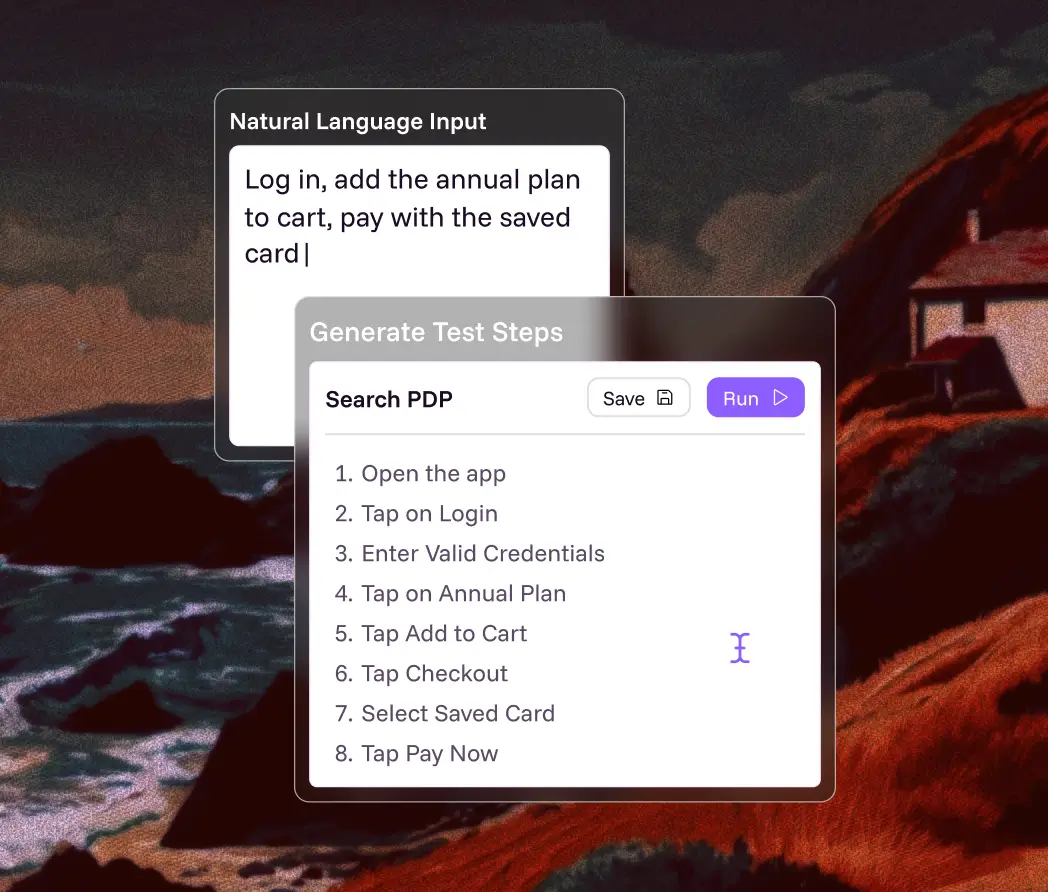
Generate
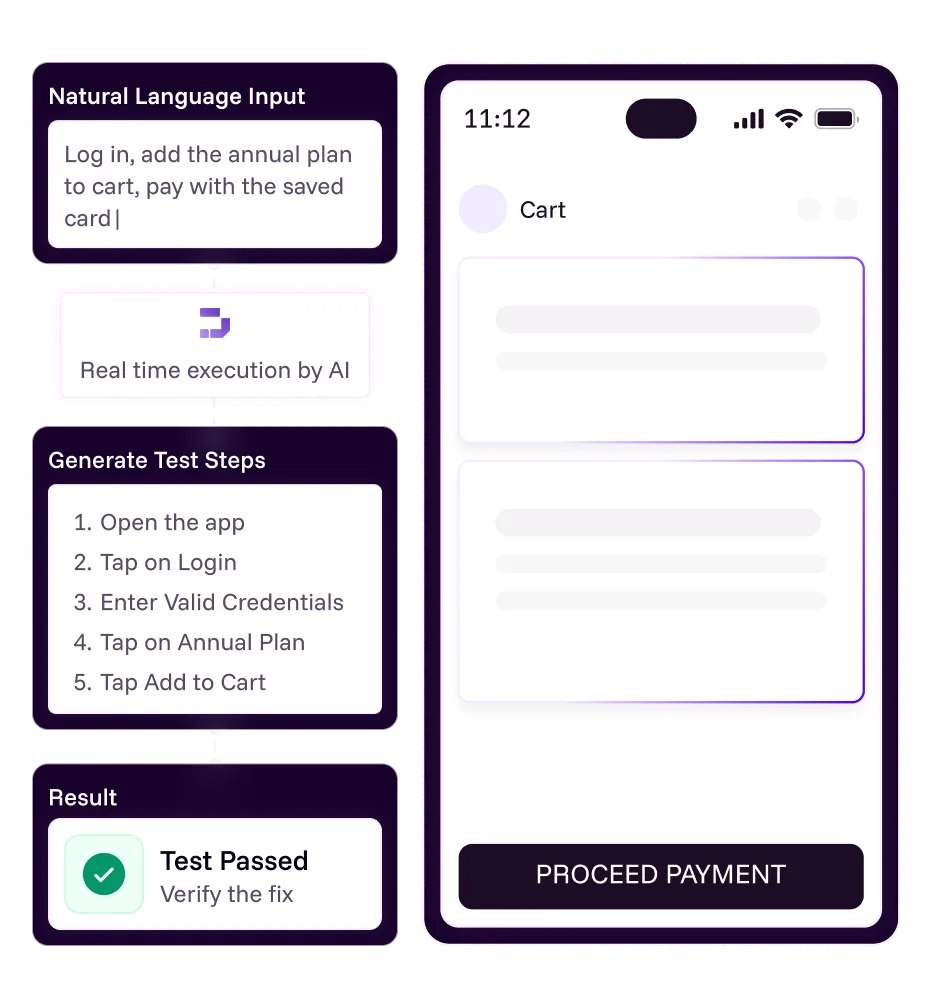
"Log in, add the annual plan to cart, pay with the saved card." Natural-language processing turns intent into executable steps, so product knowledge is the only prerequisite for authoring.
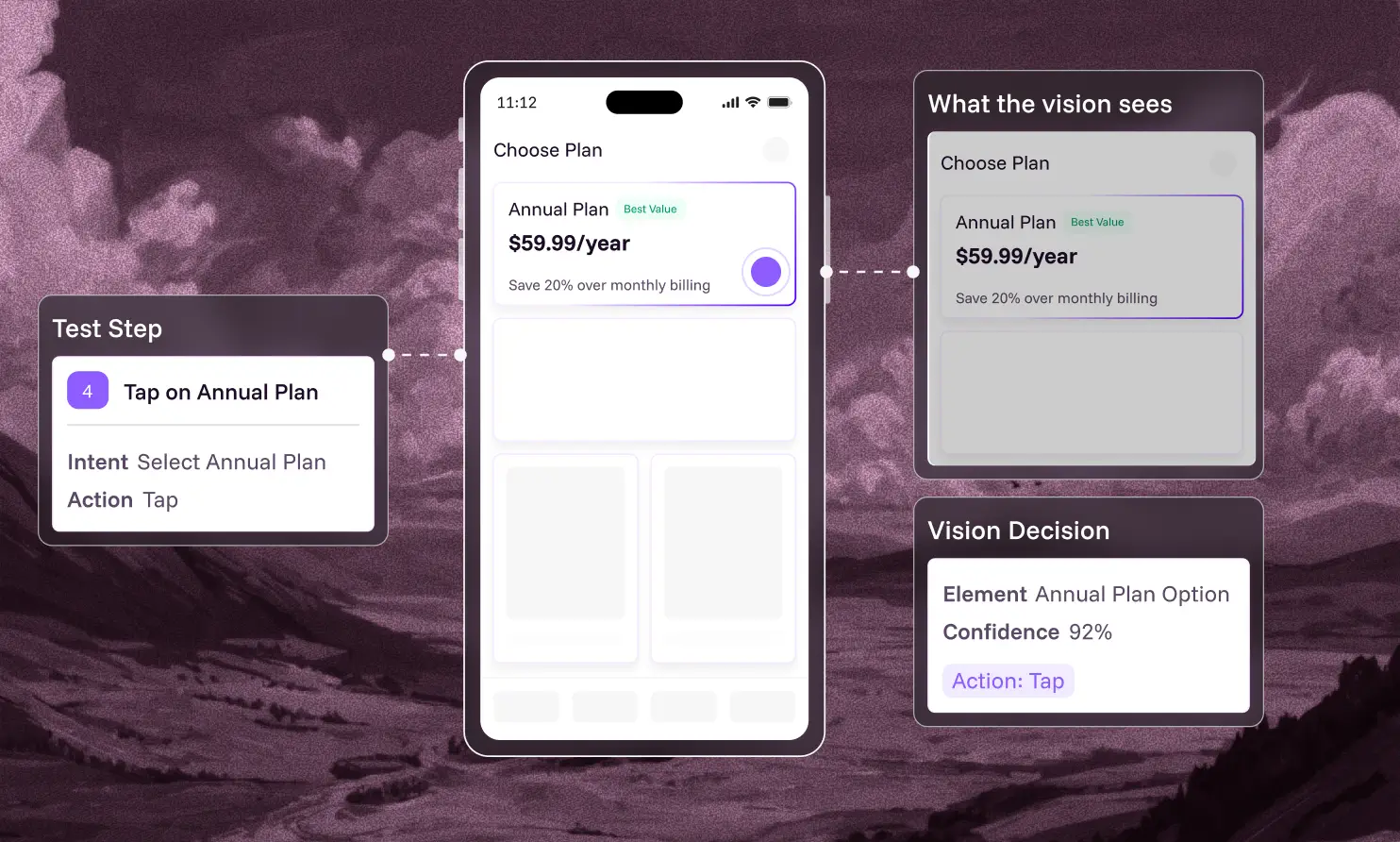
Execute
At run time the agent reads the rendered screen and acts on what is displayed — not on an identifier a developer may have renamed. This is the step most tools skip.
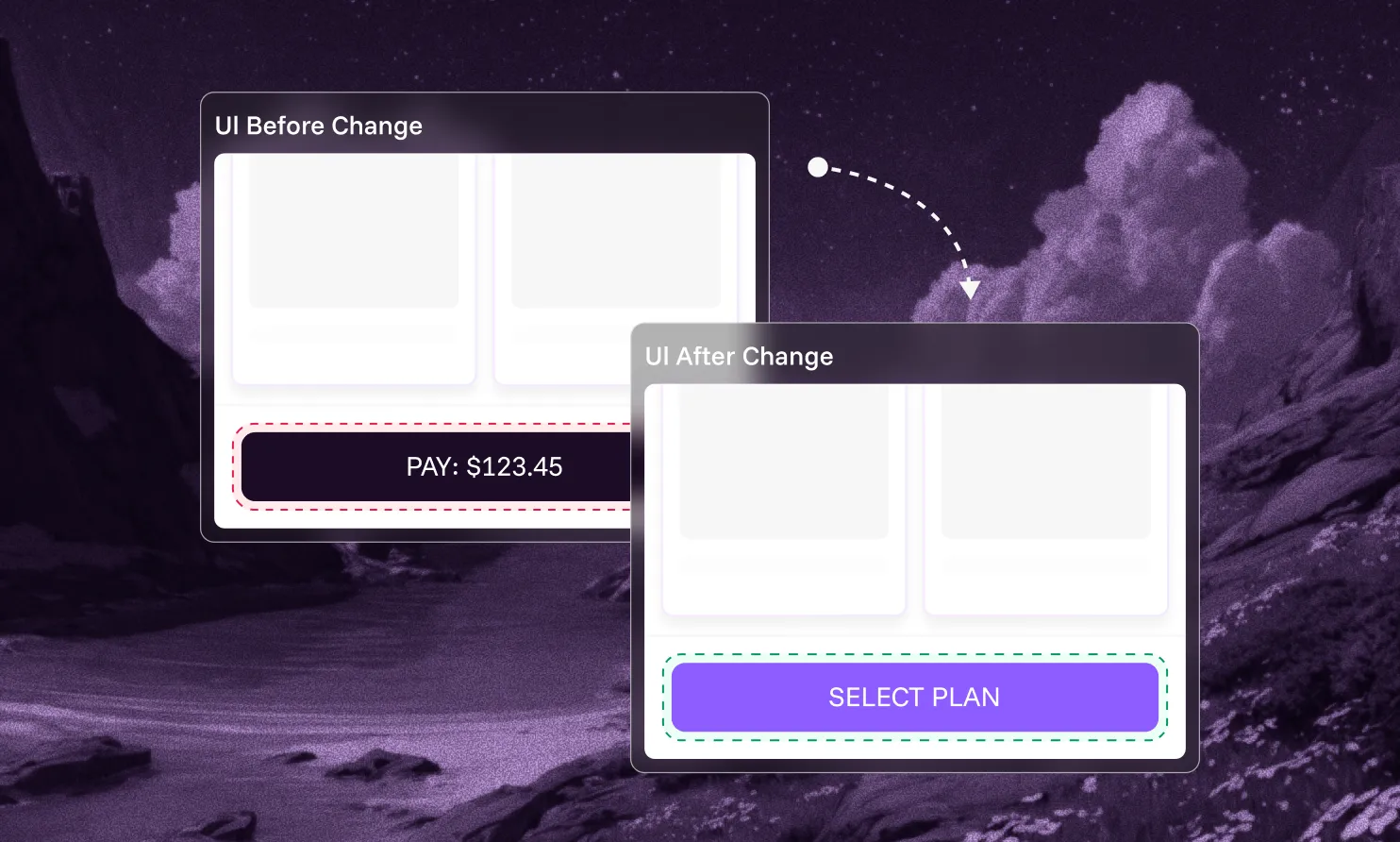
Maintain
When the UI moves, there is no locator to update because there was never a locator. A redesign costs a re-run rather than a sprint of test repair.
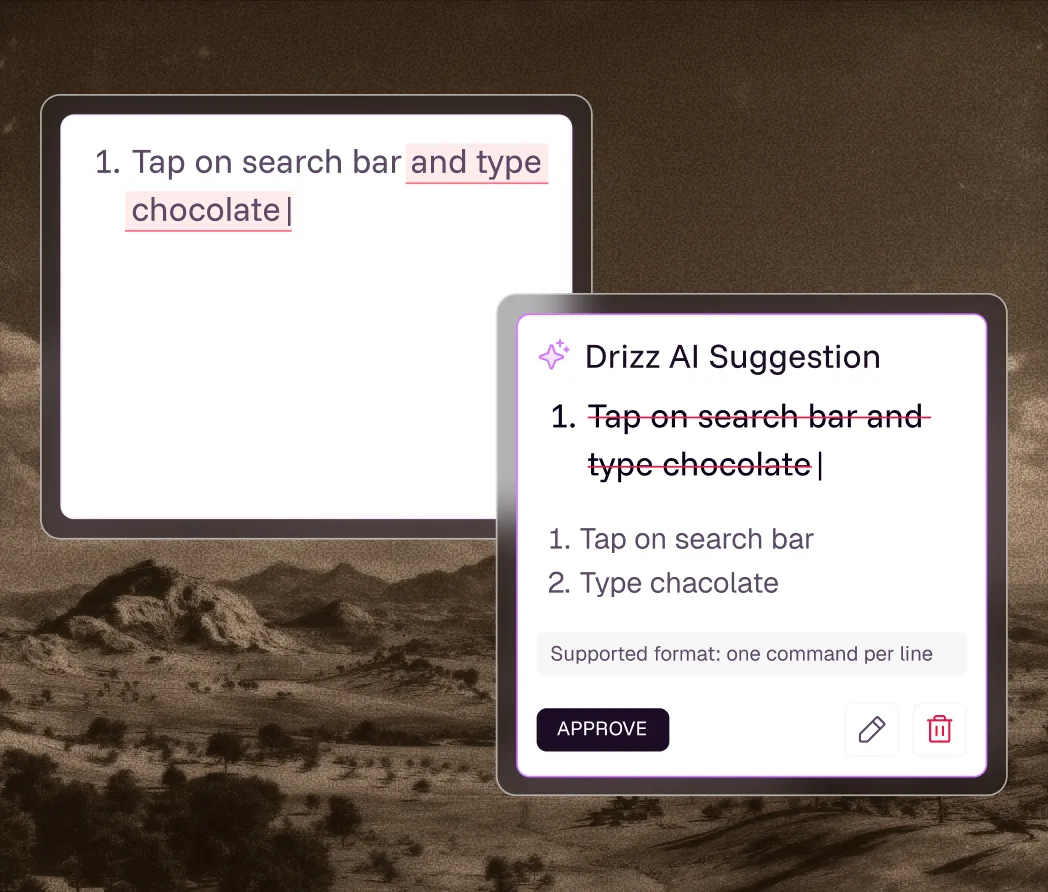
Diagnose
Screenshots, device logs, screen state and step history attached, with real regressions separated from environment noise. Most time lost to a failure goes on reproducing it.
Mechanics
All four get the same label on a pricing page. They behave completely differently once the app changes, and the difference predicts your maintenance bill more reliably than any feature list.
Scripted automation
LLM script generation
Selector AI + self-healing
Vision AI (Drizz)
Where AI is applied
Nowhere
Authoring only — drafts the script
Authoring, plus locator repair
Authoring and execution, on every run
How elements are found
Resource ID, accessibility ID, XPath
Same — the AI wrote the selectors
Primary locator, then fallbacks
What is rendered on screen
A developer renames a button
Step fails; human updates the locator
Step fails; regenerate or fix by hand
Usually recovers, if a fallback matches
Nothing to rename, so nothing breaks
Identifier missing entirely
Cannot target it
Cannot target it
Guesses by index or position
Irrelevant — none required
A screen is redesigned
Rewrite the affected tests
Regenerate and re-verify
Healing degrades as the delta grows
Re-run; the intent is unchanged
OEM-restyled system dialogs
Per-manufacturer branches
Per-manufacturer branches
Per-manufacturer branches
Recognised visually, no branches
Who can author
Automation engineers
Anyone, then an engineer reviews
QA with some technical depth
Anyone who knows the product
Cross-platform reuse
None — locators are per platform
Partial; two generated suites
Partial
One test, iOS and Android, 1.0×
Typical flakiness
~15%
~12–15%
~8–12%
~5%
Its real failure mode
Maintenance cost
Maintenance cost, now with a review step
Healing that silently picks the wrong element
Agent misreads the screen — which is why we benchmark it

The honest counterpoint. Vision-based execution has a real failure mode of its own: if the agent misreads the screen, the test does the wrong thing and no selector is there to catch it. That is precisely why the accuracy number needs to be published and reproducible rather than asserted. Selector-based tools trade that risk for a maintenance bill. Neither is free — pick which cost you would rather carry, with the numbers in front of you.
limits
Mobile testing is harder than web testing for reasons that have nothing to do with tooling preference. These are the eight that consume most QA capacity.
An agent can reach the same goal by two different routes on two runs. Usually harmless, occasionally not — a test that "passes" via a path your users never take has verified nothing. Ask how a vendor constrains this, and whether runs are reproducible.
The worst failure in the category. The agent lands on a plausible-looking screen, decides the step succeeded, and moves on. A selector-based test would have failed loudly. This is what tap accuracy actually measures.
"Check the page looks right" isn't a testable claim, whatever the marketing says. Assertions still have to be specific enough to be falsifiable. Natural language makes authoring easier; it doesn't make vague requirements testable.
Transaction lists, seat maps, calendar grids. Rows that differ only by a small text value are where spatial precision is hardest — and precisely why UI-TapBench is built from real production screens rather than clean synthetic ones.
Game engines, canvas views, charts and map layers draw pixels with no semantic structure at all. Vision handles these better than selectors do — but "better" isn't "solved", and they deserve targeted testing in a pilot.
Translated strings change length, wrap and truncate; right-to-left layouts mirror the entire screen. An agent reading text needs to cope with a locale it wasn't set up in, which is a real thing to test rather than assume.
"Cancel the most recent order" depends on account state the agent can't infer. Test data setup remains an engineering problem. AI removes the scripting, not the need for a controlled environment.
Vision inference isn't free, and a thousand-test nightly suite is a different economic proposition from a ten-test smoke run. Ask how execution is priced and how long a full regression actually takes.
Regulated teams need to show what ran and why it passed. An agent that decides at run time needs to produce a step-level record a reviewer can follow. Ask to see the artefact, not a summary of it.
Because you'll find these in a pilot anyway, and a vendor who pretended they didn't exist has told you something about how the rest of their claims should be read. The three marked Hard are genuine limits of the approach. The six marked Manageable are things a mobile-first platform is built to handle and a web-first one usually isn't.
The gap
Mobile testing is harder than web testing for reasons that have nothing to do with tooling preference. These are the eight that consume most QA capacity.

A DOM — every element in a queryable tree with stable attributes
Consistent rendering across a handful of browser engines
Text content and roles exposed by default
One viewport model, resized predictably
No app lifecycle, no permission dialogs, no OS interruptions

No DOM. Elements are drawn by the platform, and what a tool can see depends on whatever accessibility metadata the developers added
SwiftUI and Compose don't generate identifiers automatically
Hybrid apps switch between native and web contexts mid-flow
The same build renders differently across thousands of device models and manufacturer skins
Biometrics, permission prompts, incoming calls and backgrounding interrupt the flow constantly
Which is the argument for vision, not against it. On web, a structure-reading AI has plenty of structure to read. On native mobile there often isn't any — which is exactly the condition where reading the screen the way a human tester does stops being a stylistic preference and becomes the only approach that holds up. Drizz was built mobile-first for that reason.
How it works
Mobile testing is harder than web testing for reasons that have nothing to do with tooling preference. These are the eight that consume most QA capacity.

1/4
Connect your build and start instantly.

2/4
Write steps the way you use your apps.

3/4
Real-device runs that adapt in real time.

4/4
Every failure comes fully unpacked.
Evaluation
Including us. These separate a platform that holds up at scale from one that demos well — and every answer is checkable inside a single trial.
Not a case study, not a percentage on a slide. A dataset and a method you can reproduce. If the answer is no, every other number is unfalsifiable.
If it drafts a script that then runs on selectors, you still own a selector-based suite. The maintenance didn't go away; it moved one step downstream.
The single fastest test of whether self-healing is real. Change something, re-run, watch. Genuine self-healing passes; a retry mechanism fails again.
Ask when mobile support shipped relative to web. Platforms that added mobile later tend to carry DOM-shaped assumptions into an environment with no DOM.
Emulator-only execution can't surface biometrics, camera, GPS, thermal behaviour or OEM background management. For a release gate on mobile that isn't optional.
Screenshots, logs, screen state and step history should arrive attached. If your developers reproduce the bug manually first, the tool moved cost rather than removing it.
For regulated environments: on-prem or VPC deployment, SSO and SAML, RBAC, audit logs, encryption in transit and at rest. Confirm before the pilot, not during procurement.
Terminology
These terms are used loosely and often interchangeably, which makes vendor comparison harder than it needs to be. Here's what each one usually means, and the question that tells you whether it's real.
Schedule a demo
Term
What it usually means
What to check
AI testing
Umbrella term for using AI anywhere in the test lifecycle. Frequently confused with testing AI systems, which is the opposite activity.
Which of generate, execute, maintain, diagnose does it actually cover?
AI test automation
AI applied to building and running automated tests, usually with natural-language authoring as the headline feature.
Is the AI present at run time, or only when the test is written?
Codeless / no-code / scriptless
Tests authored without writing code. Says nothing about how elements are located underneath.
Can you edit an existing test codelessly, or only create one?
Self-healing
Tests that keep working after the UI changes. Sometimes genuine adaptation, sometimes a retry or a fallback locator list.
Rename a button mid-demo and re-run. That settles it.
Autonomous testing
The system explores the app and decides what to test, rather than executing tests you defined.
Useful for discovery; ask how you constrain it to what you care about.
Agentic testing
An agent plans a multi-step task and adapts as it goes, rather than replaying fixed steps.
How is a run made reproducible enough to gate a release on?
Visual AI / visual testing
Often means screenshot comparison against a baseline — a validation layer, not an execution model.
Does vision drive the test, or only assert on it afterwards?
Generative AI testing
An LLM produces test cases, test data or scripts from requirements.
Who verifies the generated tests, and what happens to them in three sprints?
Computer vision testing
Elements located by what is rendered on screen rather than by an identifier.
Is there a published accuracy figure you can reproduce?
The one that matters most. Codeless and AI-powered are independent properties. A tool can be codeless and still resolve to selectors underneath, which gives you friendly authoring on top of fragile execution. That combination is common, and it's why maintenance survives a migration that was supposed to end it. For the fuller treatment, see codeless test automation.
Best practices
The adoption failures we see are rarely about the model. They're about teams treating an agent as either infallible or untrustworthy, when the useful position is neither.
Natural language makes authoring easy enough that vague tests slip through. "The order confirms and shows an order number" is checkable. "The checkout works properly" isn't, and it will pass when it shouldn't.
An AI-drafted suite is a first draft. Read it before it becomes your regression baseline, because a test that encodes the wrong expectation is worse than no test — it manufactures confidence.
When a run fails, the first question is whether the app broke or the agent misread the screen. Teams that don't track these separately either lose trust in the suite or stop investigating real failures.
Vendors demo on a clean login flow. Point the trial at the dense list view, the map, the multi-step KYC form. If it holds there, the rest follows; if it only works on the login, you learned that cheaply.
AI is strong on repetition and weak on curiosity. Reclaiming manual QA time is the point — spend it on exploratory work and first-impression judgement, not on supervising the agent.
Record your current flakiness, authoring throughput and maintenance hours before switching. Without a baseline you can't tell whether the tool worked, and every vendor's improvement claim stays unfalsifiable — including ours.
Why drizz
Mobile-first, vision-based, and measured in public. Elements are identified by what's on screen, so the maintenance problem doesn't relocate — it disappears.
Area
Traditional Appium Testing
Competitor Tools
Authoring throughput
~15 tests/month per automation engineer
~40–80 tests/month per QA engineer
~200 tests/month per manual QA
Total test time
~30% of sprint
~15–25%
~10%, with auto-triage and repro data
iOS + Android effort
1.8× — largely duplicated
~1.2–1.5×
1.0× — write once, run both
Maintenance after UI change
High
Medium
Low — tests self-heal
Flakiness
~15%
~8–12%
~5%
Published accuracy benchmark
Not applicable
Rare
UI-TapBench, open under Apache 2.0
Authoring throughput
Traditional Appium Testing
~15 tests/month per automation engineer
Competitor Tools
~40–80 tests/month per QA engineer

~200 tests/month per manual QA
Total test time
Traditional Appium Testing
~30% of sprint
Competitor Tools
~15–25%
~10%, with auto-triage and repro data
iOS + Android effort
Traditional Appium Testing
1.8× — largely duplicated
Competitor Tools
~1.2–1.5×
1.0× — write once, run both
Maintenance after UI change
Traditional Appium Testing
High
Competitor Tools
Medium
Low — tests self-heal
Flakiness
Traditional Appium Testing
~15%
Competitor Tools
~8–12%
~5%
Published accuracy benchmark
Traditional Appium Testing
Not applicable
Competitor Tools
Rare
UI-TapBench, open under Apache 2.0
Read the benchmark, or point Drizz at your own build and rename a button. Both take less time than another vendor demo.
Resources
The full method, the scores against frontier models, and the dataset itself.

Read the report
The parent guide — strategy, types, challenges and tooling across iOS and Android.
Read the guide
How plain-English authoring works, and why mobile is harder than web.
See the breakdown
Four inputs. Returns what selector maintenance costs you per year.
Run the numbers


AI mobile testing is the use of artificial intelligence — most often computer vision and natural-language processing — to generate, execute, maintain and diagnose tests for mobile applications. In practice it means tests are written in plain language rather than code, and elements are identified by what appears on screen rather than by a selector, so tests survive UI changes instead of breaking.
Traditional automation like Appium, Espresso or XCUITest requires you to script each test and update locators by hand whenever the app changes. AI test automation generates tests from natural language, locates elements without a fixed identifier, adapts when the UI shifts, and attaches diagnosis to failures. The mechanical difference underneath all of that is element identification: selector versus vision.
Ask three things. Does the vendor publish a benchmark you can run yourself, or only a number on a slide? Does the tool still work when an identifier is renamed mid-demo, or does it fail? And is the AI used at execution time to locate elements, or only at authoring time to draft a script that then runs on ordinary selectors? A tool that only generates a script is a writing assistant — useful, but it leaves you with a selector-based suite to maintain.
UI-TapBench is an open benchmark Drizz built and published for spatial tap accuracy in mobile UI agents: 570 annotated screenshots drawn from 20 real production apps, released under Apache 2.0. Drizz scores 94.51% on it. Because the dataset is public, the number can be reproduced rather than taken on trust — which is the point of publishing it.
Web pages expose a DOM, which gives an AI a reliable structure to reason about. Native iOS and Android apps expose no equivalent. Accessibility identifiers are frequently missing or duplicated, SwiftUI and Compose don't generate them automatically, hybrid apps switch between native and web contexts mid-flow, and the same build renders differently across thousands of devices. An AI that reads structure has little to read — which is why visual understanding matters more on mobile than on web.
Self-healing means a step continues to succeed after the UI has changed. It's real when the tool identifies elements by what's on screen, because there's no identifier to break. It's often overstated when a tool simply retries a failed step or works through a fallback list of locators. The way to check is to rename a button during a demo and watch the next run.
Three genuine limits. Non-determinism — an agent can reach the same goal by different routes on different runs, so reproducibility has to be engineered rather than assumed. Silent wrong-success — the agent lands on a plausible screen, decides the step passed, and moves on, which a selector-based test would have failed loudly. And ambiguous assertions — natural language makes authoring easy enough that untestable checks like "the page looks right" slip in. Beyond those, dense near-identical list rows, custom-rendered surfaces like maps and game canvases, right-to-left localisation, test data setup, per-step inference cost and audit trails are all manageable but worth probing in a pilot.
Agentic testing means an agent plans a multi-step task and adapts as it executes, rather than replaying fixed steps — you still define what to test. Autonomous testing means the system explores the app and decides for itself what's worth testing. The first is an execution model, the second is a discovery model. They're often used interchangeably, and the question worth asking about either is how a run is made reproducible enough to gate a release on.
No, and conflating them is the most expensive mistake in this category. Codeless describes how a test is authored. AI describes what's doing the work underneath. A tool can be fully codeless and still resolve to selectors at run time, which gives you friendly authoring on top of fragile execution — so the maintenance survives a migration that was supposed to end it. See codeless test automation for the fuller treatment.
No. Exploratory testing, first-impression usability judgement and deciding what's worth testing all still need a person. AI removes the scripting and maintenance work between having a test idea and having a test that runs — which is where most QA hours actually go — rather than removing the tester.
No. Exploratory testing, first-impression usability judgement and deciding what's worth testing all still need a person. AI removes the scripting and maintenance work between having a test idea and having a test that runs — which is where most QA hours actually go — rather than removing the tester.
Yes, and academic reviews of the category describe natural-language test generation as its central capability: a non-technical user writes the scenario in plain English and the system converts it into executable steps. The harder problem is execution — whether that generated test still runs correctly on a device three sprints and one redesign later.
Drizz executes on real iOS and Android hardware. That matters more for a vision-based approach than a selector-based one, because the agent acts on what's actually rendered — and emulators don't reproduce manufacturer skins, biometric hardware, thermal behaviour or real network conditions.
Yes. Because elements are identified visually rather than through platform-specific identifiers, one plain-English test runs on both platforms at roughly 1.0× effort, against about 1.8× on selector-based frameworks where the two suites are largely duplicated work.
Yes, provided the platform meets the usual controls: on-prem or VPC deployment so test data stays inside your network, SSO and SAML, role-based access control, audit logs, and encryption in transit and at rest. Drizz supports all of these and is used by teams in financial services and healthcare.
Yes. Drizz runs headlessly in pipelines and integrates with GitHub, Jenkins, Slack, Jira, Android Studio and Xcode, and connects to device clouds including BrowserStack and LambdaTest. Authoring being conversational says nothing about how execution is triggered.



©Drizz 2026 • All Rights Reserved





