•
Drizz raises $2.7M in seed funding •
•
Featured on Forbes
•
Drizz raises $2.7M in seed funding •
•
Featured on Forbes


Mobile compatibility testing is what stops your app from shipping perfectly on QA lead's Pixel 8 and crashing on Redmi, which half your users open every morning.
It is not a nice-to-have and it is not "testing on more devices." It is a specific class of testing that answers one question: does app behave same way across device, OS, screen, and OEM combinations our users actually run?
Teams get compatibility testing wrong in two directions. Some skip it entirely and let production be compatibility surface every OEM bug becomes a support ticket and a hotfix. Others try to test every combination and drown CI budget without covering combinations that matter.
The rest of this article is about how to scope compatibility testing so it catches right bugs at right stage.
Mobile compatibility testing verifies that your app renders and behaves correctly across specific device, OS version, screen size, and OEM-skin combinations your users run.
It is not a step in release pipeline. It is a testing type that shows up at multiple stages: smoke on head-tier devices for every merge and a full sweep on risk-tier devices before a release candidate.
The output is a compatibility report, not a pass/fail. A build can pass compatibility on 95 device combinations and fail on 5 report tells you which 5, and whether those combinations are shippable given your DAU distribution.
They overlap, but they're not same thing. Understanding split saves a lot of arguing on QA channel.
Device fragmentation testing answers, "Which devices do we cover, and how do we pick them?" It is a strategy question about building device matrix, deciding what belongs in head, risk, and frontier tiers.
Mobile compatibility testing answers, "Across the devices we chose, does app behave consistently?" It is an execution question, actually running app across those combinations and checking for divergent behavior.
Fragmentation testing scopes what you'll test on. Compatibility testing is what you do once you're there. Skip either one and you have a hole. Confuse them and your test plan reads like it covers both but actually covers neither.
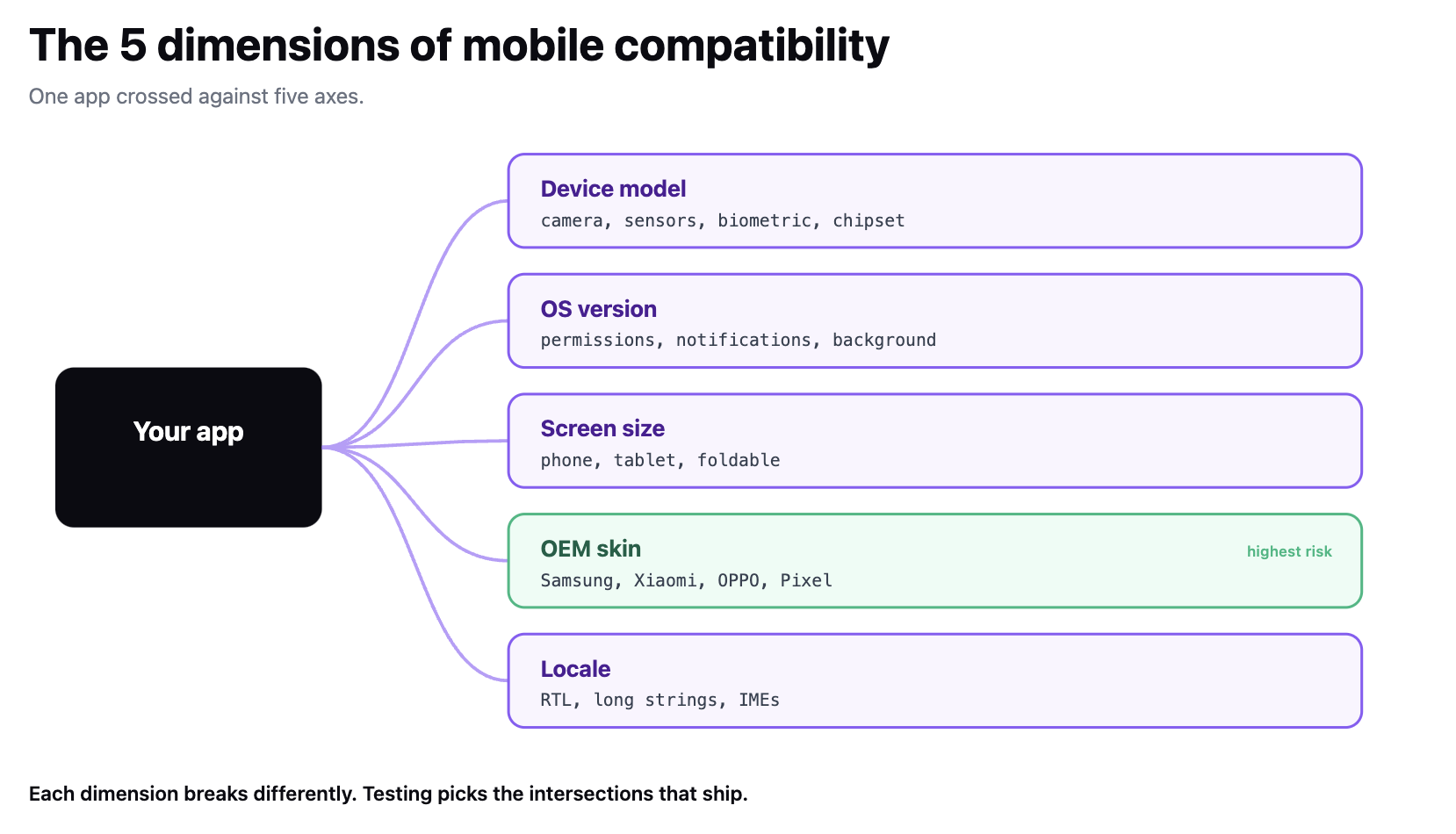
Five dimensions carry weight. Anything that breaks on mobile compatibility usually breaks along one of them.
The five aren't independent a foldable Samsung on Android 14 in Korean is a specific point in a 5D space, and app either works there or doesn't. Compatibility testing is picking points that matter and running them.
The trap is thinking you need every combination. You don't. You need combinations your users actually run, plus ones that catch highest-leverage regressions.
Start with your DAU distribution. Pull top 20 device × OS combinations from Firebase Analytics or your event stream. Those combinations should cover 80–90% of active users. Cross-reference with StatCounter or DeviceAtlas if you're in a new market and don't have first-party data yet.
Then add risk combinations. These aren't biggest cohorts; they're ones where behavior diverges most:
The finished matrix usually has 20–30 combinations, not 500. That's point it's a matrix your team can actually run without needing a full device farm every night.
Add frontier combinations sparingly. One or two on newest OS beta, one or two on hardware that will be common in six months. These are early warnings, not part of regression baseline.
Some bugs surface in emulators. Others only surface on real hardware with a specific OEM skin.
The bugs that reach production and become support tickets are usually ones that can't be tested on emulator. The emulator vs. real-device split is where those bugs live.
Compatibility bugs cluster in flows that touch OS boundary anything hitting hardware, permissions, background execution, or platform-level services.
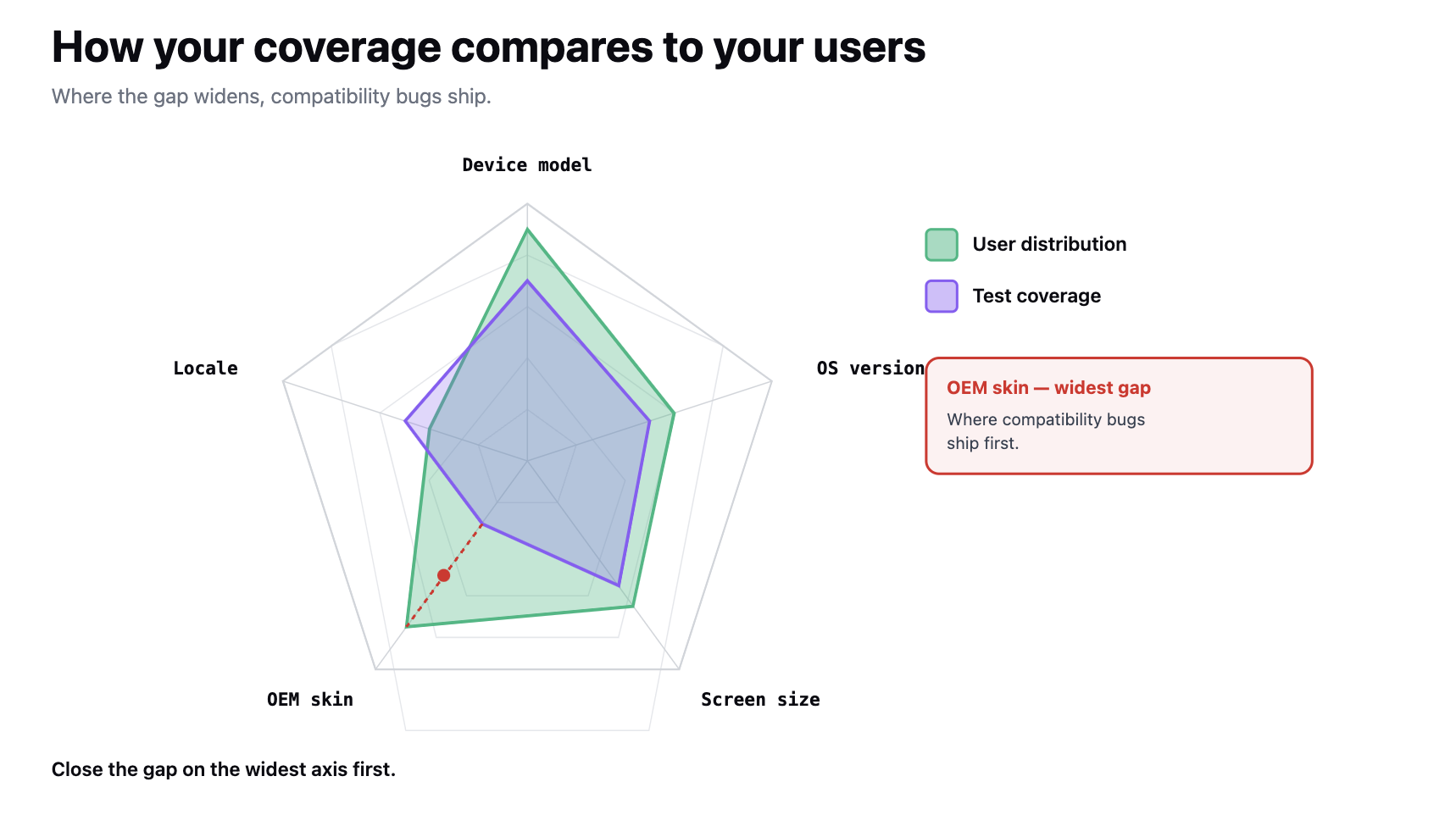
Script-based frameworks make compatibility testing linearly expensive. Every new OEM skin needs its own selectors. Every OS version bump risks locator drift. That's why teams that use Appium at scale end up under-investing in risk tier cost per new combination is high, and they're already fighting flaky tests on head tier.
Real-device clouds (BrowserStack, LambdaTest, HeadSpin, Sauce Labs) solve fleet-management side of compatibility testing but not the test-authoring side. You still have to write tests, and you still pay for locator maintenance whenever a UI change ships.
Vision-based test automation resolves authoring side. A test that describes flow in plain English doesn't need a new selector when Samsung One UI restyles a permission dialog engine sees dialog way a person sees it and clicks option that matches intent.
We built Drizz Vision AI on that argument. The same description runs on Pixel, Samsung, Xiaomi, and iPhone without changing a line. Two mechanics carry it: caching makes re-runs on same screen a fraction of resolution cost, and self-healing repairs failed tap/type/swipe steps mid-run when UI shifts.
That means same test author can cover 25 combinations instead of 8, and risk tier gets real attention.
That's case for our own tool. The general point is that when you evaluate a compatibility testing tool, cost it per new device combination, not per test that's where tier expansion actually happens.
Compatibility testing sits at three points in release train.
Anything that changes platform-facing code triggers an out-of-band compatibility sweep, even between release candidates. That includes:
The sweep is not a monthly QA ritual. It's a gate that fires when platform surface of app changes, which happens more often than teams realize.
Mobile compatibility testing is a distinct testing type not same as device fragmentation strategy, and not "just running suite on more phones." It answers whether app behaves consistently across device, OS version, screen size, OEM skin, and locale combinations your users actually run.
Build a matrix of 20–30 combinations from your DAU data plus risk points that historically diverge.
Run smoke on head-tier combinations per merge, full regression nightly, and a full sweep on release candidates and whenever platform-facing code changes.
Weight test authoring cost against number of combinations you can afford to cover that ratio decides whether risk tier gets real attention or gets skipped.
Compatibility testing is a report, not a pass/fail, and report is artifact QA leads carry into a release conversation.

No. Device fragmentation testing is a strategy question which devices belong in your test matrix, and how they're tiered. Mobile compatibility testing is an execution question once you've picked devices, does app behave consistently across them? Skipping either leaves a gap; conflating them makes it read like both are covered when neither is.
Usually 20–30 combinations, not 500. Start with top 20 device × OS pairs from your DAU data, which typically cover 80–90% of active users. Then add risk points: any device on an OS 2+ major releases behind median, any OEM skin where support tickets cluster (Xiaomi, OPPO, older Samsung), foldables, and one device per supported locale.
Anything that touches hardware or OEM behavior. Biometric authentication, push notifications on Samsung / Xiaomi / OPPO skins, foldable state transitions, camera and sensor flows, runtime permission dialogs, and deep-link interception by custom OEM intent handlers. Emulators cover functional flows well but miss sensor and background-execution behaviors where compatibility bugs cluster.
Any change to platform-facing code: bumping target SDK on Android or deployment target on iOS, adding or changing a runtime permission, changing intent filters or deep-link schemes, or adding a new locale. Those changes are ones most likely to produce silent regressions that don't surface in functional tests, so sweep fires independently of release calendar.





©Drizz 2026 • All Rights Reserved






