•
Drizz raises $2.7M in seed funding •
•
Featured on Forbes
•
Drizz raises $2.7M in seed funding •
•
Featured on Forbes


"Test failed. Element not found."
Sound familiar?
Your CI pipeline just went red. Slack is blowing up. The QA channel is flooded with the same question: "Is this a real bug or did something change?"
Spoiler: nothing broke. The checkout button still works perfectly. Users are converting just fine.
But your XPath selector was looking for btn-checkout-v1, and someone renamed it to cta-purchase-experiment-b.
Welcome to the world of dynamic UI testing where your app evolves faster than your test suite can keep up.
The old playbook says "write more robust selectors" or "implement self-healing." But here's the truth: you can't selector your way out of a fundamentally broken approach.
This is why Drizz's Vision AI exists. Not to write better selectors but to eliminate the need for them entirely.
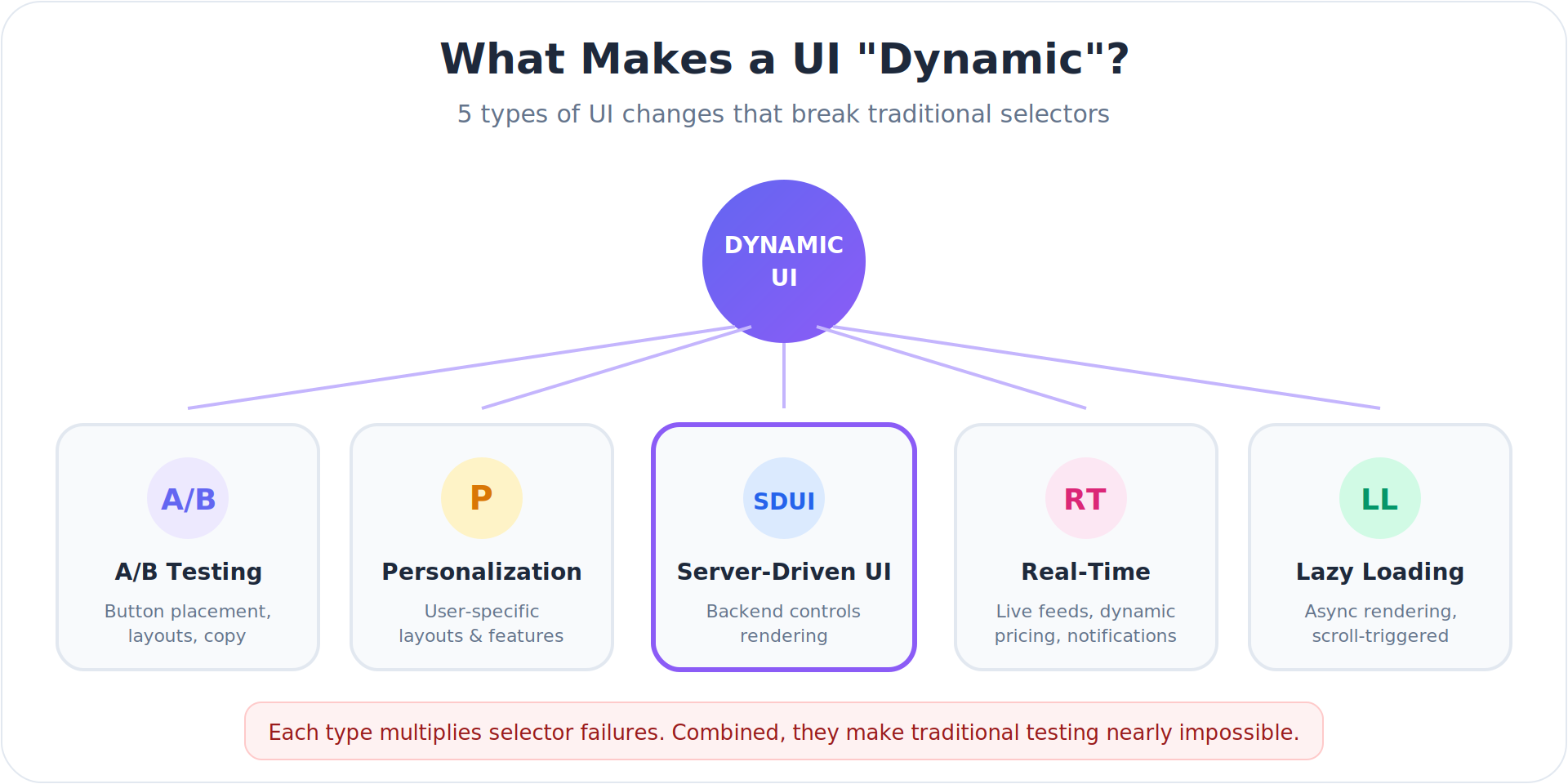
Before diving into solutions, let's define the problem. A dynamic UI is any interface where elements change without code deployment:
Product teams constantly run experiments. Button placement, color schemes, copy variations, layout structures all of these can change between user sessions or even within the same session. Facebook, Amazon, and Google run thousands of simultaneous experiments across their apps.
For testing, this means a selector that works for Control Group A fails completely for Variant B.
Modern apps tailor experiences based on user behavior, demographics, location, and preferences. An e-commerce app might show different homepage layouts for first-time visitors versus returning customers. A banking app displays different feature sets based on account type.
Each personalized variation potentially breaks selectors written for a "default" view that doesn't exist for most users.
This is the big one and it's growing fast.
SDUI flips the traditional mobile architecture on its head. Instead of hardcoding UI layouts in your app, the backend sends JSON configurations that tell the app what to render. The app becomes a rendering engine; the server controls the experience.
Why teams adopt SDUI:
Who's using it: Airbnb, Lyft, Swiggy, PhonePe, and most super-apps have adopted SDUI architectures. It's becoming standard for any app that needs to iterate quickly.
The testing nightmare:
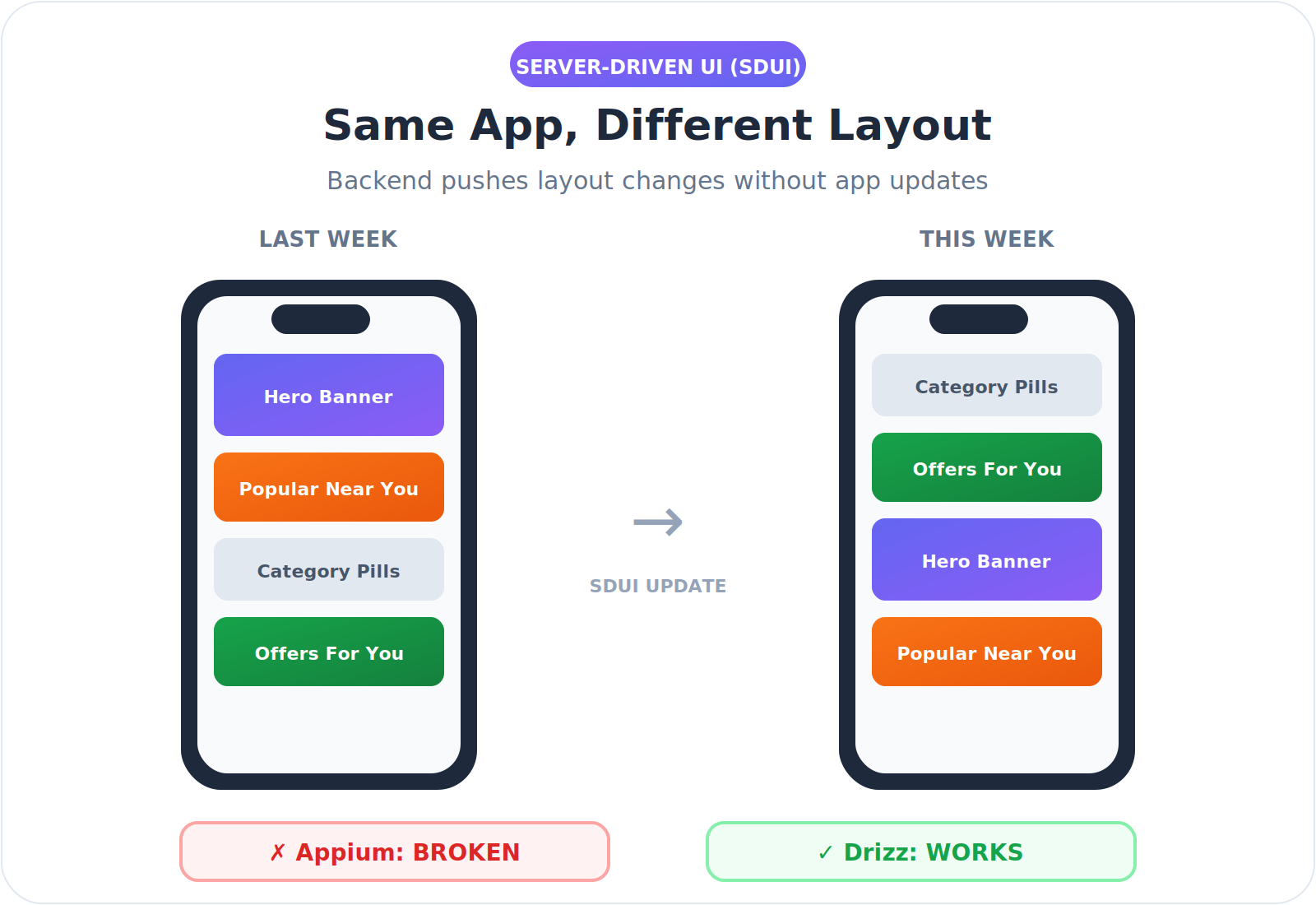
With SDUI, your element IDs, class names, and component hierarchies aren't fixed they're dynamic payloads from the server. A screen that rendered as ProductCard > Title > PriceLabel yesterday might be DynamicBlock > TextComponent > StyledPrice today.
// Monday's server response
{
  "component": "ProductCard",
  "children": [
    {"type": "Title", "id": "product-title-001"},
    {"type": "PriceLabel", "id": "price-label-001"}
  ]
}
// Tuesday's server response (after backend update)
{
  "component": "DynamicBlock",
  "children": [
    {"type": "TextComponent", "id": "txt-7x9k2"},
    {"type": "StyledPrice", "id": "price-exp-b"}
  ]
}
Same visual result. Completely different DOM structure. Every selector you wrote on Monday is broken by Tuesday.
This is why SDUI teams often give up on E2E automation entirely or accept 30%+ flakiness as "normal."
Live data feeds, dynamic pricing, inventory status, social feeds, notification counts these all create elements that appear, disappear, or change content unpredictably. A "Low Stock" badge might appear on some product cards but not others. A promotional banner might only display during certain hours.
Modern performance optimization means elements load asynchronously. A button might not exist in the DOM until the user scrolls. A modal might render with different element hierarchies depending on what content it needs to display.
Selector-based testing tools (Appium, Espresso, XCUITest, Selenium) rely on finding elements through identifiers embedded in the code:
Selectors work by matching patterns in the underlying code structure. When that structure changes even if the visual appearance remains identical the selector breaks.
Consider this scenario:
Before A/B Test:
<Button id="checkout-v1" class="primary-cta">
  <Text>Checkout</Text>
</Button>
After A/B Test (Variant B):
<TouchableOpacity testID="checkout-experiment-b" style={styles.newCta}>
  <Label>Checkout</Label>
</TouchableOpacity>
To a user, nothing changed. The button says "Checkout" and works the same way. But every selector targeting the original element now fails.
Let's break down the specific limitations of Appium, Espresso, and other selector-based tools when dealing with dynamic UIs:
1. No Visual Understanding
Traditional tools are blind. They parse the DOM tree looking for matching attributes, but they have zero understanding of what's actually rendered on screen.
// Appium sees this:
{
  "element": "XCUIElementTypeButton",
  "identifier": "checkout-btn-exp-b",
  "frame": {"x": 120, "y": 450, "width": 200, "height": 48}
}

// Appium does NOT see:
// - A green button with white text saying "Checkout"
// - Positioned at the bottom of a cart summary
// - With a shopping cart icon on the left
This means if the identifier changes but the button looks identical, the test fails. And if the button looks completely different but keeps the same identifier, the test passes missing visual bugs entirely.
2. No Semantic Context
Selectors match strings, not meaning. They don't understand that "Checkout," "Complete Purchase," and "Place Order" all represent the same user action.
# This test breaks if copy changes
driver.find_element(By.XPATH, "//button[text()='Checkout']")

# Marketing changes button to "Complete Purchase"
# Test fails. Not a bug. Just a copy change.
Traditional tools can't adapt because they don't understand intent only exact matches.
3. No Layout Awareness
When elements move, selectors break. XPath in particular encodes positional assumptions:
// "Find the second button inside the third div"
//div[3]/div/button[2]

// Designer reorders the layout
// Same button, same function, new position
// Test fails.
Tools like Appium have no concept of "the checkout button at the bottom of the screen." They only know DOM paths that become invalid when layouts shift.
4. No Cross-Variant Intelligence
A/B testing tools serve different UI variants to different users. Traditional test frameworks have no mechanism to handle this gracefully:
// Variant A: Uses React component
driver.findElement(By.id("react-checkout-btn"));
// Variant B: Uses native component
driver.findElement(By.id("native-checkout-cta"));
// Which one? You need separate tests, variant detection logic,
// or you accept random failures when CI hits the "wrong" variant.
Most teams end up with brittle workarounds: try-catch blocks, multiple selector fallbacks, or separate test suites per variant. All of these increase maintenance burden.
5. No Self-Healing That Actually Works
Some tools claim "self-healing" capabilities—they try alternative selectors when the primary one fails. But this approach has fundamental limits:
// "Self-healing" found a new selector
// Original: #checkout-btn
// Healed to: .btn-primary (first match)
//
// Problem: .btn-primary now matches the "Cancel" button
// Test passes. Logic is completely wrong.
True self-healing requires understanding what the element is, not just finding something with similar attributes.
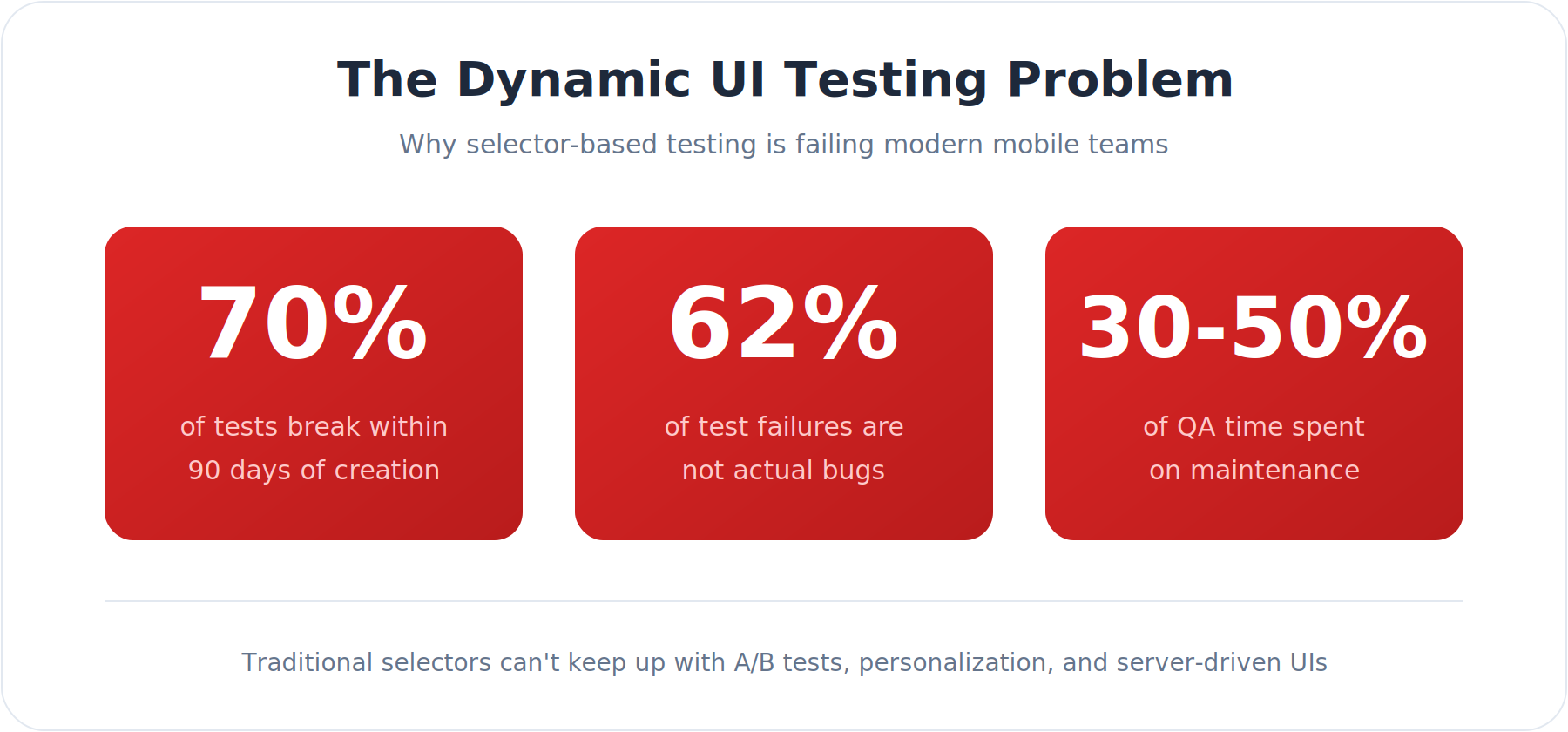
Industry data reveals the scope of this problem:
For teams running A/B tests or personalization, these numbers are even worse. Each new experiment multiplies the surface area for selector failures.
Drizz takes a fundamentally different approach. Instead of searching for elements by their code identifiers, Drizz sees the screen the way a human does.
Think about how a human tester handles a dynamic UI:
They look at the screen, identify the button labeled "Checkout," and tap it. They don't care if the underlying component is a <Button> or <TouchableOpacity>. They don't check the CSS class name. They simply see a button with text and tap it.
Drizz replicates this by treating every test step as a visual problem, not a code-lookup problem. At each step, it captures a screenshot and passes it through a computer vision model trained specifically on UI patterns: buttons, input fields, modals, navigation elements, loading states. The model returns a semantic understanding of what's on screen: not coordinates, not DOM attributes, but something closer to "there's a primary CTA in the lower-right area labeled Checkout."
Your test command: "tap the Checkout button", is matched against that semantic map. Which means it doesn't matter if the underlying component is a <Button>, a <TouchableOpacity>, or something your SDUI server rendered at runtime. If it looks like a checkout button, Drizz finds it.
Drizz analyzes screenshots using computer vision to understand what's actually on screen:
Write tests the way you'd describe them to a human:
Tap the "Add to Cart" button
Verify the cart shows 3 items
Scroll until you see "Checkout"
Enter "test@email.com" in the email field
No selectors. No XPath. No framework-specific syntax.
When the UI changes, Drizz finds elements by visual context rather than code identifiers:
Traditional "self-healing" tools attempt to fix broken selectors by trying alternative attributes. This works for minor changes but fails when components are fundamentally restructured.
Drizz doesn't need to heal selectors because it never relies on them. The visual appearance of "Checkout button in the bottom right" remains stable even when the underlying code changes completely
Let's examine how Drizz handles specific dynamic UI challenges:
An e-commerce team is testing two checkout flows:
Traditional Testing Approach:
Drizz Approach:
Navigate to cart
Tap "Proceed to Checkout"
Enter shipping address
Enter payment information
Tap "Place Order"
Verify order confirmation appears
The same test works for both variants. Drizz finds the appropriate elements in each layout without modification.
A fintech app displays different dashboard layouts based on account type:
Traditional Testing Approach:
Drizz Approach:
Login as [user_type] user
Verify dashboard displays account balance
Verify recent transactions are visible
If premium user, verify investment summary appears
If business user, verify team accounts are listed
Drizz adapts to whatever layout appears, validating the appropriate elements for each user context.
A content app uses SDUI to push layout changes without app updates. The marketing team frequently rearranges content blocks, changes promotional banners, and experiments with navigation patterns.
Traditional Testing Approach:
Drizz Approach:
Most teams try to migrate their entire test suite at once. Don't. Full migrations stall the whole testing process due to too much parallel running, too many stakeholders, too much pressure to just make the CI green again.
Start with your three highest-churn tests instead. When vision-based testing solves your worst problems without maintenance, the rest of the case makes itself. Here's how the full migration typically looks:
Start by identifying tests that break most frequently due to UI changes:
These are your candidates for migration to Drizz.
Run Drizz tests alongside existing selector-based tests:
Begin replacing high-maintenance selector tests with vision-based equivalents:
.png)
As confidence grows, expand vision testing to:
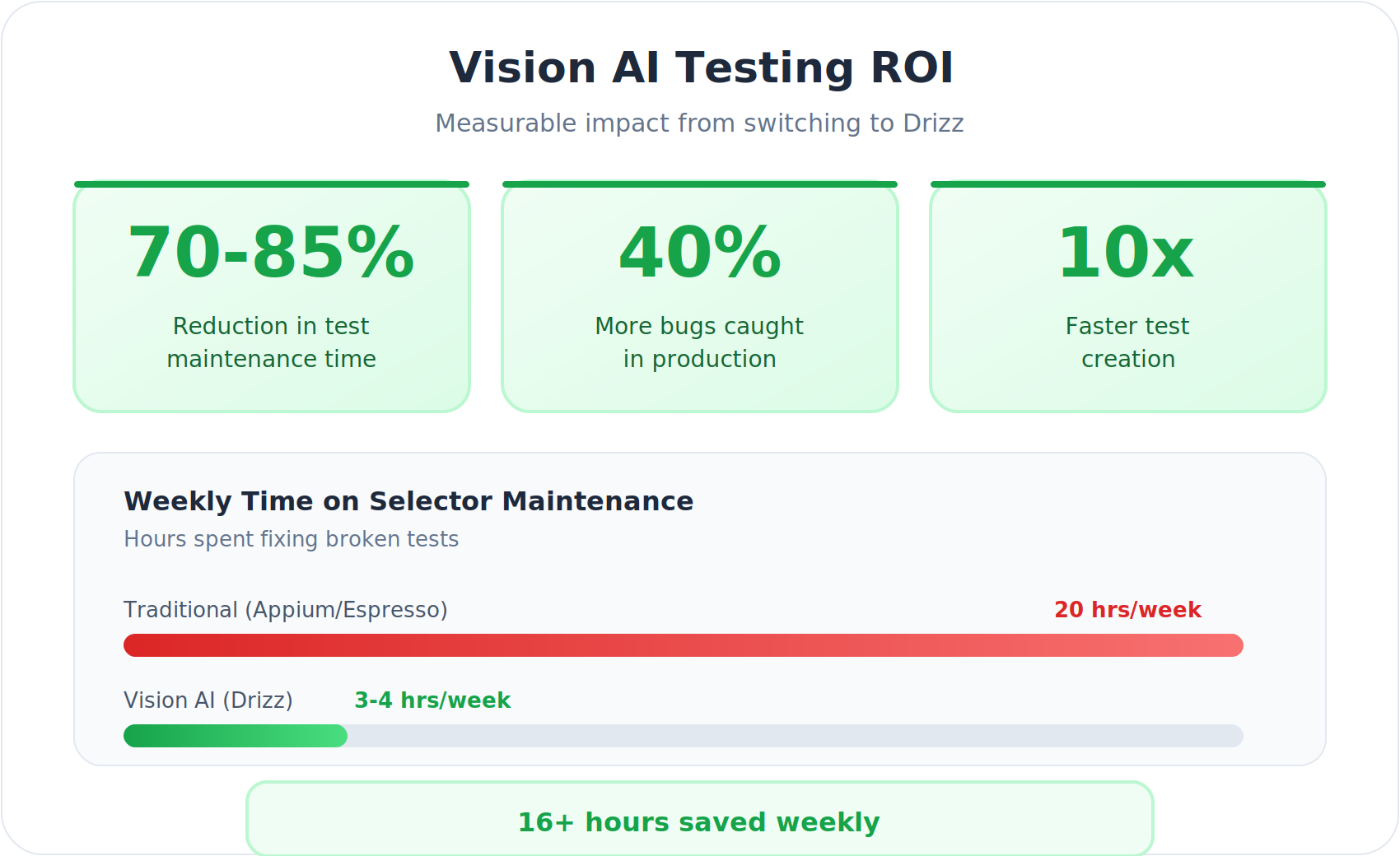
For engineering leaders evaluating Drizz, the ROI centers on three metrics:
Teams report 70-85% reduction in test maintenance time after adopting vision-based testing. For example, a fintech team running 400+ UI tests across personalized dashboards reduced their maintenance sprint from 3 days to 4 hours after migrating their highest-churn flows to Drizz. Their selectors broke after every biweekly release cycle; with vision-based testing, the same test suite ran green through 12 consecutive releases without a single maintenance touch. For a team spending 20 hours per week on selector fixes, that kind of reduction translates to 14-17 hours returned to productive work time that goes back into writing new coverage or shipping features.
When tests don't break with every A/B experiment, product teams can iterate faster:
Vision AI catches issues selectors miss entirely:
Teams report 40% more production bugs caught in the first quarter of adoption.
To be balanced, selector-based testing remains appropriate for:
However, for any app with dynamic content, personalization, A/B testing, or server-driven interfaces, vision-based testing delivers superior results with dramatically lower maintenance.
Vision-based testing has its own scenarios that require more care. UIs with multiple visually identical elements: "Add to Cart" appearing on every card in a 20-item grid, need slightly more spatial context in the test command: "tap the Add to Cart button on the first product card" rather than just "tap Add to Cart." The same applies to icon-only interactive elements, heavily animated transitions, and interfaces that change dramatically between light and dark mode. These aren't blockers, but they do mean your test commands need to be written with a bit more precision in those specific cases.
The honest summary: neither approach is universal. Selector-based testing is reliable when your UI is stable and your codebase is frozen. Vision-based testing is the better default when your product is actively evolving, which, for most teams, is most of the time.
Dynamic UIs are the new normal. A/B testing, personalization, server-driven interfaces, and real-time content updates aren't going away they're accelerating.
The testing industry's response has been band-aids: self-healing selectors, smarter locator strategies, better Page Object patterns. These help, but they don't solve the fundamental problem. Selectors are tied to code. Code changes. Tests break.
Drizz's Vision AI represents a paradigm shift. By testing what users actually see rather than what developers write, vision-based testing finally decouples test stability from code volatility.
If your team runs A/B experiments or maintains a personalized UI, the best way to see the difference is to import one of your flakiest test flows into Drizz and run it. Most teams identify 3–5 test failures that aren't real bugs within the first hour. Book a Demo
Test like humans see.





©Drizz 2026 • All Rights Reserved






