•
Drizz raises $2.7M in seed funding •
•
Featured on Forbes
•
Drizz raises $2.7M in seed funding •
•
Featured on Forbes


Self healing test automation is ability of a test suite to detect when a test fails because app changed (not because of an actual bug), diagnose cause, and repair test automatically so it keeps running. Instead of a broken test blocking your CI pipeline at 3 AM, system fixes itself and flags what it changed for human review.
The concept sounds simple. The execution isn't. Most tools that market "self healing" do one thing: they swap a broken element selector for a working one. A button's ID changed from submit-btn to checkout-submit? The tool finds button by another attribute and updates locator. That's useful. But selector problems cause less than a third of test failures in practice. The rest come from timing issues, data problems, runtime errors, and interaction failures that selector swaps can't touch.
Forrester's Autonomous Testing Platforms Landscape (Q3 2025) notes that modern testing platforms need to "enable self healing for brittle tests, optimize execution, and generate tests directly from requirements." The emphasis is on full cycle healing, not just locator replacement. Gartner's definition of AI augmented testing tools includes "generation and maintenance of test scenarios, test cases, test automation, test suite optimization" as core capabilities. Selector healing is one small piece of that picture.
I will breaks down what self healing test automation actually involves, why selector only healing falls short, what it looks like on mobile, and what happens when your tests don't use selectors at all.
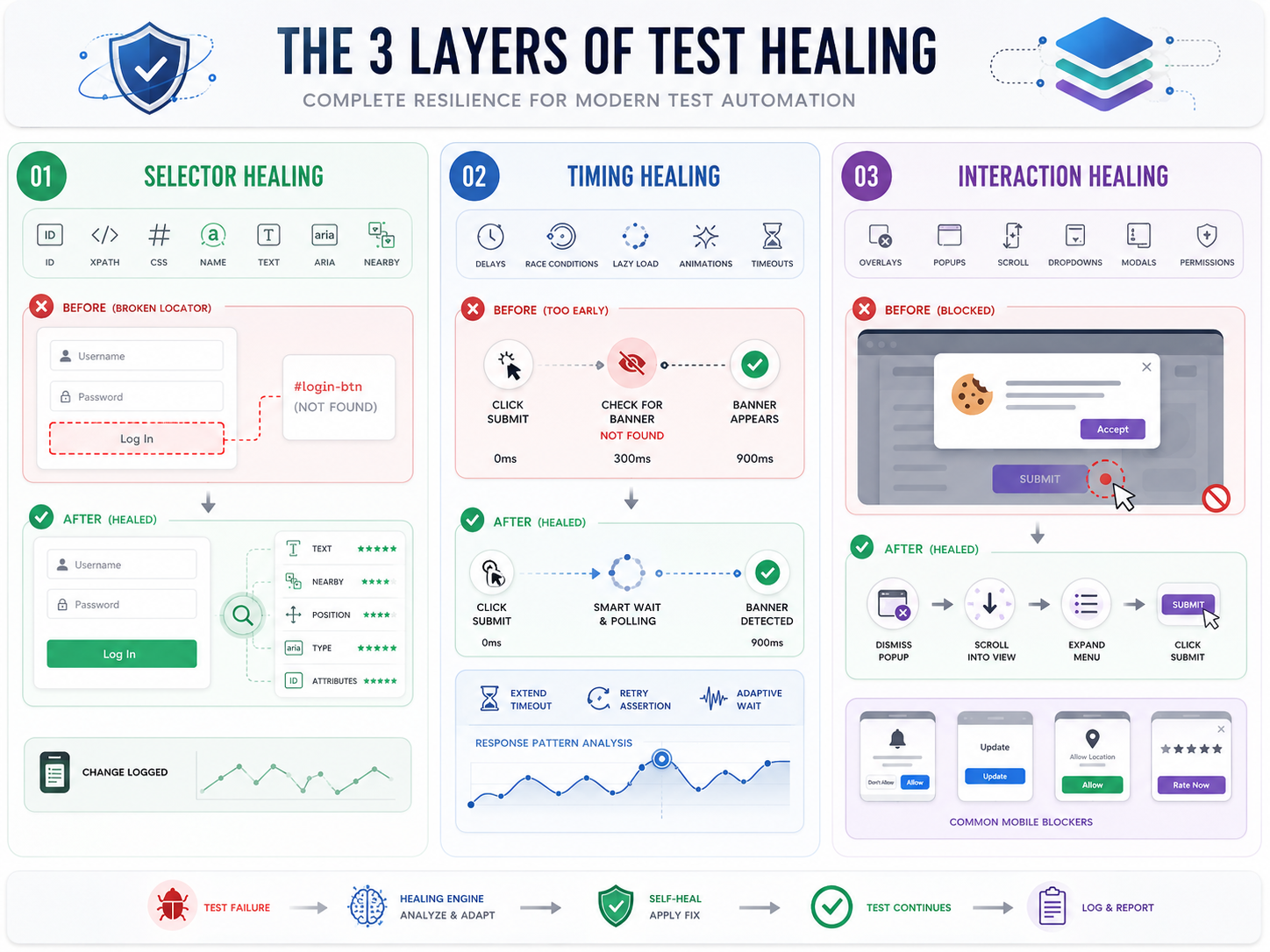
In practice, there are three distinct layers, and best tools handle all of them.
This is layer every vendor talks about. When an element's ID, XPath, CSS class, or name attribute changes, test can't find it. A self healing system detects this and tries alternative locators: text content, ARIA labels, nearby elements, visual position, or a combination of attributes weighted by historical reliability.
Here's a concrete example. Your login button has ID login-btn. A developer renames it to user-login-button during a refactor. A traditional Appium or Selenium test fails immediately. A self healing tool notices ID doesn't match, scans for elements with similar text ("Log In"), similar position (center of form, below password field), and similar attributes (type="submit"), and picks best match. The test continues. The tool logs change for review.
This works for simple locator breakage. It doesn't help when element is right there but test still fails for a different reason.
A test clicks "Submit" and expects a success banner. The banner appears, but 900ms late because API response was slow. The test already checked for banner at 300ms mark, didn't find it, and reported a failure. The selector is fine. The element exists. It just showed up later than expected.
Selector healing can't fix this. A tool with timing awareness analyzes response patterns to determine that element was delayed, not missing. Instead of swapping a selector, it adjusts wait logic: adds a resilient poll, extends timeout for that specific step, or retries assertion after a short interval.
This category also includes race conditions (JavaScript attaching event handlers after DOM is "ready"), lazy loaded content that hasn't rendered yet, and animations that temporarily block interaction with an element.
The element exists. The timing is fine. But test can't interact with it because something is blocking it. A cookie banner covers button. A dropdown menu needs to be expanded first. The element is below fold and needs a scroll. A modal dialog appeared that wasn't there in previous build.
Interaction healing detects these blockers and adds missing step: dismiss popup, scroll element into view, expand menu, close modal. It handles gap between "element is in DOM" and "element is actually clickable."
On mobile, this category is especially common. Permission dialogs, app update prompts, location consent banners, and "rate this app" popups all appear unpredictably and block test execution.
Here's practical problem. In our experience working with mobile engineering teams, typical breakdown of test failures looks something like this: roughly 25-30% are selector issues, another 25-30% are timing related, 15-20% are interaction blockers (popups, hidden elements, scroll issues), and rest are data problems or genuine bugs. Selector healing addresses first bucket. The other two thirds still need manual debugging.
That's better than nothing. But it's not "zero maintenance" promise most vendors make. Teams that adopt selector only tools often report same frustration after a few months: tool catches easy breaks but hard ones still eat up SDET time.
The industry is catching on. Forrester recently renamed their testing platform category from "Continuous Automation Testing Platforms" to "Autonomous Testing Platforms" specifically because expectation has shifted from "run tests automatically" to "heal, optimize, and generate tests autonomously." Selector healing was 2020 version of self healing. The 2026 version is diagnosis first: system has to understand why a step failed before it can apply right fix.
Mobile testing multiplies every self healing challenge. Here's why.
Device fragmentation. The same app renders differently on a Samsung Galaxy S24 (One UI skin), a Pixel 8 (stock Android), and a Xiaomi 14 (MIUI). Element positions shift. Touch target sizes vary. A selector that works on one device might fail on another because OEM skin wraps element in an extra layout container. One mobile team we work with ran same 50 test suite across 8 devices and saw 23% of failures come from device specific rendering differences, not code changes.
OS version differences. Android 14 changed how permission dialogs render. iOS 17 introduced new keyboard behaviors. A test written for Android 12 might fail on Android 14 not because of a code change but because OS updated how system UI elements appear.
Dynamic elements across screen sizes. A "Buy Now" button that sits below fold on a 5.5 inch phone is visible without scrolling on a 6.7 inch phone. A responsive layout that collapses into a hamburger menu on smaller screens shows a full navigation bar on tablets. The same logical action ("tap cart icon") requires different physical interactions on different screens.
Unpredictable system popups. App update prompts, push notification permissions, location consent dialogs, "rate this app" modals, battery optimization warnings. These appear at different times on different devices and block entire test flow. Traditional selector based self healing can't dismiss a popup it doesn't know about. You need a dedicated popup agent that runs in background and handles these automatically.
Every self healing mechanism above assumes test is built on element selectors: IDs, XPaths, CSS classes, accessibility labels. When selector breaks, system heals it. But what if test never used selectors in first place?
That's approach Vision AI takes. Instead of identifying elements by code level attributes, a Vision AI engine looks at screen same way a human tester does. It sees a button labeled "Log In" and taps it. It doesn't care what button's ID is, what its XPath is, or whether developer renamed CSS class. It found button because it read text on screen.
There's no selector to break and no selector to heal. The "healing" is built into perception model. When UI changes, Vision AI re perceives screen and finds element visually. A button that moved from center to bottom of screen? Found. A new onboarding screen that wasn't there yesterday? Read and navigated through. A popup blocking next step? Detected and dismissed.
That's how Drizz works. Tests are written in plain English: "Tap Log In, enter email, enter password, tap Submit, validate home screen." The Vision AI engine runs on real Android and iOS devices, perceiving screen visually at every step. It handles all three healing layers natively: element location (by visual recognition), timing (through adaptive wait logic that detects screen state before acting), and interaction blocking (through a built in popup agent that runs in background during every test).
The numbers from teams that have switched tell story. Traditional Appium based suites run at roughly 85% pass rate, with 15% flakiness. The same flows tested with Vision AI on real devices consistently hit 95%+ reliability. One engineering team went from spending 30% of sprint time on testing and triage to about 10%, with saved 20% going back to feature development. Another team authored 20 new tests in a single day, something that would have taken weeks with scripted automation.
Self healing test automation is a real step forward from old "fix every broken test manually" workflow. But smarter question isn't "how do I heal broken selectors faster?" It's "why am I building on a foundation that breaks in first place?"
Self healing test automation is ability of a testing system to automatically detect when a test fails due to an app change (not a real bug), diagnose cause, and repair test so it keeps running. The most common form is selector healing, where tool finds elements through alternative attributes when original locator breaks. More advanced systems also heal timing issues, interaction blockers, and data mismatches.
The system detects a test failure, classifies cause (broken selector, slow response, hidden element, stale data), and applies appropriate fix. For selector failures, it tries alternative locators. For timing failures, it adjusts wait logic. For interaction failures, it dismisses blockers or scrolls elements into view. The best tools diagnose first, then remedy, rather than assuming every failure is a selector problem.
They're same concept. "Self healing test automation," "self healing tests," "self healing automation," and "self healing testing" all refer to tests that automatically adapt when application under test changes. The term covers a range of capabilities from basic selector replacement to full AI driven diagnosis and repair.
They can, but mobile adds complexity. Device fragmentation, OS specific UI rendering, OEM skins, and unpredictable system dialogs all cause failures that desktop focused self healing tools weren't built for. Mobile specific tools need to handle cross device element positioning, OS version differences, and automatic popup dismissal in addition to standard selector and timing healing.
It reduces maintenance dramatically but doesn't eliminate it completely. Teams using vision based self healing approaches report 80-95% reduction in maintenance effort. The remaining cases are situations where app's functionality genuinely changed (not just UI), which requires human judgment to decide whether test should be updated or change is a bug.
Gartner's AI-Augmented Software Testing Tools category includes platforms with self healing capabilities. For mobile testing specifically, Drizz uses Vision AI to avoid selectors entirely, running tests on real devices with plain English steps. The right choice depends on whether you're testing web, mobile, or both, and whether you want selector based healing or a vision based approach that eliminates selector layer altogether.





©Drizz 2026 • All Rights Reserved






