•
Drizz raises $2.7M in seed funding •
•
Featured on Forbes
•
Drizz raises $2.7M in seed funding •
•
Featured on Forbes


A customer orders milk, bananas, and bread. By the time the picker reaches the milk aisle, the last carton has been claimed by another order. The app needs to suggest a substitute, the customer needs to approve it, and the picker needs to continue all within 90 seconds. The entire order will be at the customer’s door in 12 minutes.
Now try writing a test for that.
Quick commerce grocery delivery doesn’t just move faster than food delivery. It moves faster than your test suite. The 15-minute promise compresses every flow to the point where inventory changes while the customer is browsing, items go out of stock while the picker is walking the aisle, substitution approvals happen in real-time within seconds, and the entire order-to-doorstep lifecycle finishes before your regression suite completes its second test case.
This isn’t faster food delivery. It’s a fundamentally different product: dark store inventory that differs from the customer-facing catalog, weight-based produce pricing that creates variable totals at checkout, delivery slots that expire in 2-minute windows, and picker-to-customer communication happening mid-order through substitution prompts that appear and disappear in seconds.
This guide covers what specifically needs testing, why traditional automation tools fail at the speed quick commerce demands, and how to build a testing strategy for an app where the delivery arrives before your test suite finishes running.
For food delivery testing, see 30 Test Cases from Order to Doorstep. For logistics app testing, see How to Test On-Demand Logistics Apps.
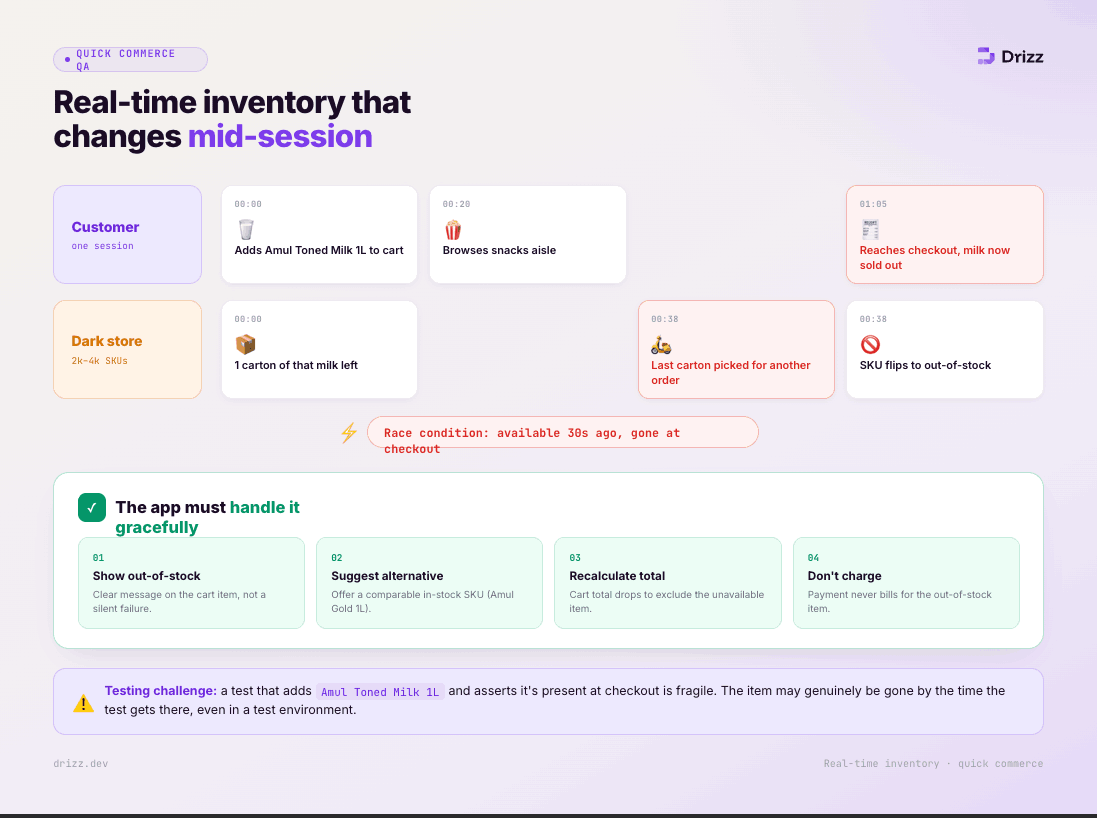
A customer adds milk to their cart. While they're browsing snacks, the last carton of that milk is picked for another order. When they reach checkout, the milk is out of stock. The app must handle this gracefully: show an out-of-stock message, suggest an alternative, recalculate the cart total, and not charge for the unavailable item.
This happens constantly in quick commerce because dark stores have limited inventory (2,000-4,000 SKUs vs 50,000+ in a supermarket) and high order velocity (hundreds of orders per hour from a single store). Items that were available 30 seconds ago can become unavailable.
Testing challenge: A test that adds "Amul Toned Milk 1L" to the cart and asserts it's present at checkout is fragile the item might genuinely be out of stock by the time the test reaches checkout, even in a test environment.
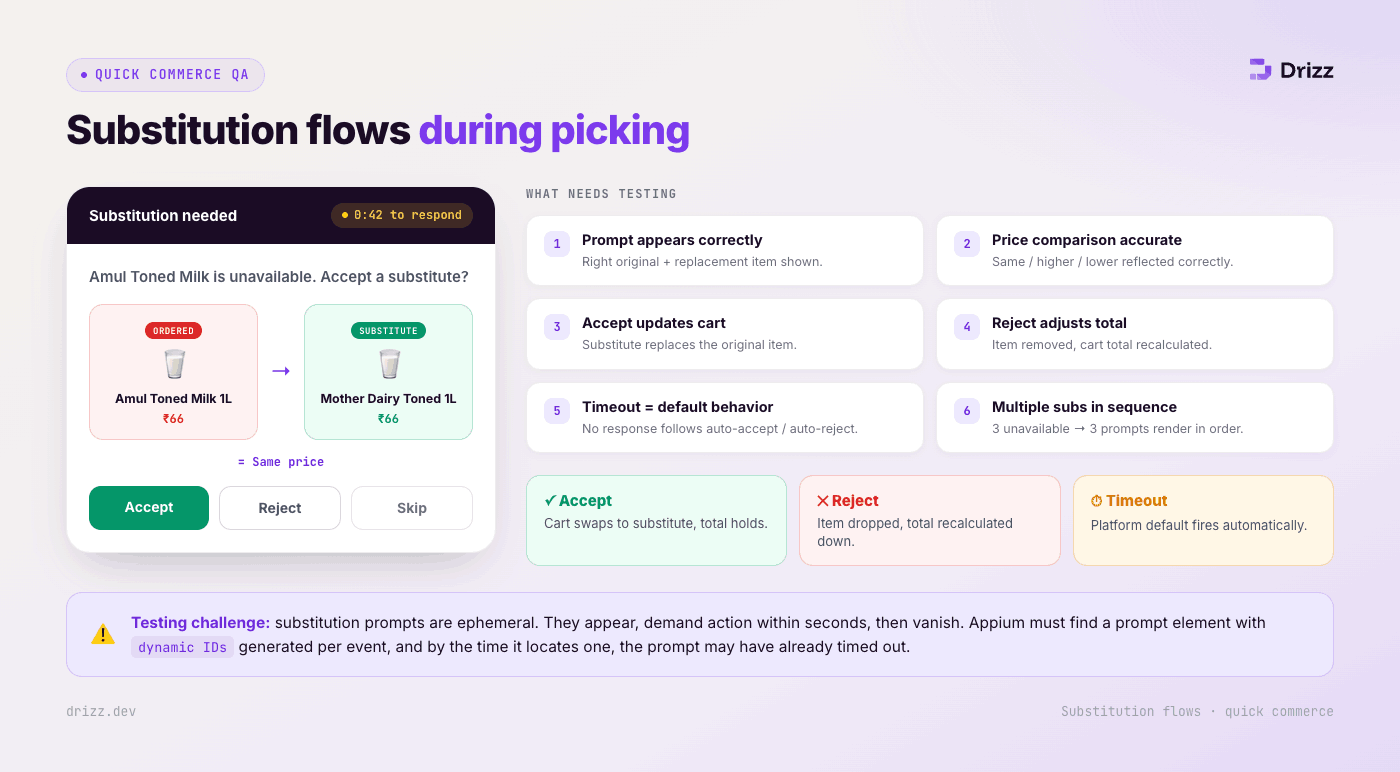
This is the feature that defines quick commerce QA complexity. When a picker can't find an ordered item, they suggest a substitute through the app. The customer sees a real-time prompt: "Amul Toned Milk is unavailable. Accept Mother Dairy Toned Milk instead? Same price." The customer has 30-60 seconds to accept, reject, or skip.
What needs testing:
Testing challenge: Substitution prompts are ephemeral they appear, require action within seconds, and disappear. Appium needs to find the prompt element, which may have dynamic IDs generated per substitution event. By the time the test locates the element, the prompt may have timed out.
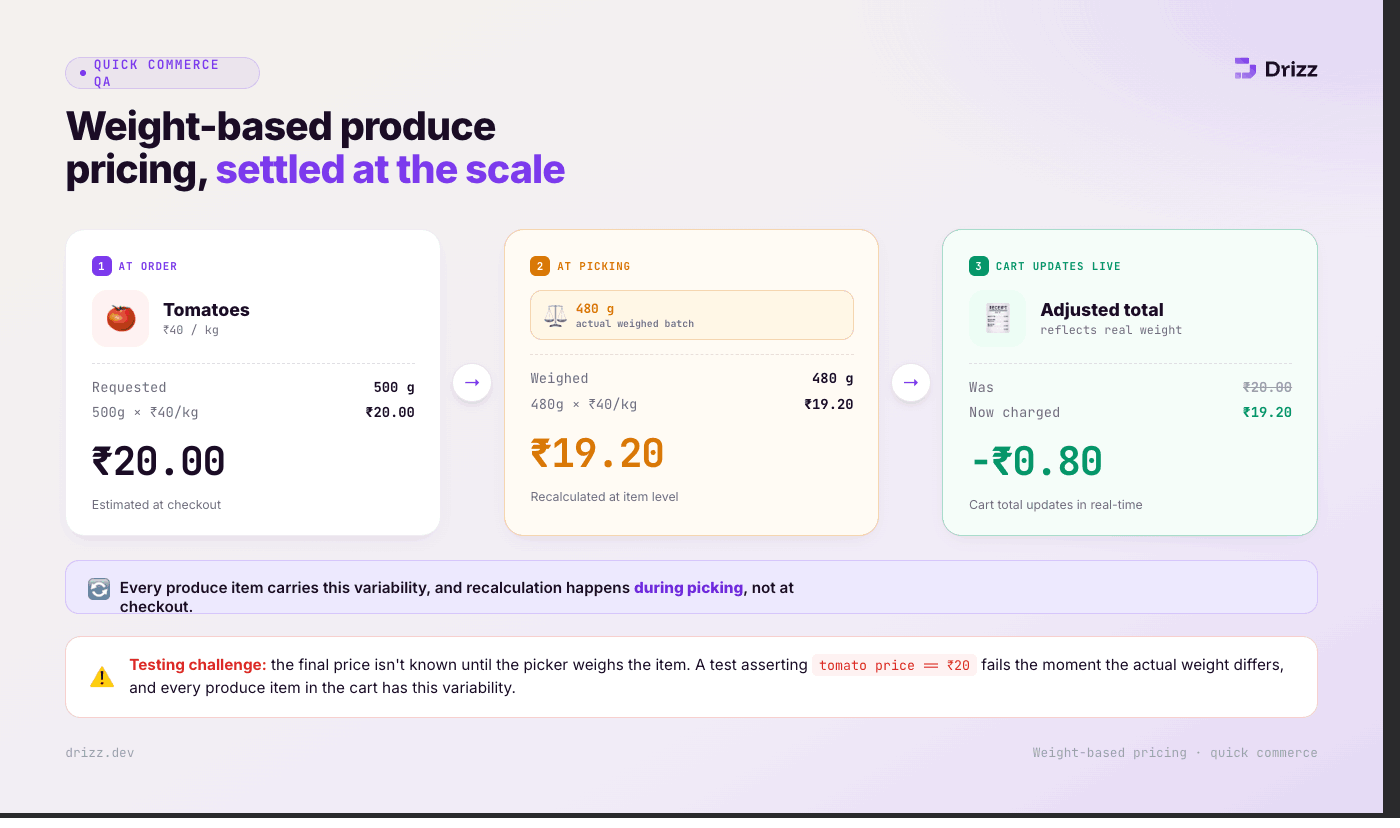
A customer orders "500g Tomatoes at 40/kg = 20." The picker weighs the actual batch: 480g. The price adjusts to 19.20. This recalculation happens at the item level, during picking, and the cart total updates in real-time.
Testing challenge: The final price isn't known until the picker weighs the item. A test asserting "tomato price is 20" fails when the actual weight differs. Every produce item in the cart has this variability.

The customer-facing catalog shows "Organic Bananas In Stock." The dark store picker scans the shelf and finds zero organic bananas. The catalog was stale by 3 minutes. This discrepancy is the #1 source of customer complaints in quick commerce.
Testing challenge: Testing catalog accuracy requires comparing the displayed catalog against actual dark store inventory in real-time a data integrity test that most QA teams don't include in their UI automation suite.
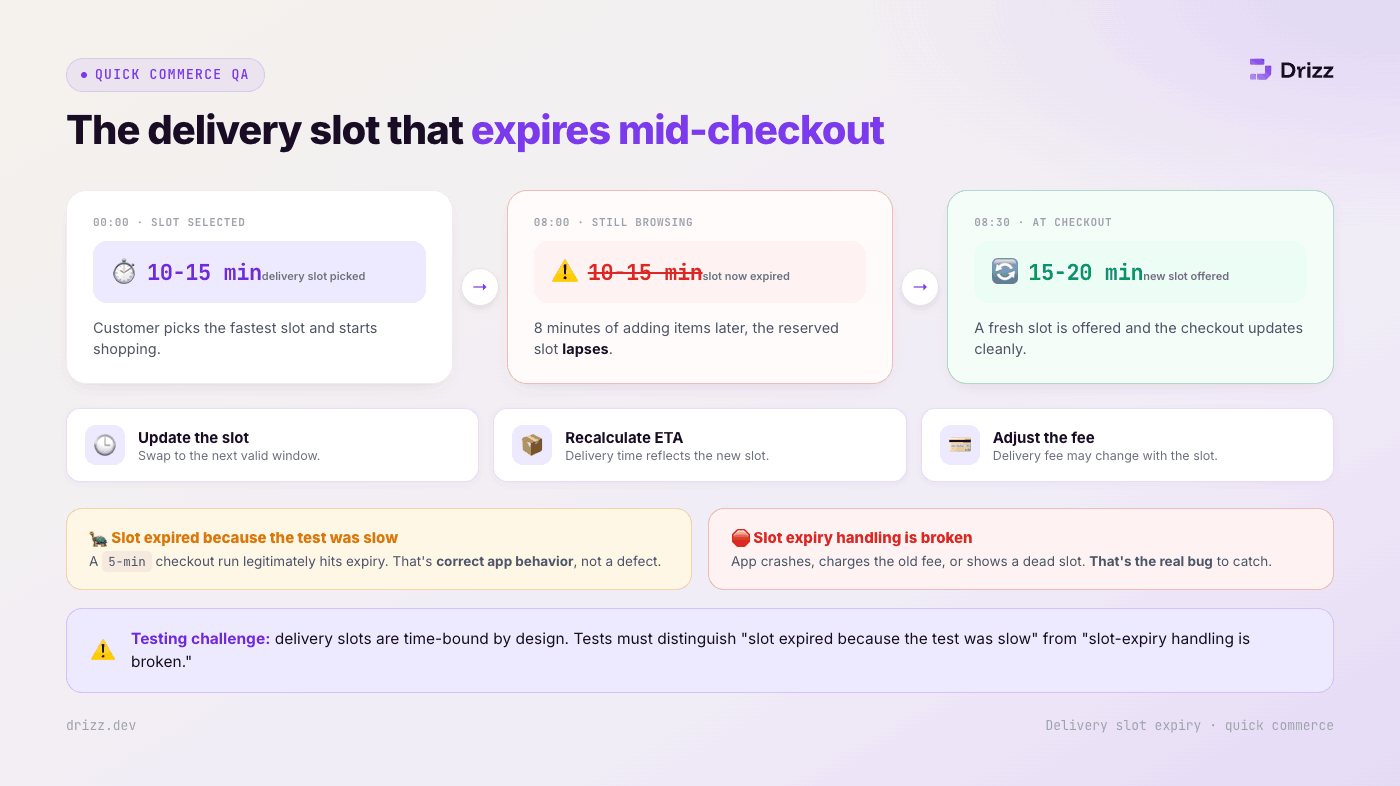
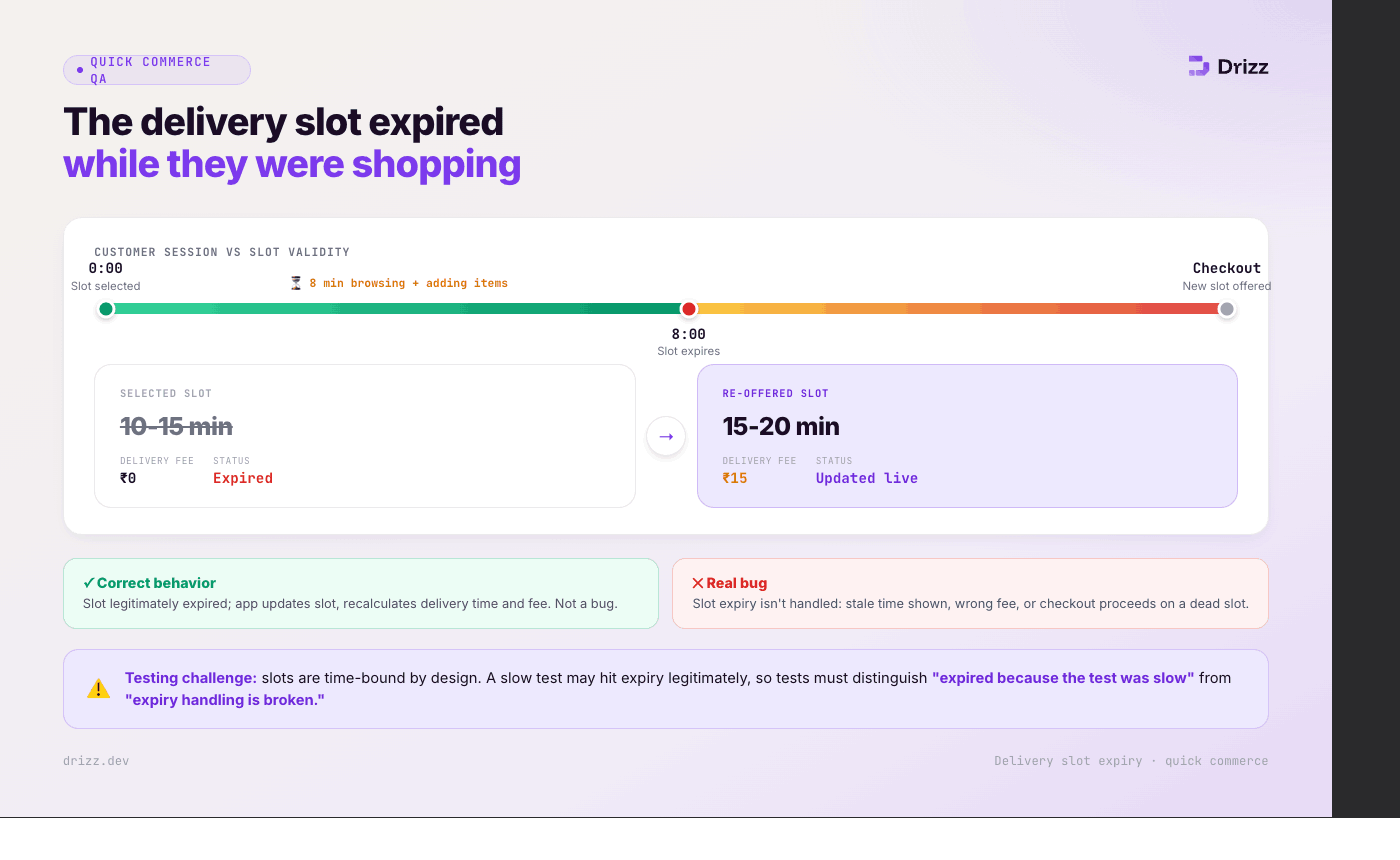
A customer selects a 10-15 minute delivery slot. They spend 8 minutes browsing and adding items. By the time they reach checkout, that slot has expired and a new slot (15-20 minutes) is offered. The app must update the slot, recalculate delivery time, and potentially adjust the delivery fee.
Testing challenge: Delivery slots are time-bound by design. A test that selects a slot and then takes 5 minutes to complete the checkout flow may legitimately encounter slot expiry which is correct app behavior, not a bug. Tests need to distinguish between "slot expired because the test was slow" and "slot expiry handling is broken."
Quick commerce apps show picking progress in real-time: "5 of 12 items picked," "Picker is selecting your produce," "Order packed, waiting for delivery partner." This is a status feed that updates every few seconds during the 3-5 minute picking window.
Testing challenge: The picking status updates are server-pushed events that change the UI every few seconds. A test that asserts "status shows 5 of 12 picked" may see "7 of 12" by the time the assertion executes.
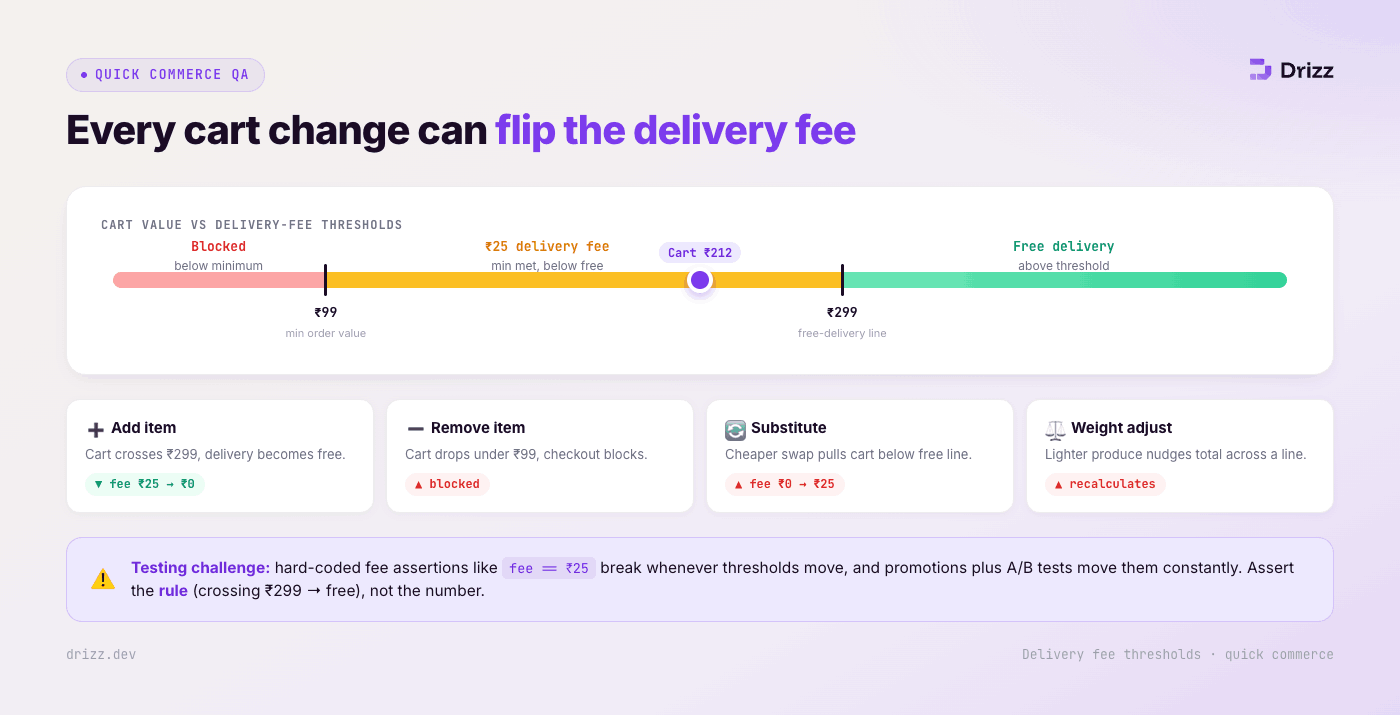
Quick commerce platforms have minimum order values (often 99-199) with delivery fees that change based on cart value (free above 299, 25 fee below). Every cart modification add, remove, substitute, weight adjustment can push the cart above or below these thresholds, changing the delivery fee and potentially blocking checkout.
Testing challenge: Delivery fee assertions break whenever the platform changes threshold values, which happens frequently with promotions and A/B tests.
Quick commerce is where Vision AI's advantage is sharpest. The three hardest flows substitutions, live picking status, and weight-based price adjustments are all visual, ephemeral, and dynamic.
Substitution prompts: Drizz sees the substitution popup the moment it appears on screen, reads the original item name, replacement name, and price comparison visually, and taps Accept or Reject. No element ID needed. When the platform redesigns the substitution prompt next sprint, Drizz still sees a popup with two item names and two buttons.
Picking progress: "Verify picking progress shows a count that increases over time" is a visual observation. Drizz reads "3 of 8 items picked," waits, reads "5 of 8," and confirms progress. No dependency on the specific component rendering the progress count.
Price adjustments: "Verify total updated after weight adjustment" is a visual check. Drizz reads the displayed total before and after the adjustment event and confirms it changed. No need to assert a specific amount that varies with every order.
Out-of-stock indicators: Greyed-out items, "Unavailable" badges, crossed-out prices these are visual treatments that Appium can't reliably distinguish from active items through element properties. Drizz sees the visual difference the same way a customer does.
Delivery slot selection: Slot cards with time windows, availability indicators, and fee labels are visually identifiable. When a slot expires, it visually changes (greyed out, removed, or marked "Expired"). Drizz observes the change without querying slot element states.
Quick commerce grocery testing requires a mindset shift from every other type of delivery testing. The 15-minute promise compresses every flow to the point where traditional test execution is slower than the product itself. Inventory is a moving target. Prices are estimates until the picker weighs the produce. Substitution prompts appear and disappear in seconds. Delivery slots expire while the customer is still browsing.
The teams that test quick commerce successfully don't write tests that assert specific inventory, specific prices, or specific slot times. They write tests that validate patterns: "an item was substituted and the cart updated," "the total changed after weight adjustment," "the delivery slot expired and new options appeared." Structural validation over data validation.
Vision AI is architecturally suited for this because every critical quick commerce flow substitutions, picking progress, price adjustments, slot expiry is a visual, dynamic event that the customer observes on screen. If the customer can see it, Drizz can test it. If the customer can't see it, the test should fail.
Grocery apps add real-time inventory management, mid-order substitution flows, weight-based variable pricing, dark store catalog discrepancies, and 2-minute delivery slot windows. Food delivery has fixed menu prices, no substitution during preparation, and longer delivery windows (25-45 minutes). Grocery testing must handle significantly more dynamic state changes during a single order.
Yes, using a test API that triggers substitution events combined with Vision AI to observe the visual result. The test API pushes "item X unavailable, suggest Y as substitute," and Drizz validates that the substitution prompt appears with the correct items, responds to accept/reject, and confirms the cart updates accordingly.
Test structurally: "verify the price displayed changes after weight adjustment" rather than "verify price is 19.20." Vision AI reads whatever price appears on screen and confirms it changed from the original estimate. The specific amount doesn't matter for regression testing — what matters is that the recalculation logic works and the UI updates correctly.
Inventory-catalog discrepancy: the customer sees "In Stock" but the picker finds empty shelves. This creates substitution cascades, cart modifications, and price changes mid-order all within a 5-minute picking window. Testing this requires simulating real-time inventory changes during order processing, which most QA environments aren't set up to do.
A production quick commerce app typically maintains 80-120 automated test cases: 20-25 for browse and cart (including inventory edge cases), 15-20 for substitution flows, 10-15 for picking and live status, 15-20 for checkout and payment (including weight adjustments), 10-15 for delivery and post-order, and 10-15 for device compatibility and performance under low memory.





©Drizz 2026 • All Rights Reserved






