•
Drizz raises $2.7M in seed funding •
•
Featured on Forbes
•
Drizz raises $2.7M in seed funding •
•
Featured on Forbes


Mobile permission testing verifies how an app requests, receives, and handles OS-level runtime permissions: camera, location, notifications, contacts, biometric, microphone, photos, calendar, and health data. Every one of these has a runtime prompt, a set of possible user responses, and an app-side flow that either handles the response correctly or crashes on the way to the next screen.
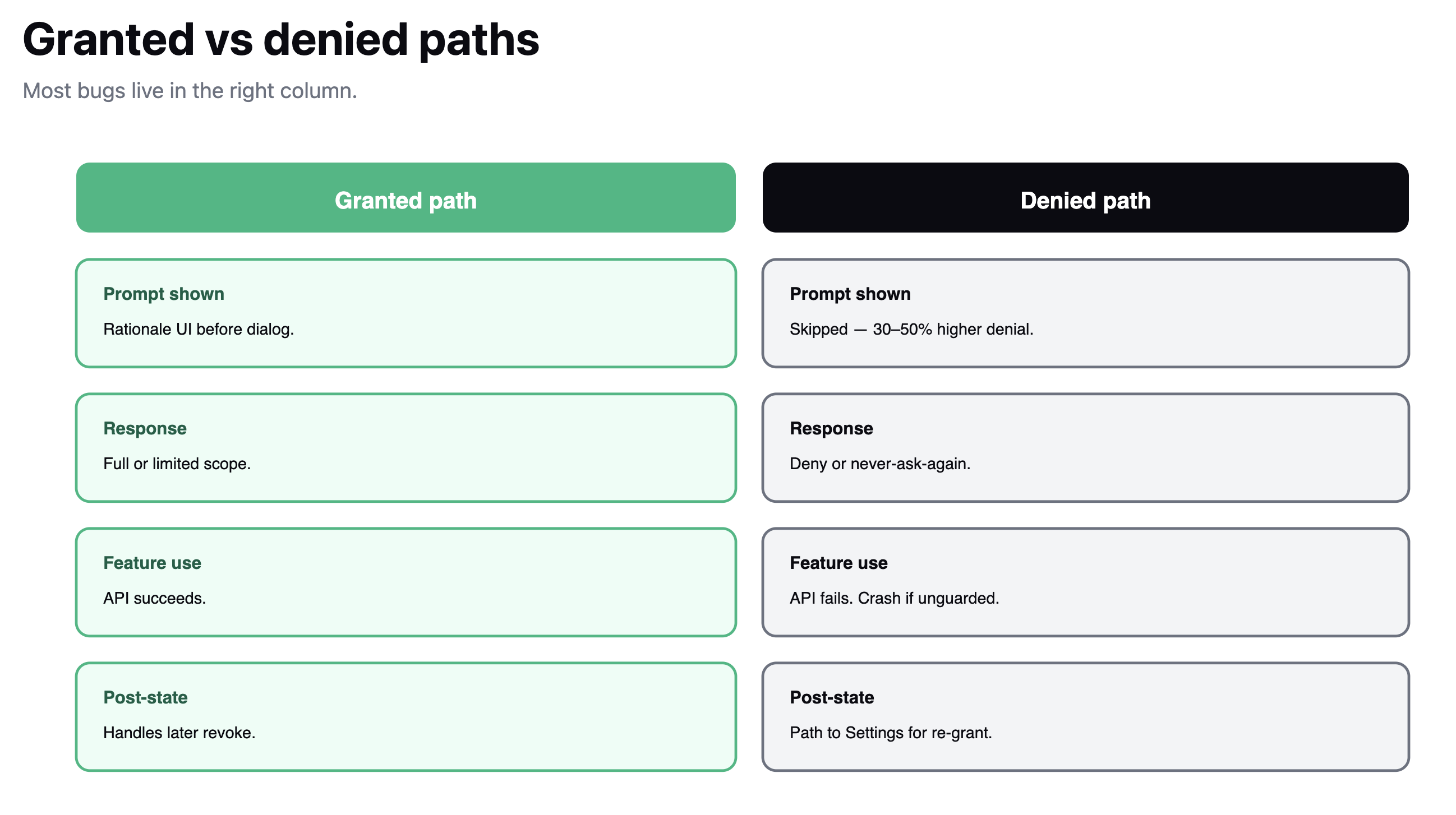
Most functional test suites cover happy path where user grants every permission. That's state where app behaves like it did in dev. The bugs live everywhere else on denial, "never ask again," mid-session revoke, and OS-version-specific prompt copy.
The rest of this piece defines mobile permission testing from a QA lead's operational view, not a security-audit view, and maps the permission state machine to tests that catch what actually breaks.
Mobile permission testing is a category of testing that verifies an app's behaviour across full permission lifecycle: pre-prompt state, prompt itself, every possible user response, and every subsequent state transition.
Security-focused permission testing with the OWASPOWASP MASTG angle checks whether an app requests permissions it doesn't need. That's a static audit of Info.plist and AndroidManifest.xml, not a runtime test.
QA permission testing verifies runtime behaviour: does the app handle a denial without crashing, does it show a useful fallback, does it recover when user grants permission later?
Both matter. This piece is about the runtime behaviour side.
On Drizz, runtime prompts that app under test can't dismiss on its own are auto-handled by blocker rules at org-level same mechanism that dismisses promo sheets and network retries. The test targets app's response to result, not mechanics of tapping OS dialog.
Nine permission categories cover most of what mobile apps request. Each has its own dialog, its own state persistence, and its own failure modes.
For each, the test scope has to cover the copy shown in prompt, app's behavior on each response, state after backgrounding, and recovery path when user changes their mind in settings.
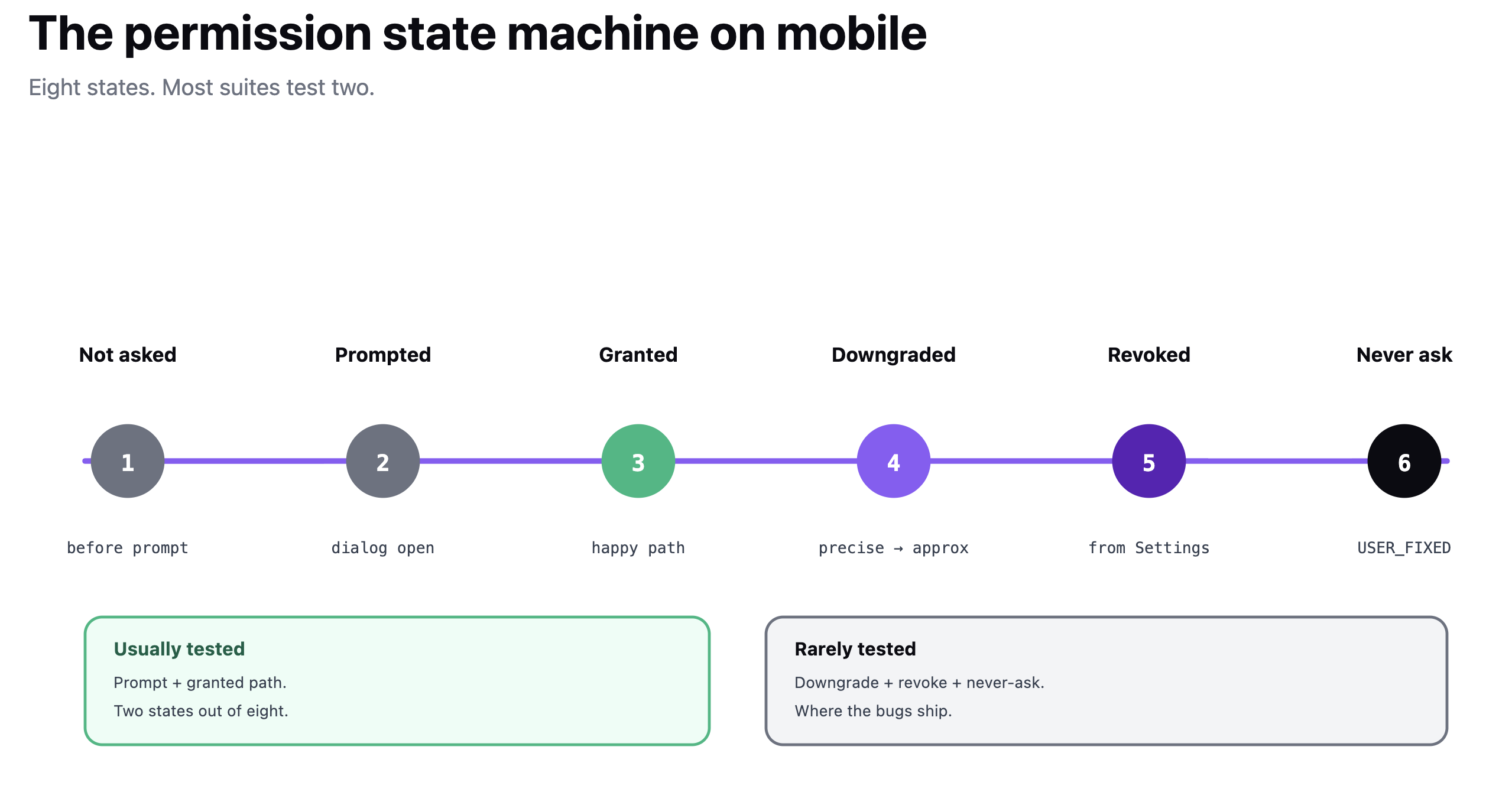
Every permission moves through a state machine that has more than "granted" and "denied." Missing states are where silent bugs live.
Any test suite that only covers "granted" and "denied" is testing two of eight states. The other six ship as production bugs.
OS versions change permission behavior in ways that break tests written for previous version. A short list of OS-version cliff-edges that matter now.
Tests written before any of these changes need to be re-verified on each new OS version. Otherwise same test that passed on iOS 15 quietly asserts on a UI element that no longer exists in iOS 17.
The blocking permission bugs cluster in six patterns. Automated tests catch three of them consistently; other three usually need a manual pass.
Testing for these needs ability to script OS dialog response, which is where tool choice matters.
A permission test case extends standard four-part structure with two extras: permission preconditions and response.
On tooling side, Appium's GrantPermissionRule pre-grants permissions so test never sees dialog. That works when you're testing granted path, but it hides every bug in denial and revocation paths.
The vision-based approach targets actual system dialog: Validate that dialog appears with expected copy, Tap target button ("Allow" or "Don't Allow"), then assert on app's response. The authoring rules require targeting visible label on dialog, which surfaces copy regressions between OS versions as authoring-time signals.
For scenarios where app has to reach settings to recover the never-ask-again path system commands drive OS settings app rather than AUT.
Permission tests belong at three pipeline positions.
Any change to a permission-requesting feature, any bump of target SDK on Android or deployment target on iOS, and any change to Info.plist or AndroidManifest.xml triggers an out-of-band permission sweep. Those changes are most common source of silent regressions.
For broader placement in a mobile testing strategy, see device tier and release stage matrix permissions typically run on same head-tier devices as functional tests, but with permission state explicitly set in preconditions rather than left as whatever last test left behind.
Mobile permission testing verifies app behavior across runtime permission lifecycle for camera, location, notifications, contacts, biometric, microphone, photos, calendar, and health data. Each permission moves through eight states, not two and six of those states are where silent bugs ship.
OS-version differences reshape test surface every year. Android 11's one-time grant, Android 13's notification runtime prompt, iOS 14's App Tracking Transparency, iOS 17's location revoke, iOS 18's contact granularity each changed a test that was passing.
A permission test case adds permission preconditions and OS-dialogue response to the standard four-part structure. Testing denial and revocation paths matters more than testing happy path, because happy path is what dev already covered.
Pipeline placement runs a small smoke set per PR, full state matrix nightly, and OS-version-specific tests at release candidate. Manifest and SDK-target changes trigger out-of-band sweeps.

Mobile security testing (OWASP MASTG framing) audits whether an app declares permissions it doesn't need a static check on Info.plist or AndroidManifest.xml. Mobile permission testing verifies runtime behavior what app does when user grants, denies, or revokes. Security asks whether permission should be requested; permission testing asks whether response is handled.
Six additional states matter: not-asked (before prompt), prompted (mid-dialog with app paused), granted-limited (iOS 14 Photos, iOS 14 precise-vs-approximate location, iOS 18 partial contacts), denied-never-ask-again (Android USER_FIXED), revoked-from-settings, and downgraded-from-settings (precise to approximate). Skipping these leaves six-eighths of state machine untested.
On Android, use adb shell pm revoke <package> <permission> to force a denied state, then run flow that would prompt and verify app renders a fallback rather than crashing. On iOS, revoke through Settings before test starts, or use a UI test that taps "Don't Allow" on actual dialog. Vision-based runners target dialog by visible label rather than pre-granting.
Crash on denial (feature calls a permission-guarded API without checking state), missing fallback UI (screen renders blank instead of showing a re-request path), no path to Settings from a never-ask-again state, silent errors after a Settings-app revoke, missing rationale UI before prompt (which raises denial rates 30–50%), and state loss when app is killed mid-prompt.





©Drizz 2026 • All Rights Reserved






