Test Cases in Software Testing: Types, Examples, and Best Practices (2026)
Test Cases in Software Testing: Types, Examples, and Best Practices (2026)
A test case is the smallest atomic unit of QA; the doc that says exactly what to test, how, and what should happen. Complete guide to the eight fields, the types that matter, worked examples, best practices, and the mistakes that quietly rot test suites.
A test case is a documented set of conditions, inputs, steps, and expected results used to verify that a specific software feature works as intended.
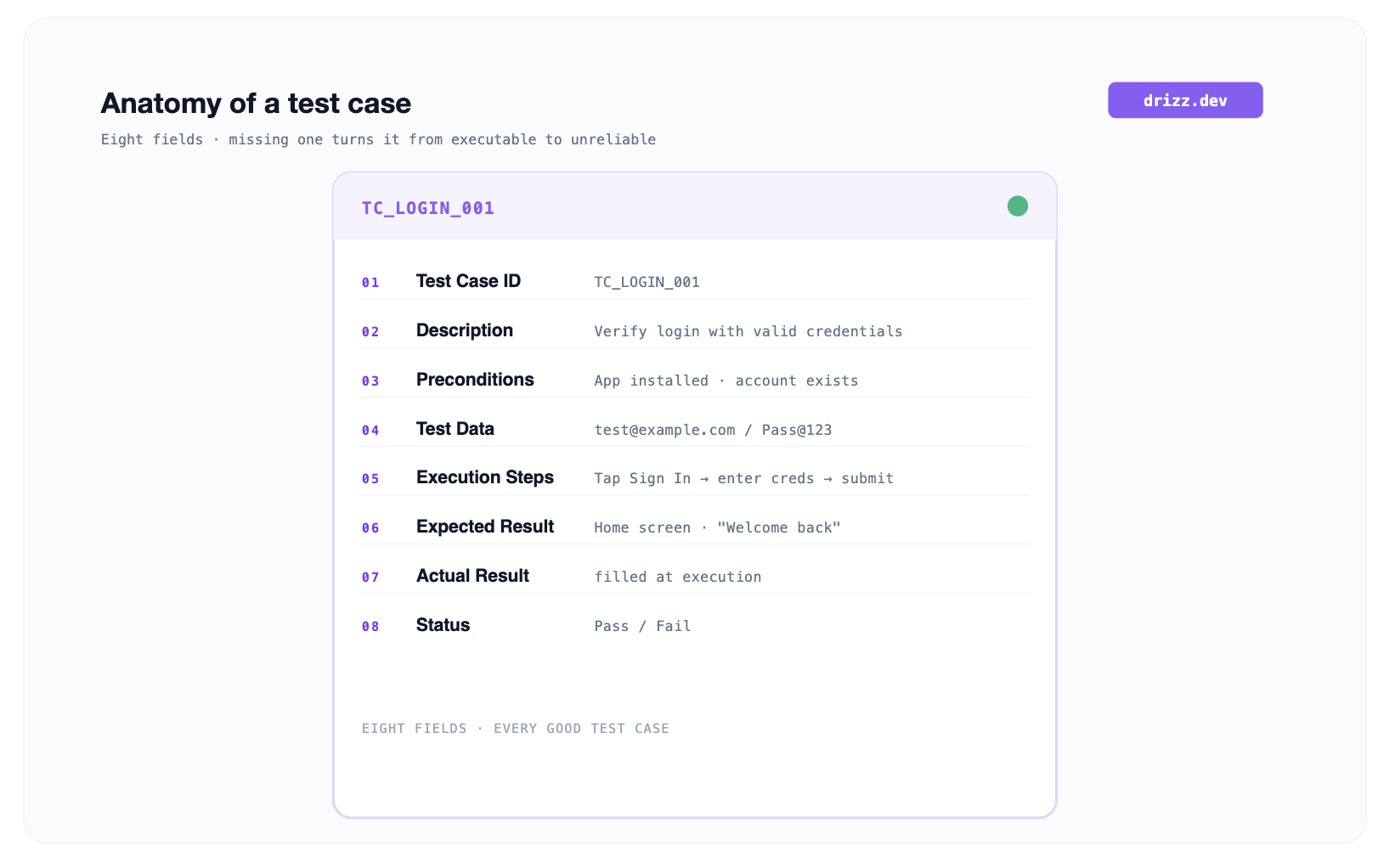
Every well-written test case has eight fields: Test Case ID, Description, Preconditions, Test Data, Execution Steps, Expected Result, Actual Result, and Status.
Test scenarios, test cases, and test scripts are related but distinct scenarios: they are high-level "what", cases are step-by-step "how," and scripts are executable code that runs them.
The main types of test cases are functional, integration, UI, security, regression, positive, negative, and boundary, each targeting each targets a different class of defect.
Good test cases are clear, concise, repeatable, and traceable back to a specific requirement so any tester can run them and any auditor can trust them.
What Is a Test Case in Software Testing?
Defining test cases starts with a simple frame: a test case is the smallest atomic unit of QA. It's one document that says exactly what to test, how to set up, what to type, and what should happen. Nothing more, nothing less. Wikipedia's definition of a test case puts it in a single line: "a specification of inputs, execution conditions, testing procedure, and expected results" and every mature QA practice traces back to that same shape.
The reason test cases exist in this specific format is that software has to be verified consistently across testers, across releases, and across the years-long life of the codebase. A test case is what lets you hand a feature to someone who's never touched it and get the same pass-or-fail signal you would've gotten yourself. It's also what lets an auditor confirm, two years later, that feature actually was verified against acceptance criteria it claimed to test.
Everything upward from test case is built on the test case being right. A test suite is a bag of test cases. A test run is one execution of that bag against a build. A test plan template says which cases exist and when they run. If underlying test cases are vague, incomplete, or non-repeatable, everything sitting on top of them is unreliable.
What Are Fields of a Well Written Test Case?
The standard software test case format has eight fields, and every one of them earns its place. Skip any of them and test case stops being executable by a peer.
Test Case ID. A stable identifier TC_LOGIN_001, TC_CHECKOUT_042 that never changes across case's lifetime. IDs are what you reference in defect reports, in requirements traceability matrix, in CI logs. Renaming a case's ID mid-life is like changing a bug's number midway through its fix nothing downstream survives it. The IEEE 829 standard for software test documentation codifies this exact requirement.
Description. One line. What case verifies. Not "test login." Something like "verify a registered user can sign in with a valid email and password and land on the dashboard." Descriptions get scanned in bulk by anyone reading a run report; they have to be readable at a glance.
Preconditions. The state system needs to be in before step 1 runs. "A registered user exists," "app is installed," "payment sandbox is reachable." Preconditions separate what case is testing from what has to be true before it can even start. Missing preconditions are single biggest cause of tests that "work on my machine."
Test Data. The specific input values. Not "any valid email" test@example.com. Not "any password". Pass@123. Specific data is what makes case repeatable. A case with vague data is a case where you're going to blame tester when it fails intermittently.
Execution Steps. Numbered actions, atomic, unambiguous. "1. Tap Sign In. 2. Enter email. 3. Enter password. 4. Tap Submit." Each step is one thing a tester or an automation runner does. If a step needs interpretation, split it.
Expected Result. What should happen if software's working. Written before case runs that's what makes pass/fail objective. "The home screen renders with 'Welcome back, Test' inside 3 seconds." Vague expected results ("login should work") let intermittent bugs hide.
Actual Result. What software actually did during this run. Filled in at execution time. If it matches expected result, case passes. If it doesn't, case fails and you have precisely enough context to file a defect.
Status. Pass, Fail, Blocked, or Skipped. Pass and Fail are self-explanatory. Blocked means a precondition wasn't met so case never ran. Skipped means case was intentionally excluded from this run. The rest of QA pipeline reads status; you owe them accuracy.
What's the Difference Between a Test Scenario, a Test Case, and a Test Script?
These get conflated in almost every QA meeting, and confusion costs sprint velocity. The three sit at different levels of abstraction.
Test scenario. The high-level "what to test." One sentence. "Verify user login." No steps, no data, no expected result. It's seed a test case grows from.
Test case. The step-by-step "how to test." One scenario typically expands into 5-15 cases happy path, wrong password, empty email, empty password, locked account, expired session, invalid characters. Each has all eight fields above.
Test script. The executable version of a test case. Written in a scripting framework, a plain-English testing DSL, or an automation tool that turns steps into runnable code. A script implements a case; it doesn't replace it.
The hierarchy is: one scenario expands to many cases, and each case can (optionally) be automated into a script. When a team's automation coverage is 40%, that means 40% of their test cases exist as scripts in addition to case docs not instead of them.
Anatomy of a Test Case
What Are Main Types of Test Cases?
Teams categorize cases by what class of defect they're hunting. A mature suite has cases across every type below, weighted by product risk.
Functional cases verify that a feature does what its requirement says. Submitting checkout form charges payment method and creates an order. This is majority of most test-case libraries.
Integration cases verify that two or more modules pass data correctly. The order created in checkout appears in order-history screen within a second. Integration cases catch seams between systems that unit tests can't.
UI cases verify layout, tap targets, contrast, and responsiveness. The Sign In button is centered, tappable at 44×44pt minimum, and readable in dark theme.
Security cases verify authentication and authorization boundaries. A logged-out user hitting /account gets redirected without leaking any personal data.
Cases for regression testing verify that features that used to work still work after code changes elsewhere. Regression suites are usually largest slice of a mature library because they only grow features get added, features rarely get removed.
Positive cases use valid inputs and expect success. A correct email + password logs user in.
Negative cases use invalid inputs and expect graceful failure. An empty password field shows "Password is required" and stops submit.
Cases for boundary testing hit extreme valid values right at edge of what's accepted. A 128-character password (max allowed) works; 129 characters gets rejected.
There are a handful of specialized types worth knowing too state-transition cases verify what happens when system moves between states, and sanity cases are a small subset run to confirm a build's minimally functional. The eight above cover bulk of what any regression suite contains. The ISTQB glossary is industry-standard reference for how each of these types is formally defined.
How Do You Write a Test Case Step by Step?
How do you write test cases that peers can execute without asking a clarifying question? Six steps take you from "I need to test this feature" to "here's a case a peer can run." How to make test cases that hold up over time starts with reading requirements carefully.
Step 1: Read requirement. Every case verifies a specific requirement. Read the acceptance criterion carefully. If the criterion is vague, "login should be fast" go back and rewrite criterion before writing case. Vague criteria produce vague cases, which produce cases that pass when feature is broken.
Step 2 Identify scenario. One sentence. "Verify a user can log in with valid credentials." Don't add detail here yet.
Step 3: List paths. Take scenario and enumerate every distinct path a user could take through it. For login: valid credentials, wrong password, empty email, empty password, locked account, unverified account, expired session, and injection attempt. Each becomes one case.
Step 4: Fill eight fields. For each case, write ID, Description, Preconditions, Test Data, Execution Steps, and Expected Result. Leave Actual Result and Status blank; those get filled at execution.
Step 5: Peer review. This is how to prepare test cases that hold up in production. Hand case to someone who's never seen feature. If they can run it end-to-end without asking a clarifying question, it's good. If they get stuck, revise. Peer review is single highest-leverage QA activity most teams underinvest in.
Step 6: Store it findably. In test case management tools, a version-controlled repo, or a shared doc where case can be referenced by ID and re-run. A case that only lives in someone's head has no ID, no history, and no value. Our full playbook for how to write test cases for mobile apps goes one level deeper on mobile-native quirks that show up during this step.
What Does a Real Test Case Example Look Like?
Here are sample software test cases for a mobile login feature starting with a full worked case, every field filled in, ready to run.
Field
Value
Test Case ID
TC_LOGIN_001
Description
Verify a registered user can log in with valid email and password
Preconditions
1.App installed and launched
2.Test user test@example.com exists with password Pass@123
Test Data
Email: test@example.com
Password: Pass@123
Execution Steps
1.Tap "Sign In" button on welcome screen
2.Enter email in Email field
3.Enter password in Password field
4.Tap "Sign In"
Expected Result
The user lands on home screen and greeting shows "Welcome back, Test" within 3 seconds
Actual Result
Filled after execution
Status
Pass / Fail — filled after execution
And six related test case examples in a compact index a test cases sample covering positive, negative, and boundary paths for same feature.
Test Case ID
Scenario
Expected Result
TC_LOGIN_002
Log in with wrong password
Error: "Invalid email or password"
TC_LOGIN_003
Log in with empty email
Validation: "Email is required"
TC_LOGIN_004
Log in with empty password
Validation: "Password is required"
TC_LOGIN_005
Log in with a locked account
Error: "Account locked, contact support"
TC_LOGIN_006
Log in with an injection payload in email
Input rejected safely, no server error
TC_LOGIN_007
Log in successfully, then log out
Returns to welcome screen with no session
For anyone starting from scratch, our test case template has field layout above already set up with real examples across a few common flows.
What Are Best Practices for Writing Test Cases?
These eight practices show howhow to write good test cases that hold up over time, separating cases teams actually maintain from cases that die in a spreadsheet. Call them "test cases" or "writing best practices" if you're building test cases into a formal QA program.
Trace every case back to a requirement. If you can't answer "Which acceptance criterion does this verify?" you either don't have a requirement written well, or you don't need a case. A proper traceability matrix enforces this at the pipeline level. Martin Fowler's test pyramid makes same argument at layer level.
One case per path. Don't fold "valid login" and "invalid login" into one case. Split them. Failures point precisely at failing path.
Specific data, not vague data. test@example.com beats "any email." Repeatability lives or dies here.
Write for a peer, not for yourself. If a case needs tribal knowledge to execute, it's not a case; it's a personal note.
Number execution steps. Numbered steps read as a procedure. Bullet points read as hints. Testers execute procedures.
State expected results before run. Deciding what "correct" looks like after observing what happened is confirmation bias, not testing.
Keep cases atomic. A case with 30 steps is a mini test plan. Break it into 3-5 cases of 5-10 steps each.
Version control the whole library. Cases evolve with product. Treat them like code with history, review, ownership, and deprecation. Cases for removed features become dead weight and should be archived or deleted.
What Are Common Mistakes When Writing Test Cases?
Six patterns show up over and over in QA reviews. Each has a straightforward fix.
Vague expected results. "The login should work" is not an expected result. "The home screen renders with user's name in header within 3 seconds." Fix: state observable behaviour, in specifics, before running.
Missing preconditions. Tests fail intermittently, and nobody knows why, usually because a required prerequisite was true when case was authored and isn't now. Fix: list every state that must hold before step 1.
Combining multiple validations in one case. One case, one expected result. Fix: if case verifies "login page works and dashboard loads and profile is complete," it's three cases.
Hard-coded time-sensitive data. Dates, sandbox tokens, and session cookies that expire. Fix: use variables or reusable fixtures that survive the calendar.
Writing cases only after code ships. Post-hoc cases document what was shipped, which is fine for a regression baseline, but they don't catch design ambiguity. Fix: write from acceptance criteria before or during development.
Never deleting stale cases. A case for a removed feature runs, passes trivially, and takes up space in every report. Fix: audit quarterly. Archive cases you're not sure about rather than deleting them outright, so traceability history isn't lost.
How Do Test Cases Fit into a Modern QA Workflow?
The case is an atomic unit, but it sits inside a larger pipeline. The pattern most mature teams converge on:
A PM or business analyst writes a requirement or user story with acceptance criteria.
QA extracts scenarios from those criteria.
Cases get written for each scenario: positive, negative, and boundary. Each traces back to a specific requirement ID.
Cases get stored with unique IDs in a management tool linked to the requirement tracker.
Scripts get written for cases that make sense to automate. Manual cases run manually. Automated cases run in CI.
Test runs execute suite on every build. Pass-fail results feed management tool and defect tracker.
Defects open against a specific case ID that surfaced failure to close the traceability loop back to the requirement.
On the mobile side, workflow breaks most often at step 5 gap between "we wrote case in plain English" and "now someone has to translate it into scripting framework code." That translation layer is where most mobile QA teams lose sprint time. We built Drizz so a case authored in plain-English steps runs directly on a real iOS or Android device without a scripting layer between case and run. That's a specific piece of workflow Vision AI mobile testing targets.
Frequently Asked Questions
How Long Should a Test Case Be?
Short enough that a peer runs it in 2-5 minutes. If a case takes 30+ minutes, it's a small test plan and should be split. Atomic cases fail precisely at failing step, which is what makes debugging fast.
How Many Test Cases Does a Typical Feature Need?
One happy-path case per feature plus 4-8 negative-and-boundary cases per input field or state variable. A login screen with email + password typically ends up with 8-15 cases when properly covered including state-transition cases if feature has meaningful states like "logged in / locked / verifying."
Do You Write Test Cases Before or After Code?
Before, ideally, from acceptance criteria. Writing cases first (behavior-driven development style) forces requirement to be specific enough that a test can be written against it. Post-hoc cases document what shipped, not what was supposed to ship.
Can PMs Write Test Cases?
Yes, and they increasingly do. Writing an acceptance criterion in a form specific enough that a QA engineer can turn it into a case without ambiguity is essentially same skill. On mobile specifically, modern tools accept plain-English cases directly from a PM removing QA-translation step entirely.
How Are Manual and Automated Test Cases Different?
The case document is identical. What differs is execution. Manual: a human follows numbered steps. Automated: a framework runs them programmatically. A good case can be run either way; choice is a function of run frequency and effort, not case design. Exploratory testing sits outside this it doesn't use pre-written cases and shouldn't try to.
What's the ideal ratio of positive to negative test cases?
Roughly 1:3 to 1:5 in a mature suite. For every happy path, expect 3-5 cases covering invalid input, boundary conditions, and error handling. Suites that skew positive miss defects that live in error paths, which is where the worst production bugs hide.
Where Should Test Cases Be Stored?
Somewhere with unique IDs, links back to requirements, execution history, and team-wide access. A dedicated test case management tool is mature answer. A version-controlled Markdown repo works for smaller teams. Anywhere except one person's laptop.
How Do You Create Test Cases from a User Story?
The short version of how to create test cases: read user story, extract every acceptance criterion, list every distinct path a user could take through each criterion (happy, sad, boundary, error), then fill eight fields for each path. That's whole workflow. If you're asking "how are test cases written for a story I have in front of me," start with acceptance criteria they map one-to-one to test scenarios, and each scenario expands into 3-8 cases depending on input complexity.
About the Author:
Asad Abrar
Co-founder & CEO, Drizz
Ex-Coinbase PM and IIT Kharagpur grad killing flaky mobile tests by day, and obsessing over F1 lap timings by night.