•
Drizz raises $2.7M in seed funding •
•
Featured on Forbes
•
Drizz raises $2.7M in seed funding •
•
Featured on Forbes


In-app purchases carry more revenue risk per bug than any other testing surface in a mobile game.
When storefront misrenders a limited-time offer, when sandbox returns receipt validation error 21002, or when server credits a purchase but client fails to update player's inventory failure lands directly on player's screen and, more importantly, on studio's revenue line.
The reason IAP testing feels harder than any other category is that a single purchase touches four independent systems: storefront UI, payment sandbox, server-side validation, and post-purchase inventory. Each has its own failure modes, and none of four is fully covered by any single testing tool.
Most studios end up assembling a custom stack. The complete mobile game testing guide already flags monetization as least mature category in space.
This post covers four layers, specific failure modes that show up in each, and stack that actually catches them.
Every in-game purchase runs through same four systems in sequence, regardless of engine, storefront, or payment provider.
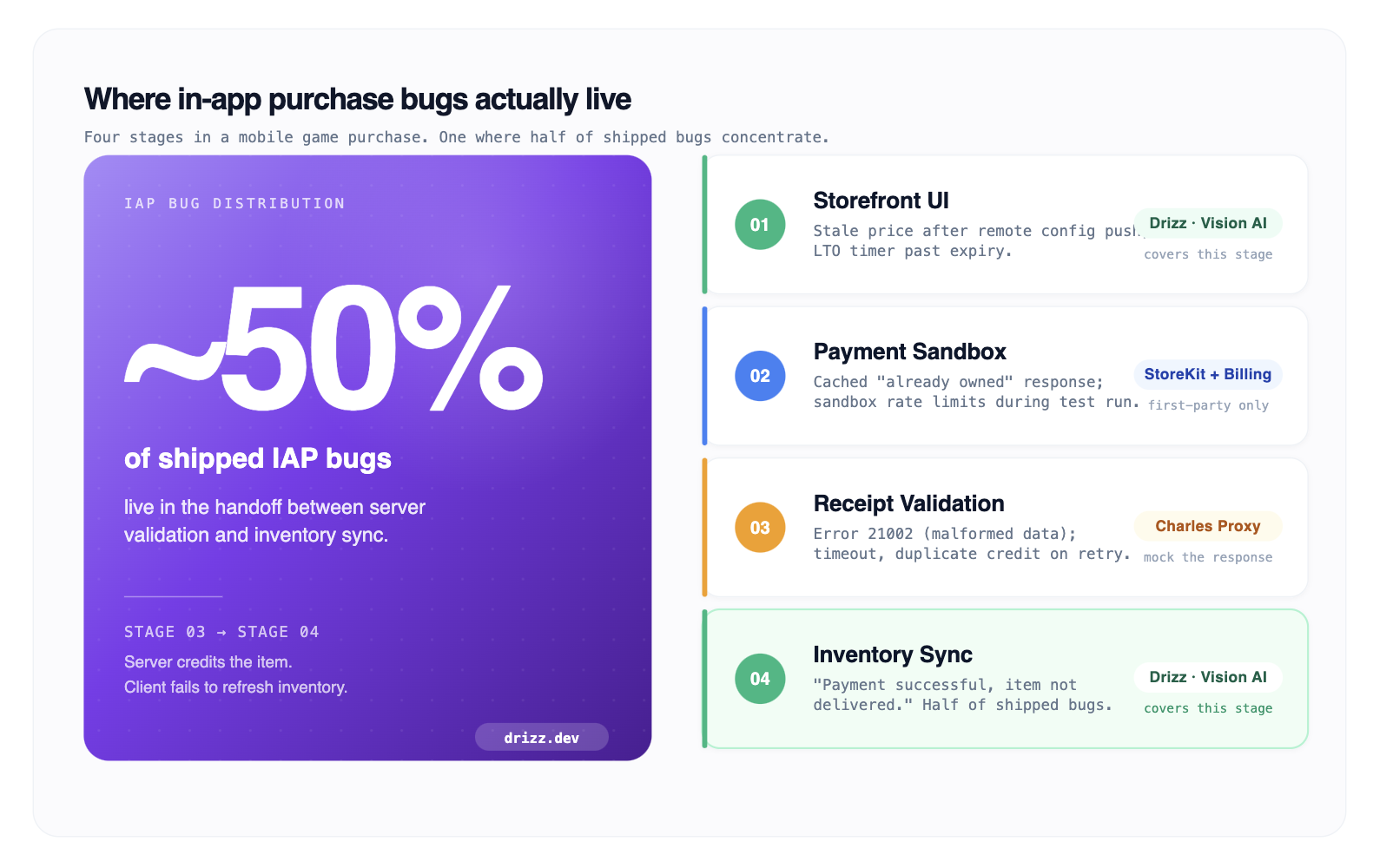
What this diagram helps with: a QA engineer can watch transaction move through each stage and attribute a bug to exact system where it happened, rather than debugging "shop is broken" as one undifferentiated problem. Roughly half of shipped IAP bugs live between stages 3 and 4 server credits item, but client fails to refresh inventory.
Everything player sees before tapping Buy. Shop tiles, promotional pricing, limited-time offer countdowns, currency display, regional price conversion, restore-purchases button.
The failure modes at this layer are visual and driven by remote configuration:
Traditional automation tools have a specific weakness here. The shop is rendered inside game's canvas, so Appium and other native automation frameworks see one opaque view instead of individual bundle tiles.
Vision AI reads rendered screen way a player does matching on visible price text, promotional badges, and layout. It's layer of stack that catches storefront regressions on real release builds.
The Apple StoreKit test environment and Google Play Billing test environment sit between storefront and real payment processor during testing. Both are mandatory. Both have specific behaviours that differ from production, and testing IAP without exercising both sandbox environments end-to-end is one of most common gaps in mobile game QA.
Key failure modes at this layer:
This layer belongs to first-party sandbox tools. Third-party automation frameworks (Drizz, Appium, Charles Proxy) can orchestrate around sandbox, but they cannot replace it. Detailed setup for both platforms is covered in sibling in-app purchase test guide for iOS and Android.
After a sandbox purchase completes, game client sends receipt to your backend, and backend validates it against Apple's or Google's servers and returns a signal to grant item. This is where most confusing bugs live.
Apple receipt validation status codes deserve their own memorisation exercise:
Apple's full list is documented in App Store Receipt validation guide.
Google Play Billing does not use numeric status codes in same way. It returns response codes like BILLING_UNAVAILABLE and ITEM_ALREADY_OWNED. The "already owned" semantic is one that causes most confusion for consumable purchases client has to explicitly acknowledge purchase before item becomes available for repurchase.
Testing this layer is where Charles Proxy and Proxyman earn their place in stack. Intercept receipt validation request between client and server, rewrite response to force a specific error code, and observe how game client handles it.
This is how teams catch bug where a 21002 response leaves storefront stuck on "processing" instead of surfacing a retry. The same pattern generalises to any payment flow testing on mobile without failing test cards every sprint.
The layer that ships most production bugs and is one teams' automation touches least. After server validates receipt, game client is supposed to update player's inventory add coin bundle to their wallet, unlock character, mark battle pass as purchased. Teams routinely test that purchase completes and forget to verify that item actually arrived.
Failure modes:
Catching a Layer 4 bug requires visually verifying that inventory screen shows new item after purchase completes. That's a visual regression check against game's rendered inventory UI, which sits inside same canvas that native automation cannot read.
Testing at this layer is a natural extension of same dynamic UI element handling that wider Vision AI stack handles for game builds.
A single-afternoon evaluation is more informative than any vendor demo. Take five IAP flows from your live game a single-item consumable, a bundle, a subscription, a limited-time offer, and a restore-purchases flow and run them through each layer with your candidate stack.
An IAP test suite that doesn't do all four is not testing IAP. It is testing one layer and hoping other three work.

Three tools cover four layers together. No single tool covers all four alone; honest recommendation is a small stack rather than a monolith.
Drizz is a Vision AI mobile testing platform that reads rendered screen and runs plain-English tests on real iOS and Android devices.
On IAP surface it covers Layers 1 and 4 storefront UI and post-purchase inventory sync. These are two layers no other automation tool touches directly for games.
Because Drizz matches on rendered pixels rather than on selectors or view hierarchies, it works on exact game canvas that Appium is blind to. Storefront tests verify that promotional prices, LTO timers, currency display, and bundle art render correctly across device matrix.
Post-purchase tests do specific check that catches "payment successful but item not delivered" bug: they verify inventory UI actually renders newly delivered item, not just success toast.
Reported flakiness on production customer suites sits around 5%. Every run returns per-step screenshots and action logs, which is difference between attributing a Layer 1 bug to a locale-conversion error and spending an afternoon debugging why shop tile "looks weird."
Suited to game QA teams shipping weekly or biweekly live-ops updates on Unity or Unreal titles, where storefront lives inside engine canvas. This is a subcategory drill-down for broader mobile game testing tool comparison.
Charles Proxy is industry-standard HTTP debugging proxy. On IAP surface, it covers Layer 3.
The workflow is direct: intercept receipt validation request between game client and your backend, rewrite response to force any error code client should handle, and observe result. Force a 21002. Force a 21005. Force a delayed response with a two-second timeout. Force a payload that returns success but with missing fields.
Every game with a receipt-validation server should have a Charles Proxy suite for Layer 3 negative testing. Proxyman is near-equivalent for macOS-native workflows, but Charles remains more widely adopted tool across game studios.
Best fit for any team validating a receipt-validation backend, which is roughly every game studio shipping IAP.
The mandatory sandbox environments: non-negotiable, first-party, and free.
Apple's StoreKit Testing in Xcode provides local sandbox testing without a network round-trip, plus a full sandbox environment for pre-production.
Google's Play Billing test environment provides both static test SKUs (android.test.purchased, android.test.canceled, android.test.item_unavailable) and a full alpha-track sandbox against real Play Billing infrastructure.
Both are mandatory for Layer 2 and neither is replaceable by third-party tools. Best fit for every mobile game shipping IAP there is no honest way to skip either sandbox.
Automated IAP testing has real bounds:
None of this makes IAP testing not worth automating. The automated suite catches pre-production and regression tier of bugs. A small manual pass on release candidate stays in picture.
Status code 21002 means "data in receipt-data property was malformed or service experienced a temporary issue."
In practice, 21002 is almost always a client-side base64 encoding problem receipt data being sent to Apple is not correctly encoded rather than a genuine server issue on Apple's end.
The correct response is to re-encode receipt on client and retry. A game client that surfaces "network error, try again" for a 21002 is doing wrong thing.
Partially. Apple's StoreKit Testing in Xcode allows local sandbox testing without a network sandbox account, which covers a large portion of Layer 2 test cases. Full end-to-end testing against Apple's real sandbox infrastructure requires a sandbox account. There is no way to test production-parity IAP behaviour without either local StoreKit test environment or a real sandbox account.
The bug lives at Layer 4 post-purchase inventory sync. To reproduce it, complete a real sandbox purchase, then verify that inventory screen actually renders new item.
The pattern most teams miss is verifying inventory UI itself. They verify "purchase successful" toast instead, which fires on Layer 2 completion and does not prove that Layer 4 succeeded.
A visual regression test on inventory screen after purchase catches this class of bug.
Either works for Layer 3 interception. Charles is more widely adopted at game studios and has broader documentation for game-specific workflows. Proxyman is macOS-native and often preferred for its UI. Both can intercept HTTPS traffic on iOS and Android with right root certificate installed on test device. Pick one and standardise team on it do not run both.
Roughly 85-90% of surface. Layers 1, 2, and 3 automate cleanly. Layer 4 automates with a visual regression tool that can see game canvas.
The remaining 10-15% is manual: production-parity real-money validation, sandbox account rotation for restore-purchases, and release-candidate smoke test that a human plays end-to-end before shipping.
That last 10% is not going away. It's sanity check that keeps IAP revenue safe on release day.





©Drizz 2026 • All Rights Reserved






