•
Drizz raises $2.7M in seed funding •
•
Featured on Forbes
•
Drizz raises $2.7M in seed funding •
•
Featured on Forbes


Every mobile game ships design refreshes on a weekly or biweekly cadence. And every design refresh breaks something in one of same three places: HUD, menus, or shop. QA teams know this pattern well enough that most studios have a running joke about it, but joke exists precisely because three zones are hard to test automatically.
The reason is structural. All three zones render inside game's graphics canvas, not as native UI views. That is surface where Appium and other native automation frameworks go blind on games they see one opaque view instead of individual buttons, tiles, or health bars.
This post covers what breaks at each of three zones, why they need a testing approach that reads rendered screen, and regression pattern most studios end up building. It sits alongside broader mobile game testing guide that maps six categories of testing stack.
Every mobile game regardless of engine, genre, or monetization model has these three visual surfaces:
These three cover roughly 60-70% of visual surface players interact with outside of active gameplay. They are also where largest concentration of shipped bugs lands, and where regression cost dominates a QA function's week.
Traditional mobile automation frameworks Appium, Espresso, XCUITest work by parsing accessibility tree exposed by operating system. On a normal mobile app, buttons, text fields, and labels show up as distinct elements in that tree. Each one is queryable by ID, XPath, or accessibility identifier.
Games do not work this way. Whether engine is Unity, Unreal, Cocos2d, or a proprietary in-house engine, game renders its entire UI to a single graphics surface. From accessibility tree's point of view, whole screen is one big rectangle.
The consequence is that a script trying to click "Buy" on a shop tile can't find button. The accessibility tree has no button at that position. There is only a canvas.
This is shape of problem Vision AI mobile testing was designed to solve reading rendered screen way a player does rather than parsing what OS exposes.
The primitives that make selector-based automation possible on native apps W3C target-size guideline, Google Material Design's layout foundations simply don't reach into game canvas.
The HUD is always-on overlay that surfaces gameplay state. It changes constantly during a match, updates every frame, and is one of highest-density visual surfaces in game.
What breaks after a UI change:
The tests that catch these are visual comparisons across device matrix at multiple game states. Not a single screenshot at start screenshots at combat start, at mid-combat, at low-health state, and at victory state. Anything less misses state-dependent breakage.
Menus are highest surface area in most games. A mid-sized mobile RPG can have 40 to 60 distinct menu screens, each with its own layout, its own state variants, and its own interaction surface.
What breaks after a UI change:
Menu regression is largest source of QA time in most studios. It's also where greatest testing leverage exists, because these screens are essentially static between builds and change only when design updates. That makes them a prime target for automated coverage if automation can see menu contents at all.
The shop is where design refreshes carry highest revenue risk. Every visual bug on a shop tile is a bug on surface player transacts against, and failure modes are specifically ones players notice.
What breaks after a UI change:
Shop regression is closest of three zones to a monetization bug every visual break here potentially costs revenue. The full four-layer story on IAP testing (including shop UI as Layer 1) is in in-app purchase testing for mobile games drill-down.
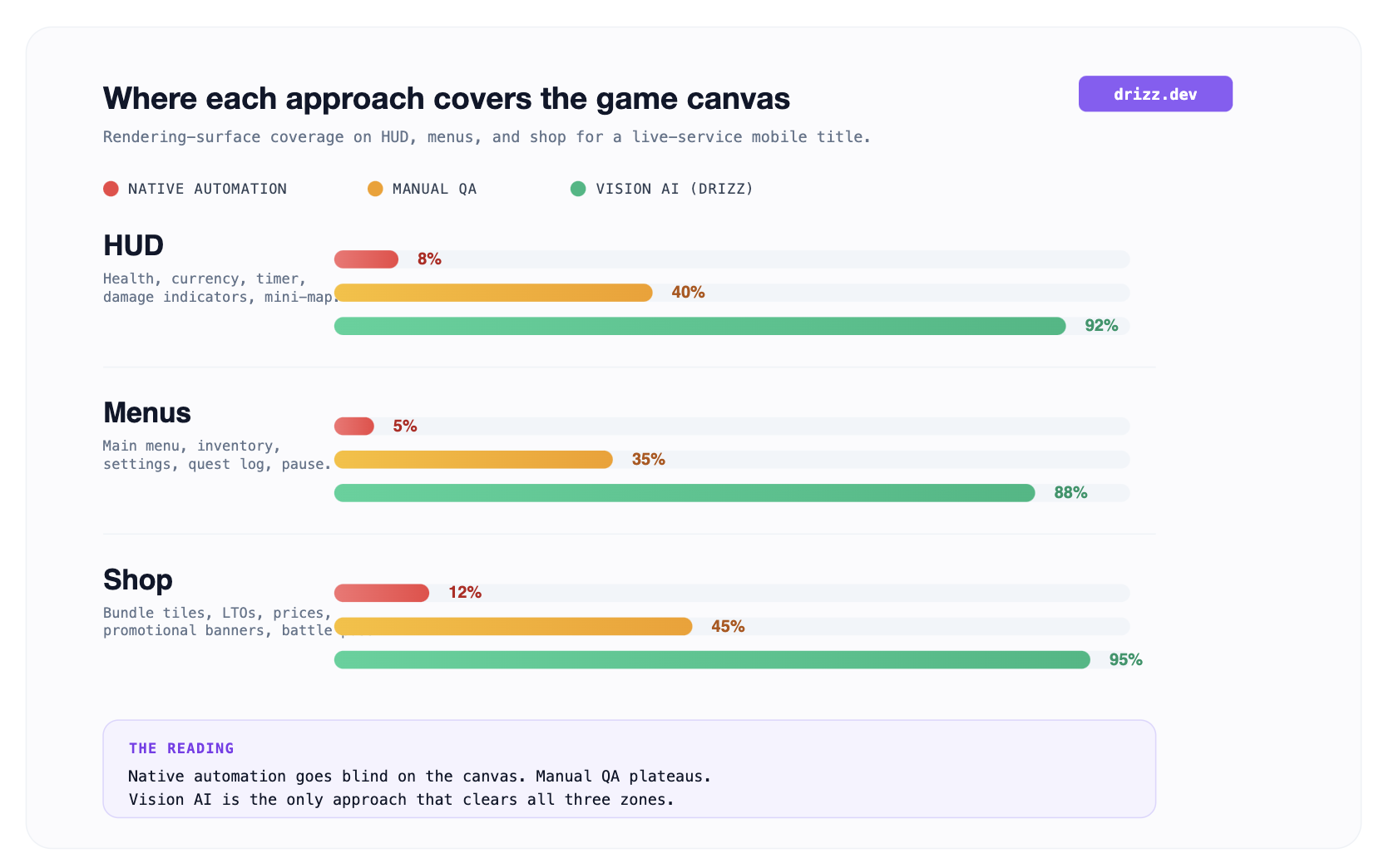
What this chart helps with: it shows why studios end up with weekly manual regression cycles even after buying automation. Native automation covers almost none of three zones. Manual QA covers a third of each and gets tired. Vision AI is only approach that covers all three zones at production cadence, which is reason it changes QA cost curve for game studios shipping live-ops.
The pattern most game studios converge on is a per-release smoke test across all three zones. Twelve items, done in one pass:
Anything more than 12 items belongs in CI-triggered regression suite, not pre-merge smoke pass.

Three tools cover three zones between them. No single tool covers all three depths alone. The honest recommendation is a stack rather than a monolith.
Drizz is a Vision AI mobile testing platform that reads rendered game screen and runs plain-English tests on real iOS and Android devices.
On HUD, menu, and shop specifically, Drizz is only widely-deployed platform that covers all three zones without engine SDK integration. Because it matches on visible layout text, price tags, layout constraints, safe-area geometry it works on Unity, Unreal, Cocos2d, and proprietary engines with same test source.
Storefront tests verify promotional prices, LTO timers, and bundle art across device matrix. Menu tests verify component consistency and modal z-order. HUD tests verify text-overflow, clipping, and rendering at multiple gameplay states.
Reported flakiness on production customer suites sits around 5%. Every run returns per-step screenshots and action logs, so a scanning QA engineer can attribute a regression to exact zone and screen where it appeared.
Suited to game studios shipping design updates weekly or biweekly on native or React Native or Flutter titles.
AltTester is industry-standard framework for looking inside a Unity build. It injects an SDK into an instrumented build and exposes GameObject hierarchy over a WebSocket connection, which lets automation frameworks query and interact with engine's scene graph.
For HUD and menu logic tests, this is deepest coverage available on Unity. If your test needs to verify that health bar's underlying integer value is decrementing correctly, AltTester reads that value directly.
The trade-off is that AltTester requires source-code access and an instrumented build. It cannot run on final release builds. Studios that ship a production APK and test that same APK need a rendering-based approach for release-candidate coverage.
Best fit for Unity studios with source-code access wanting deep engine-level state verification alongside a rendering-based tool for release-candidate coverage.
BrowserStack App Automate is largest real-device cloud for mobile testing. On game surface, it plays a specific complementary role: device-matrix breadth for cross-resolution HUD verification.
The HUD zone is one most sensitive to physical device differences notch shape, safe-area sizing, screen aspect ratio, refresh rate. Running same HUD test suite across 30-50 real devices catches class of bugs that only appear on specific hardware.
BrowserStack doesn't automate game canvas itself it provides device layer. Pair it with a rendering-based automation tool (Drizz or a vision-based competitor) to get both device breadth and canvas coverage.
Best fit for studios whose HUD bugs concentrate on specific device configurations that emulators cannot reproduce.
Automated regression at HUD, menu, and shop zones is genuinely powerful, but not unlimited.
The automated suite catches pre-production and regression tier of visual bugs. The manual release-candidate pass stays in picture for animation, first-time-seen screens, and engine-state verification.
Menu regression, by volume. A mid-sized mobile RPG has 40-60 menu screens; a design system update almost always ships in a subset and creates mismatched-styling regressions in rest. HUD bugs get more player attention but menu bugs happen more often.
Only parts of shop rendered as native views usually just native payment sheet at Layer 2 of an IAP flow. The shop UI itself (tiles, prices, promotional banners) renders inside game's canvas and is invisible to Appium's accessibility-tree queries.
Per release cadence data across production suites: roughly 60-70% of shipped visual bugs live in one of these three zones. The rest are gameplay bugs (not visual), platform-integration bugs (payments, deep links, biometrics), and edge-case device bugs.
Partially. Emulators cover most HUD content bugs (truncation, overflow, currency drift), but they miss device-shape bugs (notch, safe area, foldable) that only appear on real hardware. A hybrid emulator + real-device matrix is standard pattern.
Depends on test coverage you need. Drizz covers rendering-based regression across all three zones on release builds without SDK integration. AltTester covers engine-state verification (integer values, GameObject properties) that Drizz cannot reach. Studios shipping a Unity title with strong engine-state test needs often run both.





©Drizz 2026 • All Rights Reserved






